
How to Sell a Website: The Complete Guide to Getting the Best Price
From preparing your numbers to the final handover: how to sell a website for a fair price, to a serious buyer, without being exposed.

Selling a website is one of the few times you can turn years of work into a single payment. Done well, it pays you for the traffic, the content and the systems you built. Done in a hurry, it leaves money on the table or, worse, leaves you exposed during the handover.
This guide explains how to sell a website from the first spreadsheet to the final password change: how to get your numbers ready, how buyers will value the site, how to write a listing that attracts serious offers, how to deal with buyers safely, and how to hand everything over without risk.
Whether your site earns a few hundred dollars a month or a few thousand, the steps are the same. Only the amount of paperwork changes.
Key takeaways
- Start preparing before you list. Clean, checkable numbers raise the price and shorten the sale.
- Buyers value most sites on average monthly net profit, then adjust for risk. Reducing risk is the fastest way to a better price.
- Give buyers read-only access to analytics and income dashboards. Never share your passwords.
- Agree in writing what is included, how payment works and the order of the handover.
- Don’t transfer anything until the payment is secured, through escrow or a trusted middleman.
When is the right time to sell a website?
The best time to sell is when the site is doing well and you could keep running it. That sounds obvious, but many owners only think about selling once traffic has dropped or they’ve lost interest, and both of those show in the numbers buyers study.
Good moments to sell include:
- After 12 months or more of steady or rising income. A long, stable record is what buyers pay a premium for.
- When you want to move on to a bigger project and the site would benefit from an owner with more time.
- Before a big investment you don’t want to make, such as a redesign or a new content push. A buyer may be happy to make it.
Bad moments are right after a sharp drop you can’t explain, or in the middle of a change you haven’t finished. If you’ve just been hit by a search update, read how buyers assess Google update risk before deciding whether to wait.
Step 1: Prepare the site and your numbers
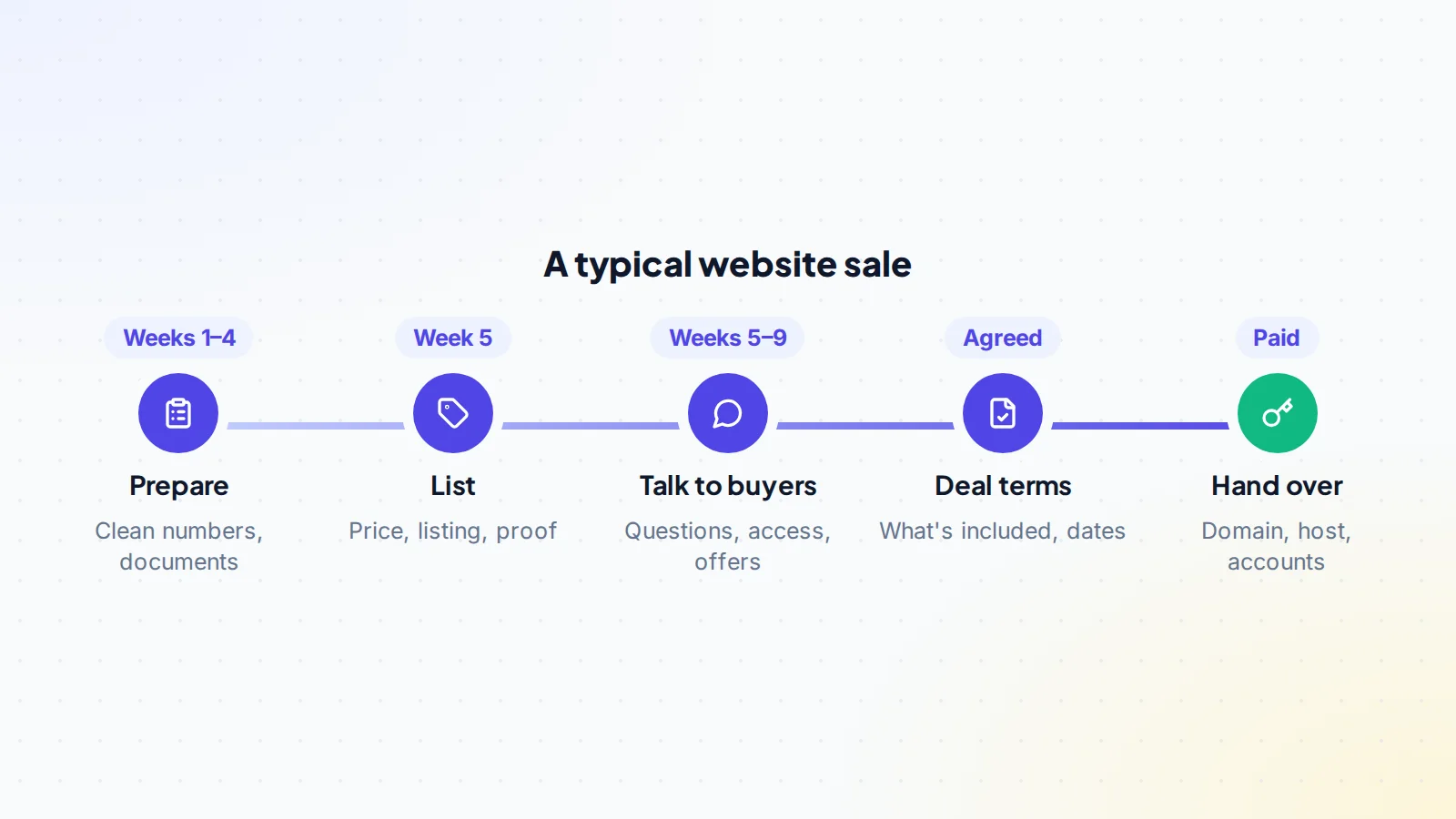
Preparation is where most of the price is won. Buyers pay for certainty, so your job is to make everything easy to check. A full plan is in how to prepare your website for sale; these are the essentials.
Separate the site’s money from yours
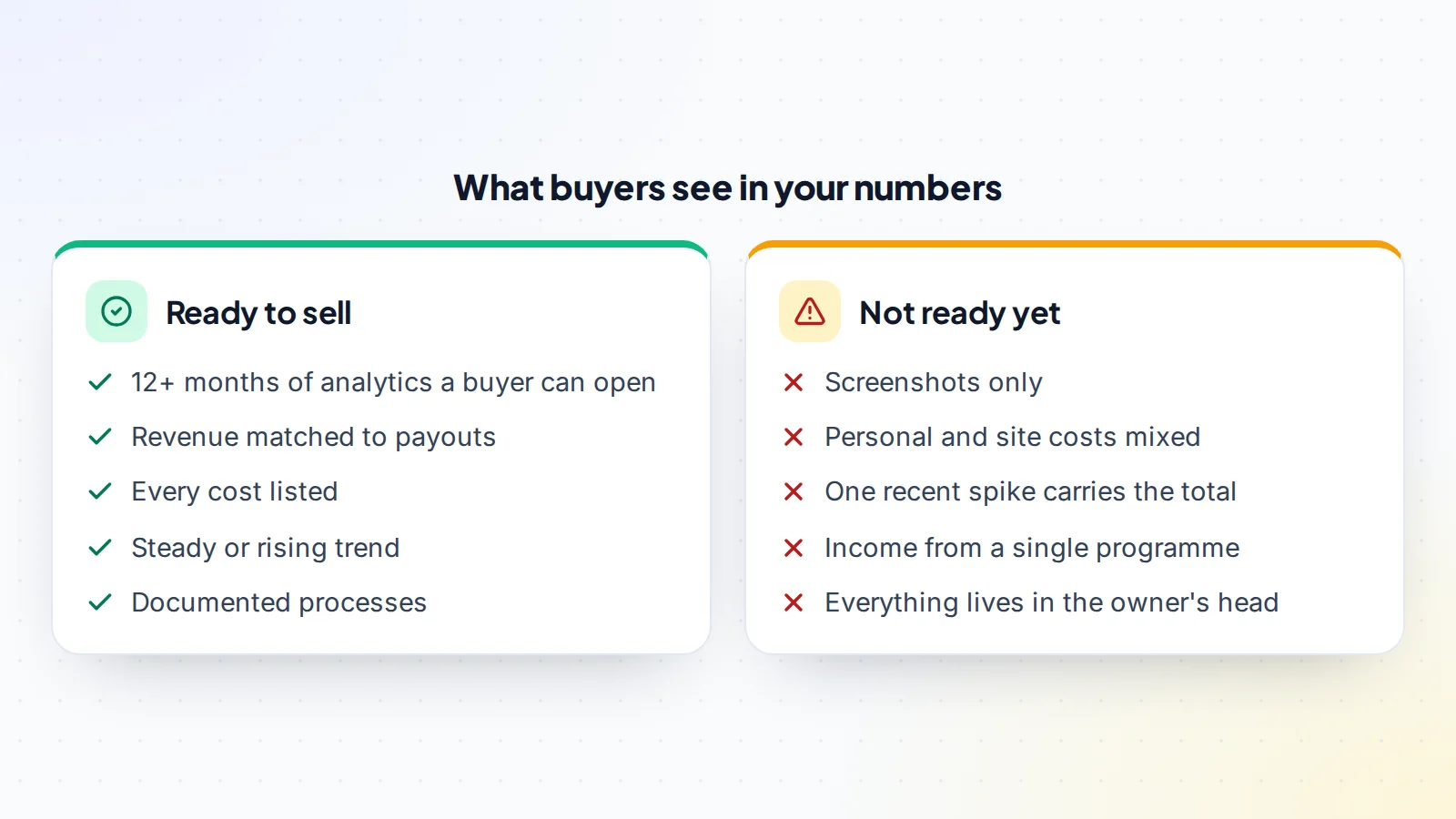
Put together a simple profit and loss statement for at least the last 12 months: revenue by source, and every cost the site needs to keep running. If personal expenses and site expenses share an account, separate them now. A buyer who finds a mystery cost in month 9 will wonder what else they haven’t seen.
Make the data accessible
Check that Google Analytics and Google Search Console are set up correctly and have a long history. Buyers will want to see both, and you’ll be adding them as users rather than sending screenshots. Our guide on giving a buyer Google Analytics and Search Console access shows how to do it safely.
Fix what a buyer would find
- Broken links, outdated articles and pages that load slowly.
- Plugins and themes that need updates, and licences that are about to expire.
- Security issues or manual actions flagged in Search Console.
- Anything that only works because you remember to do it by hand.
Write down how the site runs
Document your routines: how articles are briefed, written and published, which writers or freelancers you use, how affiliate links are managed, and which tools do what. A buyer is far more confident when they can see the business doesn’t live only in your head.
Step 2: Work out what your website is worth
Most established content, affiliate and ecommerce sites are valued as a multiple of their average monthly net profit, usually measured over the last 6 to 12 months. Profit means revenue minus every cost the site needs to keep running, including paid help.
The multiple is the part you can influence. Buyers pay more for:
- Age and stability: a long record of steady income.
- Diversity: several income sources and traffic channels rather than one.
- Low effort: a site that needs a few hours a week, or runs on documented processes.
- Verified numbers: figures a buyer can check at the source.
- A healthy trend: recent months at or above the average.
They pay less for a declining trend, dependence on one programme or a handful of pages, unclear costs, and numbers that can’t be checked. You can get a quick estimate with the free valuation tool, and our guide to valuing an online business explains the method in depth.
Tip
Price within a realistic range and leave room to negotiate. An asking price far above what the numbers support usually gets no offers at all, and a listing that sits for months starts to look like it has a problem.
Step 3: Choose where and how to sell
You have three broad options.
- A marketplace. You list the site, talk to buyers directly and keep control of the price and terms. Fees vary widely; on digiflippers.com, it’s no success fee, so you keep 100% of the sale price.
- A broker. A broker vets buyers and runs the process for you, usually for a percentage of the sale price. That can make sense for large or complex businesses.
- A private sale. Selling to someone you know or someone who approached you. It can be quick, but you have to manage verification, contracts and payment safety yourself.
We compare the first two in detail in marketplace vs broker.
Step 4: Write a listing that sells
A good listing does two jobs: it helps the right buyer recognise the site quickly, and it answers the questions that would otherwise fill your inbox. Include:
- A clear summary: the niche, the business model, the age and the headline numbers.
- Traffic: monthly visitors over time, the main sources and the top countries.
- Revenue and profit: monthly figures for at least 12 months, broken down by source.
- The work involved: hours per week, and what those hours are spent on.
- Growth opportunities: realistic ideas you didn’t have time for.
- What’s included: domain, content, email list, social profiles, tools and supplier relationships.
- Why you’re selling. Be honest; buyers can tell.
Our guide to writing a website listing that sells includes examples of each part. When you list on digiflippers.com, you can connect your accounts with read-only access so buyers see a verified badge next to your numbers, which answers the first question most buyers ask. See how verification works.
Step 5: Talk to buyers and handle due diligence
Serious buyers will ask a lot of questions. That’s a good sign. Answer them clearly and in writing, and keep the conversation in one place so you both have a record.
Share access, not passwords
Give buyers read-only access so they can check the data themselves. In Google Analytics, users are added under Admin → Access Management, and you can choose the Viewer role so they can see reports without changing anything. In Search Console, owners can add users under Settings → Users and permissions. Remove that access when the buyer no longer needs it.
For income dashboards, a live screen share is usually safer than adding a buyer to the account. Never share login details, and never let a buyer “just check something” in your accounts.
Spot buyers who aren’t serious
- They ask for your full content, list of suppliers or keyword research before showing real interest.
- They want to pay outside the agreed method, or ask you to transfer first and be paid later.
- They make an offer without having looked at any of the data.
- They push for a decision in hours rather than days.
It’s reasonable to share sensitive details only after a buyer has shown proof of funds, made a written offer, or both.
Step 6: Agree the terms
Once you accept an offer, agree the details in writing before anything moves. A simple agreement covers:
- The price and how it will be paid.
- Exactly what is included in the sale.
- The order of the handover and who does each step.
- How long the buyer has to check everything after the transfer.
- Any support you’ll provide after the sale, and for how long.
- Whether you agree not to build a competing site, and for how long.
On digiflippers.com, the agreed terms are kept in a free Deal Room where each step is confirmed by both sides. You can read about the whole flow on how it works.
Step 7: Get paid safely
The golden rule for sellers is simple: don’t transfer anything until the payment is secured. With escrow, the buyer pays a licensed escrow company first, you see that the money is held, you transfer the site, the buyer checks it, and then the money is released to you. Neither side has to trust the other with the whole amount. Read how escrow works for the details.
On digiflippers.com, the ways to pay in a deal are: directly to the seller, through escrow. The platform never holds the money itself.
Watch for the common payment scams aimed at sellers: fake escrow websites, emails that look like a payment confirmation but aren’t, and buyers who “accidentally” overpay and ask for the difference back. Always check payments in your own account, never through a link a buyer sends.
Step 8: Hand the website over
Work through the handover in the agreed order and tick each step off with the buyer.
- Back everything up before you start: files, database, email list and any documents.
- Transfer the domain to the buyer’s registrar account. Moving it to another registrar needs an authorisation (transfer) code; ICANN’s rules require your registrar to provide it within five calendar days of your request. Some registrars can also move a domain directly between two accounts with them.
- Move the hosting and files, or transfer the hosting account if your provider allows it. See transferring hosting after a sale and, for WordPress sites, transferring a WordPress website.
- Make the buyer an owner in Analytics and Search Console, then remove yourself when they confirm they’re set up.
- Hand over the rest: email lists, social profiles, tools, documents and introductions to writers or suppliers who are staying on.
- Remove your payment details from any services the buyer now pays for, and your ad and affiliate codes once the buyer’s are in place.
The complete sequence is in our handover checklist. After the buyer confirms everything works, the payment is released and the sale is done.
Mistakes that cost sellers money
Most sellers who are disappointed with their result made one of a handful of avoidable mistakes. Knowing how to sell a website is partly knowing what not to do:
- Listing before the numbers are ready. The first two weeks of a listing get the most attention. Spend them answering questions about mixed-up costs and you lose the buyers who move fastest.
- Pricing on the best month. Buyers average the last 6 to 12 months. An asking price built on a peak looks unrealistic and puts serious buyers off.
- Making big changes during the sale. A redesign, a new theme or a burst of new content changes the numbers buyers are studying. Keep the site steady until the handover.
- Letting the site slip. Keep publishing and maintaining as usual. A drop in traffic during negotiations is the most common reason offers are lowered.
- Handing over before the money is secured. No buyer’s promise is worth more than secured payment.
How to sell a website: the checklist
- At least 12 months of profit and loss, with site costs separated from personal ones.
- Analytics and Search Console set up, with a long history and no unresolved issues.
- Broken links, outdated content, plugins and licences sorted.
- Routines and suppliers documented.
- A realistic price based on average monthly profit and the site’s risks.
- A clear listing with traffic, revenue, work involved and what’s included.
- Numbers verified at the source where possible.
- Buyers given read-only access, never passwords.
- Terms agreed in writing, including the handover order and inspection period.
- Payment secured before anything is transferred.
Ready to sell?
List it on digiflippers.com with verified numbers, answer buyers in one place and agree every step in a free Deal Room. No success fee.
Frequently asked questions
How much can I sell my website for?
Most established sites sell for a multiple of their average monthly net profit. The multiple depends on age, stability, diversity of income, the effort needed and how well the numbers can be verified. A free valuation gives you a starting range; a buyer’s due diligence decides the final figure.
How long does it take to sell a website?
It varies with price, niche and preparation. A well-prepared small site can sell within weeks; larger or more complex businesses can take months. Our guide on how long it takes to sell a website breaks down each stage.
Can I sell a website that makes no money?
Yes, but buyers will value it on what they can build from it: the domain, the content, the design, any traffic and the time it would save them. Expect a much lower price than for a site with a record of profit.
Should I tell buyers why I’m selling?
Yes. Every serious buyer asks, and a clear, honest answer builds trust. Moving on to another project, lacking time or wanting to cash out are all normal reasons.
Do I need a contract to sell a website?
A written agreement that lists what is sold, the price, the payment method and the handover steps protects both sides. For larger sales, many sellers use a formal asset purchase agreement and take legal advice.