
Asset Transfer Checklist: Accounts, Files, Domains and Data
Every item to hand over when a website, app or online business changes hands, grouped by category, with the safe order and the checks that confirm each step.

When an online business changes hands, the price is agreed in one conversation, but the handover involves dozens of separate items: a domain, a hosting account, payment systems, analytics, email, files, social accounts, suppliers. Miss one and the buyer may find a broken checkout, a missing backup or a supplier who only talks to the old owner. A clear asset transfer checklist turns that list into a plan both sides can follow and tick off.
This guide gives you the full checklist, grouped by category, with the safe order to work in and the checks that confirm each item has really moved. It works for websites, SaaS products, e-commerce stores, content sites, newsletters and digital product businesses. Use it alongside our step-by-step guide to transferring an online business.
Key takeaways
- Write the full inventory into the deal terms before anything moves, so both sides agree what “complete” means.
- Secure the payment with escrow or a middleman before the handover starts.
- Copy first (files, data, DNS records), then move ownership, then remove the seller’s access.
- Use each platform’s own ownership or user process. Avoid sharing passwords wherever an invite or transfer exists.
- Check each item from the buyer’s side before confirming the handover is complete.
Before you start: the inventory
The checklist starts before the handover, with a written inventory. The seller lists every account, file and relationship the business uses; the buyer reviews it and asks about anything missing. The final list goes into the deal terms. That one document prevents most handover arguments, because “complete” means “every item on the list”.
For each item, note: what it is, the login or owner, whether it can be transferred or needs a new account, who does each step, and how the buyer will check it. A shared spreadsheet works well.
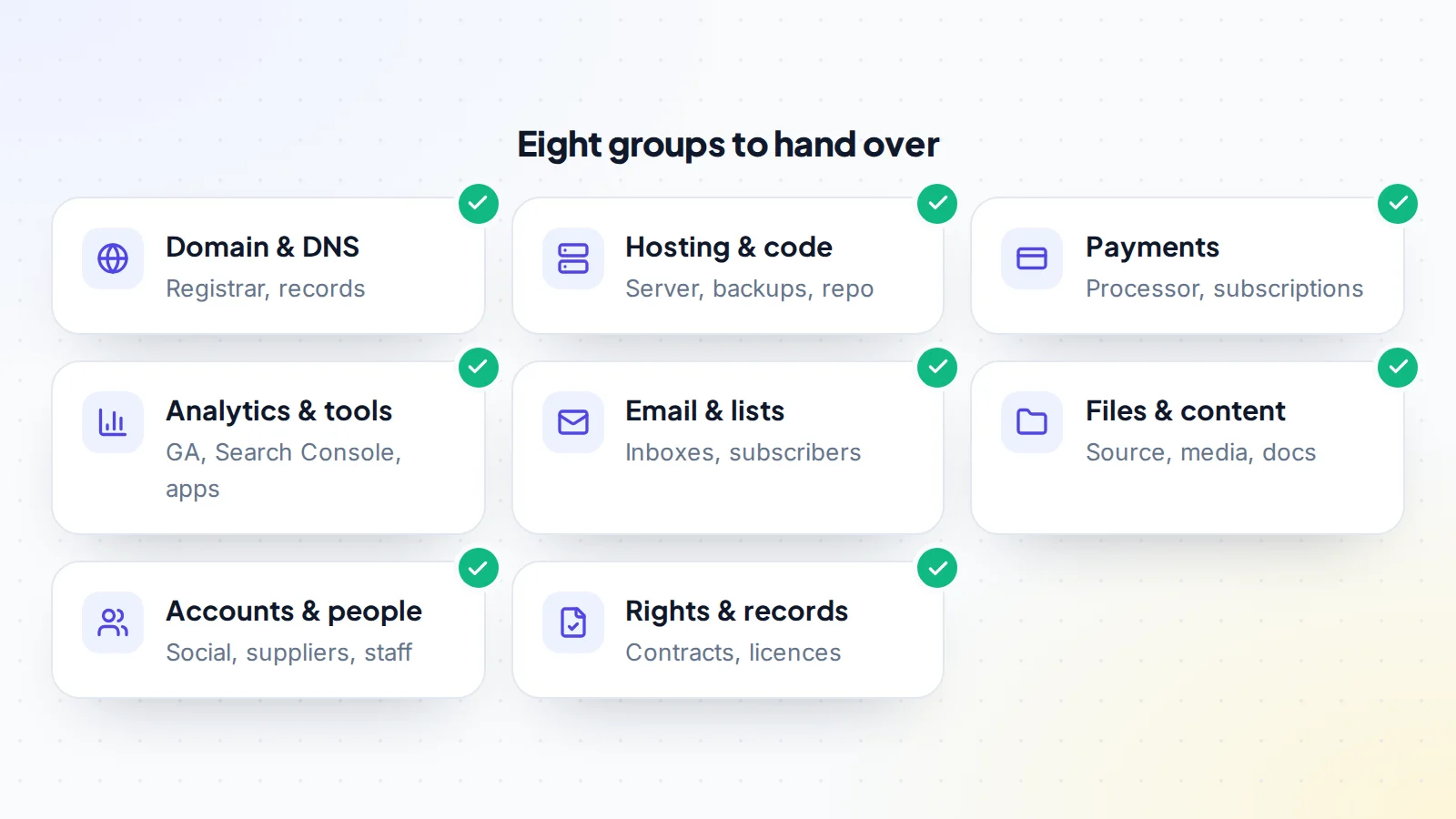
1. Domain and DNS
- Every domain listed, including misspellings and alternative extensions.
- Expiry dates checked; renewed if close to expiry.
- All DNS records exported before anything changes: website, email, verification and authentication records.
- Domain unlocked and auth code provided, or pushed to the buyer’s account at the same registrar.
- Transfer completed and registrant details updated to the buyer.
- Domain lock re-enabled and two-factor turned on at the new registrar.
ICANN explains that registrars must provide the auth code within 5 calendar days of a request. Our guide to the domain transfer process covers locks and waiting periods.
2. Hosting, code and backups
- Full backup of files and databases taken and stored by the buyer.
- Hosting account transferred, or the site migrated to the buyer’s hosting.
- Code repository transferred or shared, with history where possible.
- Server, CDN, SSL and caching settings documented.
- Third-party services connected to the site (APIs, plugins, licences) listed with their accounts.
- Site tested on the new hosting: pages, forms, checkout, logins and scheduled tasks.
3. Payment systems and subscriptions
- Payment processor plan agreed: transfer the account, or move to the buyer’s account.
- Active subscriptions and payment plans handled so customers keep paying without disruption.
- Payouts going to the buyer’s bank account from the agreed date.
- Pending payouts, refunds and disputes allocated in writing.
- Store or marketplace seller accounts transferred where the platform allows it.
Payment accounts are often the most complicated item. Stripe’s support explains that, when a business is sold, the account holder should contact Stripe support first, because what can change depends on the situation. Ask your processor early.
4. Analytics, search and tools
- Google Analytics: buyer added as administrator, then the seller removed. Google’s help explains how users are added and managed in the admin area.
- Search Console: buyer verified as owner, seller removed. Search Console’s help explains owners, full and restricted users.
- Advertising accounts, tag managers and pixels transferred or replaced.
- SaaS tools (email platform, design, SEO, support, scheduling) transferred, or new accounts set up and data exported.
- Renewal dates and costs of every tool listed.
5. Email and subscriber lists
- Business email accounts and aliases transferred or recreated, with forwarding during the transition.
- Subscriber lists moved with consent records and suppression lists.
- Sending domain authentication (SPF, DKIM, DMARC) checked after any DNS change.
- Automations, sequences and forms working on the buyer’s account.
For newsletters, see newsletter transfer. If the business runs on Google Workspace, read how to transfer Google Workspace.
6. Files and content
- Source files: design files, raw video, images, product files, templates and documents.
- Content archive: articles, pages and media, beyond what’s on the live site.
- Brand assets: logo files, fonts, colour codes and style guide.
- Process documents: how content is made, how orders are handled, how support works.
- Passwords and access notes moved to the buyer’s password manager, then changed.
7. Accounts, suppliers and people
- Social media accounts and pages transferred through each platform’s own process.
- Affiliate and partner programmes transferred where allowed, or the buyer’s own accounts approved and links swapped.
- Suppliers, contractors and freelancers introduced, with agreements reassigned or renewed.
- Sponsors and key customers introduced as agreed.
- Staff or contractors who stay told of the change and given new access.
Accounts protected by two-factor authentication need extra care; see transferring accounts with two-factor authentication.
8. Rights, contracts and records
- Signed sale agreement and any assignment of intellectual property.
- Contractor agreements and assignments for content and code.
- Licences for software, fonts, images and music that continue after the sale.
- Trademark records, if any.
- Customer data handled according to the privacy rules that apply, such as the GDPR for customers in the European Union.
- Financial records for the period used in the valuation.
Extra items by business type
The eight groups apply to almost every online business. Some types add their own items to the asset transfer checklist:
- SaaS and apps: cloud accounts (servers, databases, storage), API keys and webhooks, app store developer accounts, error monitoring, status pages, customer data exports, and the documentation a developer needs to run the product. See micro-SaaS for sale for what buyers check.
- Content and affiliate sites: affiliate programme accounts or replacements, ad network accounts, writer contracts, the content calendar and keyword research.
- E-commerce: supplier and fulfilment accounts, stock records, product listings on marketplaces, shipping settings and returns processes.
- Digital product businesses: product files, delivery platform accounts, customer access to past purchases and licence keys.
- Newsletters and communities: platform ownership, subscriber or member data, paid subscriptions, moderation roles and bots.
Who does what
Each item on the list needs an owner. A simple rule of thumb:
- The seller exports, unlocks, invites and approves: backups, DNS records, auth codes, user invitations and outgoing transfers.
- The buyer prepares and accepts: their own registrar, hosting, payment and tool accounts, and incoming transfers.
- Both test, confirm and record each step in the deal messages.
- The escrow provider or middleman holds or confirms the payment and releases it when the buyer confirms.
Put the owner’s name next to every line of the asset transfer checklist. Items without an owner are the ones that get forgotten.
The safe order
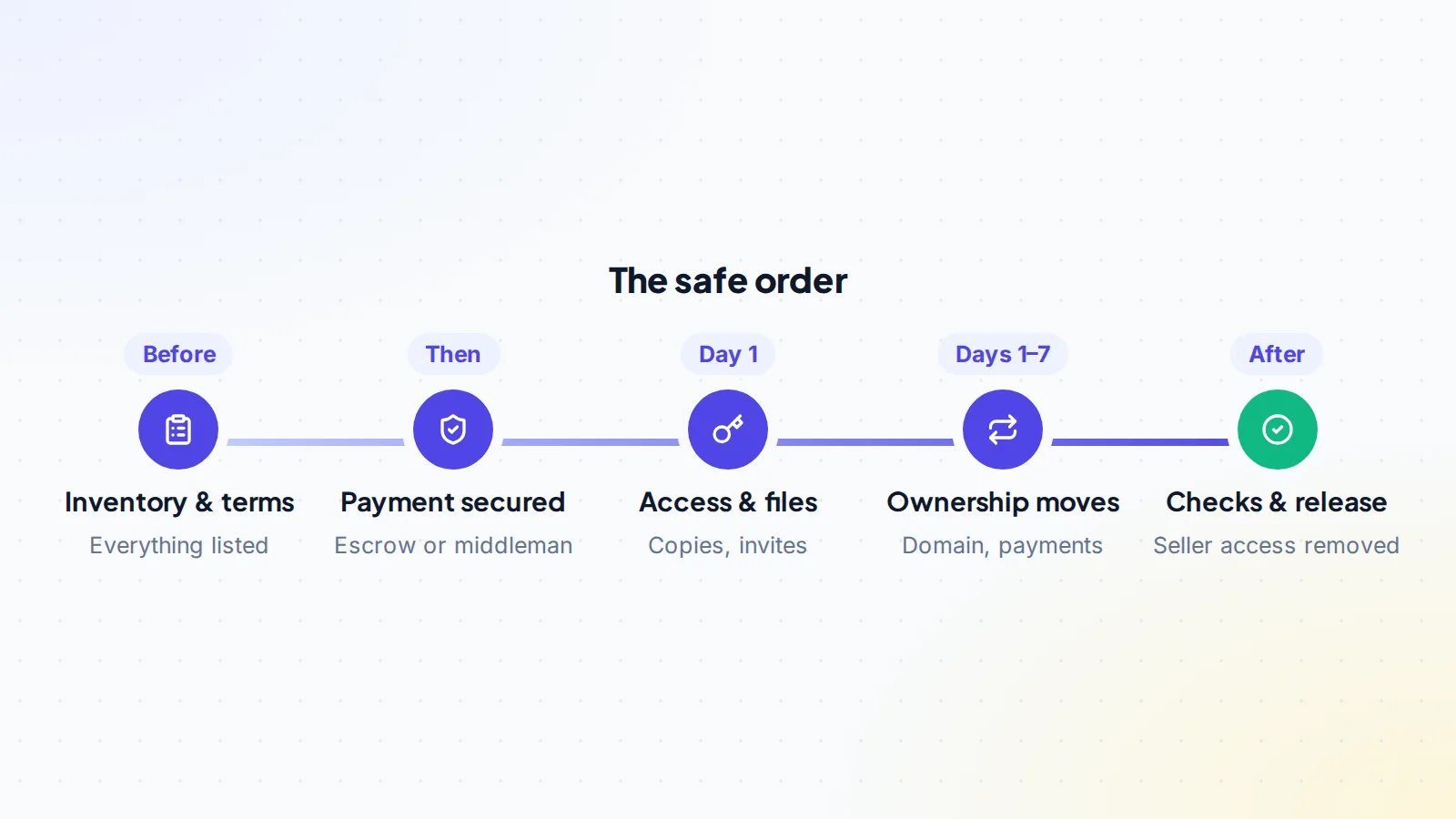
- Inventory and terms agreed and signed.
- Payment secured by escrow or a trusted middleman. On digiflippers.com, the ways to pay in a deal are: directly to the seller, through escrow, and the platform never holds the money itself.
- Copies first: backups, files, DNS records, data exports.
- Access next: buyer invited as owner or administrator on tools that support it.
- Ownership moves: domain, hosting, payment systems, social accounts.
- Checks: the buyer tests everything from their own accounts.
- Seller’s access removed, and the payment released.
For how payment protection works, read escrow vs direct payment.
Planning the timing
Some items move in minutes; others take days. Plan around the slow ones:
- Domain transfers can take from hours to about a week, and waiting periods can apply after recent changes.
- Payment processors and store platforms may need support tickets or verification of the new owner.
- Affiliate programmes may need the buyer’s own application to be approved before links can be swapped.
- Social platforms sometimes need a waiting period before a new owner gets full control.
Start the slow items first, and run the quick ones (tool invitations, file copies) in parallel. Agree a target completion date in the terms, with a little room for platform delays, so neither side feels the other is dragging the process out. Keep the payment held until the last item is confirmed, even if most of the business has already moved.
A worked example
The details below are made up to show the process.
A buyer purchases a small e-commerce store selling digital and printed planners. The inventory lists 41 items across the eight groups, including two domains, a store platform account, a payment processor, a print-on-demand supplier, an email platform with 9,000 subscribers, three social accounts and a freelance designer.
On day one, with payment held in escrow, the seller exports DNS records and product files, and invites the buyer to analytics, Search Console and the email platform. Over the next five days the domains transfer, the store account changes owner through the platform’s process, and the buyer connects their own payment account. The supplier confirms the new account details. The buyer places a test order, checks a welcome email arrives, and confirms each social account is theirs.
Two items slip: a font licence was in the seller’s personal name, and one automation still sent from the seller’s address. Both are on the checklist, so they’re caught before the buyer confirms. The seller transfers the licence and the buyer fixes the automation. Then the buyer confirms, the seller’s access is removed and escrow releases the payment.
How the buyer confirms each item
- Domain: public registration data shows the new registrar and the buyer as registrant.
- Hosting and site: the buyer can log in, restore a backup, and every key page and form works.
- Payments: a test transaction reaches the buyer’s account.
- Tools: the buyer is the owner or administrator, and the seller is no longer listed.
- Email: a test message sends and arrives with authentication passing.
- Files: stored in the buyer’s own storage, not a shared link the seller controls.
After the transfer
Change any password the seller ever knew, review every account’s users and connected apps, update billing details, and keep the checklist with the deal records. A short support period from the seller, agreed in the terms, helps with questions that only appear once the buyer is running the business. Our guide to transition support after a sale explains how to set one up, and closing a digital asset deal covers the final paperwork.
Common mistakes
- No written inventory, so items are remembered only when they break.
- Moving the domain before copying DNS records.
- Leaving the seller as an owner on analytics or tools.
- Forgetting renewals and licences held in the seller’s personal name.
- Confirming completion before testing payments and email.
Ready to find your next asset?
Browse listings with verified numbers, ask sellers your questions before you offer, and agree every step in a free Deal Room.
Frequently asked questions
What should an asset transfer checklist include?
Every domain, hosting account, payment system, tool, email account, file, social account, supplier relationship, contract and licence the business uses, with who moves each one and how the buyer checks it.
Who prepares the checklist?
Usually the seller drafts it and the buyer reviews and adds to it. The final version goes into the deal terms.
How long does a full transfer take?
Often one to two weeks for a small online business, depending mostly on domain transfers and payment accounts.
Should passwords be shared?
Only where no invite or transfer process exists, and then changed immediately by the buyer. Most platforms offer a proper ownership or user process.
What if something is missed?
Keep payment held until the checklist is complete, and agree a short support period so late items can still be handed over.
Is there a template I can use?
Use the eight groups in this guide as columns or sections in a shared spreadsheet: item, current owner, transfer method, who does it, how it’s checked, and status. Add the extra items for your type of business.
Do I need a separate checklist for each platform?
No. One list for the whole business works best, with a line for each platform. Platform-specific steps go in the notes for that line.