
How to Buy a Website: A Step-by-Step Guide for First-Time Buyers
A step-by-step guide for first-time buyers: what to buy, how to check the numbers, what to pay, how to pay safely and how the handover works.

If you want to buy a website, you are really buying three things at once: an audience that already arrives every day, a way of turning that audience into money, and the work someone else has already done to get there. Get all three right and you skip years of building. Get one wrong and you pay a premium for a site that slowly stops earning.
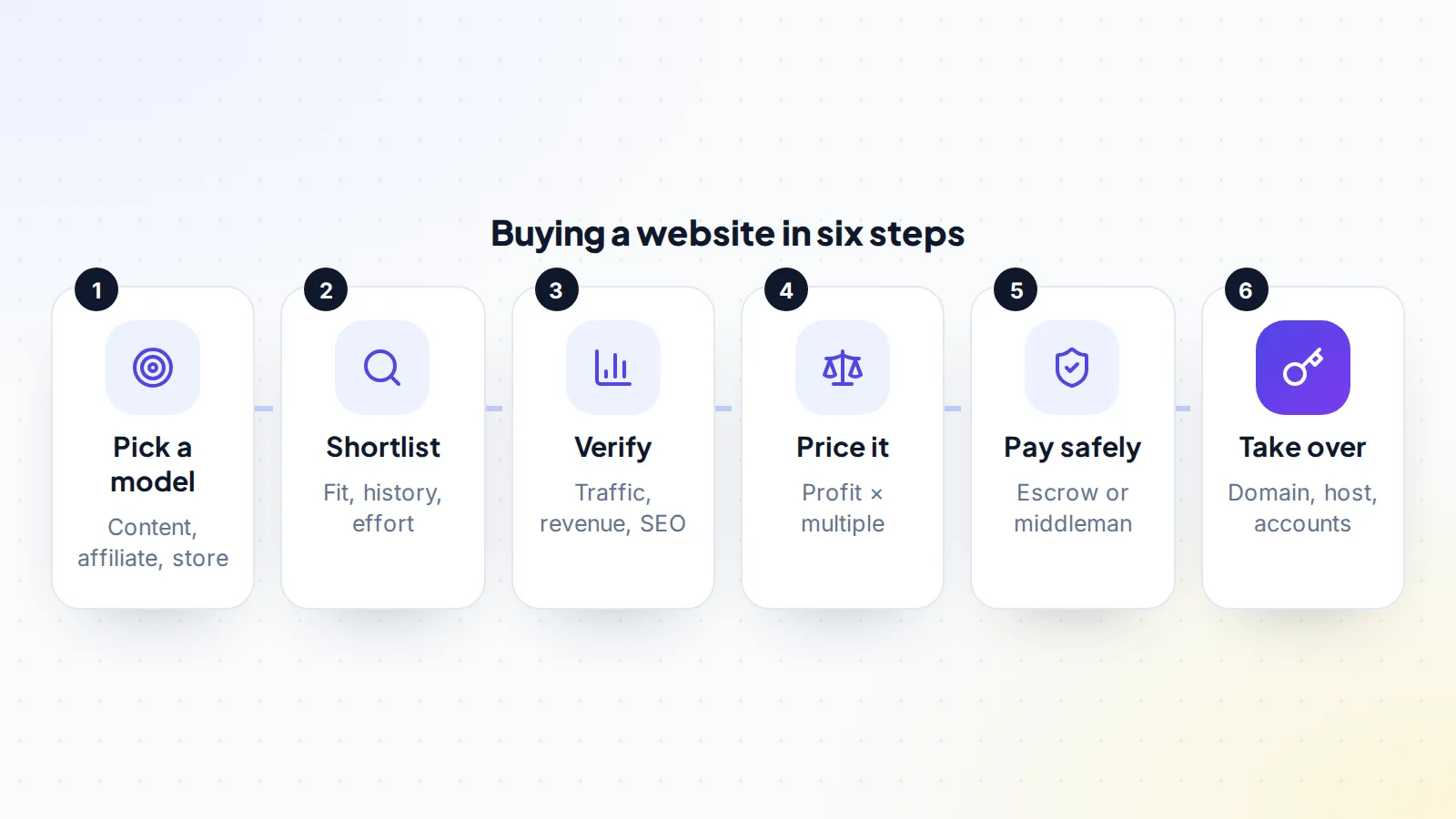
This guide shows you how to buy a website step by step, in the order experienced buyers follow. You will learn which kinds of site suit which buyers, how to check the traffic and revenue yourself instead of trusting screenshots, how to work out a fair price, how to pay without being exposed, and how to take over every account so the site is truly yours.
It is written for first-time buyers, but nothing here is simplified. Knowing how to buy a website well is mostly about order and patience, not insider tricks. The checklist near the end is the same one you should run through on your tenth purchase.
Key takeaways
- Decide on a business model first (content, affiliate, ecommerce or a mix). It decides how much work the site needs and which risks matter.
- Verify traffic and revenue at the source: read-only access to analytics, Search Console and the payout dashboards, never screenshots alone.
- Price a site on its average monthly net profit over the last 6 to 12 months, then adjust for risk.
- Pay through escrow or a trusted middleman, and release the money only once the domain, hosting and income accounts are in your control.
- Budget for the months after the purchase. Most sites need content, fixes and attention to keep earning.
Why buy a website instead of building one?
Building a website from nothing is slow in a very specific way: for months, sometimes more than a year, you publish and wait while search engines decide whether to trust you. An established site has already passed that stage. It has pages that rank, links pointing at it, and a record of income you can examine before you commit.
That head start is what you pay for. Whether it is worth it depends on how much your time is worth and how confident you are in the numbers. We compare the two routes in detail in buying an established website vs building one, but the short version is this: buying costs more money and less time, and it lets you judge real results instead of hoping for them.
It also changes the kind of risk you take. A new site risks never getting traffic at all. A bought site risks that its traffic or income is weaker than it looks, which is a risk you can reduce a great deal with careful checks.
Step 1: Choose the kind of website you want to own
“Website” covers very different businesses. Before you browse a single listing, decide which of these you actually want to run.
- Content sites earning from display ads. Articles attract search traffic and ad networks pay per thousand page views. They are fairly hands-off, but income moves with traffic, so search health is everything. See how display ad income works.
- Affiliate sites. Reviews and comparisons earn a commission when readers buy through a link. Margins can be high, but the site depends on the affiliate programmes’ rules and rates. Our affiliate website checklist covers what to check.
- Ecommerce stores. Real products, real customers, real logistics. Revenue is usually more stable than ad income, but you inherit suppliers, stock and customer service. Read how to buy an ecommerce store before you shortlist one.
- Lead generation and service sites. Pages that send enquiries to local businesses or partners. They can earn well per visitor, but income often relies on a handful of relationships.
- Starter sites. New sites with little or no income, sold for the work already done. They are cheaper, and much more speculative. See whether starter sites are worth buying.
Then answer three honest questions. How many hours a week can you give it? Do you want to write, manage writers, or run operations? And what would you do if traffic dropped by a third next month? Your answers rule out more listings than any filter.
Step 2: Build a shortlist worth investigating
When you look at websites for sale, resist judging them on the headline revenue. Read each listing for the things that predict whether income will continue:
- Age and track record. A site that has earned steadily for two or three years has survived several search updates. A site that has only earned for a few months has not been tested yet.
- Where the traffic comes from. A mix of search, direct, email and social is sturdier than one channel. Heavy reliance on one search engine is normal for content sites, but price it in.
- Concentration. If a handful of pages bring most of the traffic, or one affiliate programme brings most of the money, the site is more fragile than its totals suggest.
- Why the owner is selling. Moving on to a bigger project is a good answer. A vague answer is a reason to dig harder, not a reason to walk away straight away.
- What the work involves. Ask how many hours the seller spends and on what. That is the job you are buying.
On digiflippers.com, you can ask the seller questions publicly on the listing before you make an offer, and you can see which numbers have been verified straight from the source. Those two things save a lot of back and forth when you are comparing several sites.
Step 3: Verify the traffic and revenue at the source
This is the step that separates good purchases from expensive lessons. Screenshots are easy to edit, and spreadsheets only show what the seller typed. You want to see the numbers where they are produced.
Traffic
Ask the seller to add you as a user with the Viewer role in Google Analytics. Google’s own help explains that users are added under Admin → Access Management, and a viewer can see reports without changing anything. Do the same in Google Search Console, where owners can add users with restricted or full access under Settings → Users and permissions. Read-only access is safe for the seller and gives you the real picture.
When you have access, look for:
- Traffic over at least the last 12 months, and longer if available. Look for sudden drops around search updates.
- Search queries in Search Console that match the site’s topic, not unrelated terms.
- Countries and devices that make sense for the audience and the ad or affiliate income.
- Referral traffic from unfamiliar sources, which can be a sign of bought visits.
Our step-by-step guide to verifying website traffic goes deeper, including how to spot bot traffic.
Revenue and costs
Ask for a screen share of each income dashboard (the ad network, the affiliate programmes, the payment processor or store admin), showing at least 12 months. Then match those figures to payouts in the seller’s bank or payment account. Income that never reaches a bank account is not income yet.
Costs matter just as much. List every recurring expense: hosting, themes and plugins, email software, writers, editors, virtual assistants, tools. Profit is what is left, and it is profit you will be paying for. Our guide to verifying revenue and profit claims includes the questions to ask about each line.
Tip
Listings on digiflippers.com can show numbers checked by connecting the source accounts with read-only access. That doesn’t replace your own checks, but it tells you the figures weren’t typed by hand.
Search health and history
For most content sites, search traffic is the business. Check three things:
- Manual actions and security issues in Search Console. Either one needs explaining before you go further.
- The link profile. Natural links come from relevant sites over time. Piles of links from unrelated or low-quality sites can be a sign of bought links, which Google’s spam policies treat as link spam. See how to audit backlinks before buying.
- The domain’s past. Look the domain up on the Internet Archive’s Wayback Machine. If it used to be a completely different site, ask why. Google’s spam policies also describe “expired domain abuse”, where an old domain is bought and reused mainly to borrow its ranking power.
A full checklist is in our SEO due diligence guide.
Step 4: Work out what the website is worth
Most established sites are priced as a multiple of their average monthly net profit, usually over the last 6 to 12 months. Averaging smooths out a lucky month and shows whether the trend is up or down.
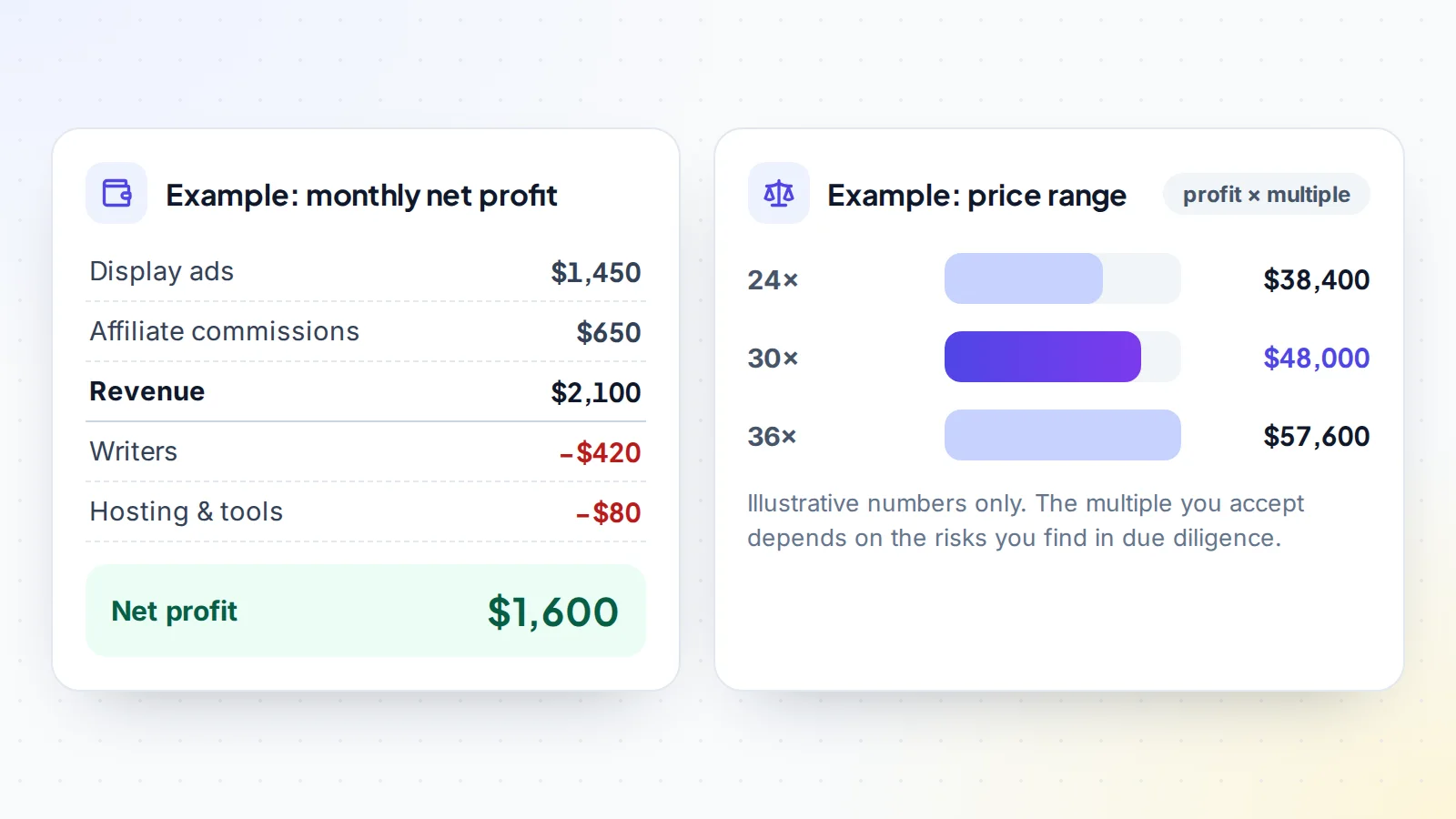
The multiple is where judgement comes in. It rises when the site is older, earns from several sources, needs little work and has clean, verified numbers. It falls when traffic depends on a few pages, income relies on one programme, the trend is down or the seller’s numbers can’t be checked. In the example above, the same $1,600 a month of profit could reasonably be priced anywhere across that range depending on what due diligence turns up.
Two practical rules help:
- Price the trend, not the peak. If the last three months are well below the 12-month average, ask why and lean on the lower figure.
- Price the work. If the seller spends 15 hours a week on the site and you will pay someone to do that, subtract that cost before you apply any multiple.
You can get a quick estimate with the free valuation tool, then read our pillar guide to valuing an online business for the full method.
Step 5: Make an offer and agree the terms
Your offer is more than a number. Write down what is included and how the deal will run, because most disputes come from things that were assumed, not agreed. Cover at least:
- What is included: the domain, the site files and database, content, images, email lists, social accounts, supplier and affiliate relationships, and any tools or licences that transfer.
- How you will pay and when the money is released.
- The handover: who moves what, in what order, and by when.
- An inspection period after the handover, so you can confirm everything works before the seller is paid.
- Support after the sale: a few weeks of answers to questions is common and very useful.
- A non-compete if the seller could easily start a near-identical site.
On digiflippers.com, the agreed terms live in a free Deal Room where both sides confirm each step, so nothing depends on memory or scattered messages.
Step 6: Pay safely
The safest payment protects both sides: the seller knows the money exists, and you know it won’t be released until you have the site. That is what escrow does. A licensed escrow company holds your payment, the seller transfers the site, you check it, and only then is the seller paid. Read how escrow works when you buy an online business for the details.
On digiflippers.com, the ways to pay in a deal are: directly to the seller, through escrow. The platform itself never holds your money. Whatever method you use:
- Never pay outside the agreed method because a seller suddenly asks you to.
- Check the payee’s name matches the seller you have been dealing with.
- Keep every message and agreement in one place, so there is a record if something goes wrong.
Step 7: Take over every account
A website is only yours when the accounts behind it are yours. Work through them in a sensible order, and don’t release payment until the critical ones are done.
- The domain. Either move it to your own registrar account or have the seller push it to your account at the same registrar. Check that the contact details and the registrant are now yours.
- Hosting and files. Move the site to your own hosting, or take over the hosting account if the provider allows it. Keep a full backup of the files and database. Our guides cover moving hosting after a sale and transferring a WordPress site.
- Analytics and Search Console. Have the seller make you an owner or administrator, then remove their access once you are sure everything is set up.
- Income accounts. Ad networks and affiliate programmes are usually tied to a person or company, so you normally apply with your own account and swap the codes on the site. Ask each programme how it handles a change of owner.
- Everything else. Email lists, social profiles, suppliers, writers, tools and licences.
- Passwords and recovery details. Change every password and replace the seller’s email and phone recovery options with yours.
The full sequence, including what to check at each step, is in our handover checklist.
After the purchase: the first 90 days
The first months decide whether the purchase pays off. Change very little at first: keep publishing in the same style and schedule, and watch traffic and income closely so you can tell a normal wobble from a real problem. Then improve the obvious things, such as updating old articles, fixing slow pages and adding income sources the seller never tried.
Keep notes on what you change and when. If traffic moves, you will want to know whether you caused it. Our guide to growing traffic after a purchase covers the first improvements to make.
How to buy a website: the checklist
- The business model matches the time and skills you have.
- At least 12 months of traffic seen directly in analytics, with no unexplained drops.
- Search Console checked for manual actions, security issues and sensible queries.
- Revenue seen in each income dashboard and matched to real payouts.
- Every cost listed, and the true monthly net profit calculated.
- Backlinks and domain history reviewed.
- Price based on the average profit and the risks you found.
- What is included, the handover order and an inspection period agreed in writing.
- Payment through escrow or a trusted middleman, released only after the handover.
- Domain, hosting, analytics and income accounts in your name, passwords changed.
Ready to find your next asset?
Browse listings with verified numbers, ask sellers your questions before you offer, and agree every step in a free Deal Room.
Frequently asked questions
How much does it cost to buy a website?
Anything from a few hundred dollars for a starter site to millions for a large business. Established sites are usually priced as a multiple of average monthly net profit, so a site earning $500 a month and one earning $5,000 a month sit in very different ranges. The multiple depends on age, stability, effort and risk.
Is buying a website a good investment?
It can be, when the numbers are real and you can keep the site running. A bought site gives you income from day one and a track record you can check. The main risks are overpaying, traffic falling after a search update and income sources changing their terms, which is why verification and a sensible price matter so much.
How long does it take to buy a website?
For a small site, a few weeks from first contact to completed handover is typical. Due diligence often takes one to three weeks, and the transfer a few days to a couple of weeks, depending on the domain, hosting and income accounts involved.
Can I learn how to buy a website with no experience?
Yes, if you start small and choose a simple model. Content sites with steady traffic and little upkeep are the most common first purchase. Spend more time on due diligence than feels necessary, and ask the seller for a few weeks of support after the sale.
What is the biggest mistake first-time buyers make?
Trusting numbers they haven’t verified. Almost every bad purchase starts with screenshots taken at face value. Our list of common website buying mistakes covers the rest.