
How to Buy a YouTube Channel Safely: A Step-by-Step Guide
A step-by-step guide to buying a YouTube channel: verify the numbers, check the channel's standing, price it on profit, pay safely and complete the Brand Account handover.

Buying a YouTube channel can save you two years of uploading to an empty room. It can also cost you every cent you paid in a single afternoon, when the seller quietly takes the channel back a week after the money lands.
Both outcomes happen all the time. The difference is rarely luck. It’s whether the buyer checked the right things, in the right order, before any money moved.
This guide shows you how to buy a YouTube channel safely (for other platforms, see our guide to buying social media accounts): what comes with a channel, how to check the numbers yourself, what a fair price looks like, and exactly how the ownership transfer works so the seller can’t pull it back. It’s written for first-time buyers, but the checklist at the end is the same one experienced buyers run through before every deal.
Key takeaways
- Look for channels that sit on a Brand Account. It’s the one way to hand over ownership with Google’s own tools, without sharing a password.
- Never trust screenshots. Ask for a live screen share of YouTube Studio, or numbers verified through a read-only Google connection.
- Price a channel on its average monthly profit over the last 6 to 12 months, not on its subscriber count.
- Pay through escrow or a trusted middleman, and release the money only once you’re the primary owner and the seller’s access is gone.
- The biggest scam in this market is account recovery. Your transfer isn’t finished until the seller has no way back in.
What comes with a YouTube channel when you buy it
Google gives owners a built-in way to hand a channel over. A channel connected to a Brand Account can have several owners, and the primary owner can pass that role to someone else, so the whole handover can happen without anyone sharing a password. That’s the route that makes a clean purchase possible.
Here’s what moves to you, and what you set up yourself:
- The channel itself: its videos, playlists, subscribers, comments and history, including its standing with YouTube.
- Your own AdSense account. Earnings go to whichever AdSense account is linked. After the handover, you link yours in YouTube Studio.
- Not the seller’s personal Google account. You get the channel, not their Gmail, and you should never want their Gmail.
- The verification badge stays while the name stays. YouTube removes the checkmark when a verified channel changes its name, so keep the name until you’ve settled in.
As the new owner, you’ll run the channel under YouTube’s current policies. Read the YouTube Partner Program overview before you buy a monetized channel, so you know exactly what keeps monetization on.
Why buy a YouTube channel instead of starting from zero?
The hardest stretch on YouTube is the beginning. To join the Partner Program you currently need 1,000 subscribers plus either 4,000 valid public watch hours in the last 12 months or 10 million valid public Shorts views in the last 90 days. Most new channels never get there. A channel you buy has already done that climb, and its back catalogue keeps pulling in views while you make new videos.
The catch is that you’re buying an audience that subscribed for a certain kind of video. Change the format too much and the recommendations dry up. A good purchase is one where you can realistically keep making what those viewers came for.
Step 1: Decide what kind of channel you actually want
Before you browse a single YouTube channel for sale, answer five questions. They’ll rule out most of the channels you’d otherwise waste a week on.
- Faceless or face-led? A faceless channel (voice-over, animation, screen recordings) survives a change of owner. A channel built around one person often doesn’t: viewers followed the host, not the topic.
- Long videos or Shorts? Shorts can bring huge view counts, but they usually earn far less per view than long-form videos. Judge the income, not the views.
- Where does the money come from? Ad revenue, sponsors, affiliate links, merch or a course. Sponsor deals are often tied to the creator personally, so ask which ones actually carry over.
- Is the niche worth advertising in? Topics like finance, software and business attract advertisers who pay more per view than broad entertainment does.
- Can you keep up the pace? If the channel grew on three videos a week, count how many you can produce, and what editors and voice-over will cost you.
Step 2: Verify the numbers yourself
A screenshot of YouTube Studio takes about a minute to fake, so never buy a YouTube channel based on one. Ask for either of these instead:
- A live screen share of YouTube Studio where you choose the date ranges and the seller clicks where you ask.
- Numbers verified at the source. On digiflippers.com, sellers can connect a channel through a read-only Google sign-in, and the listing then shows subscribers, monthly views and estimated revenue pulled straight from YouTube, not typed in by the seller.
During the screen share, open Analytics, switch to advanced mode and look at the last 12 months, month by month:
- Views and watch time. Is the trend flat, rising or quietly sliding?
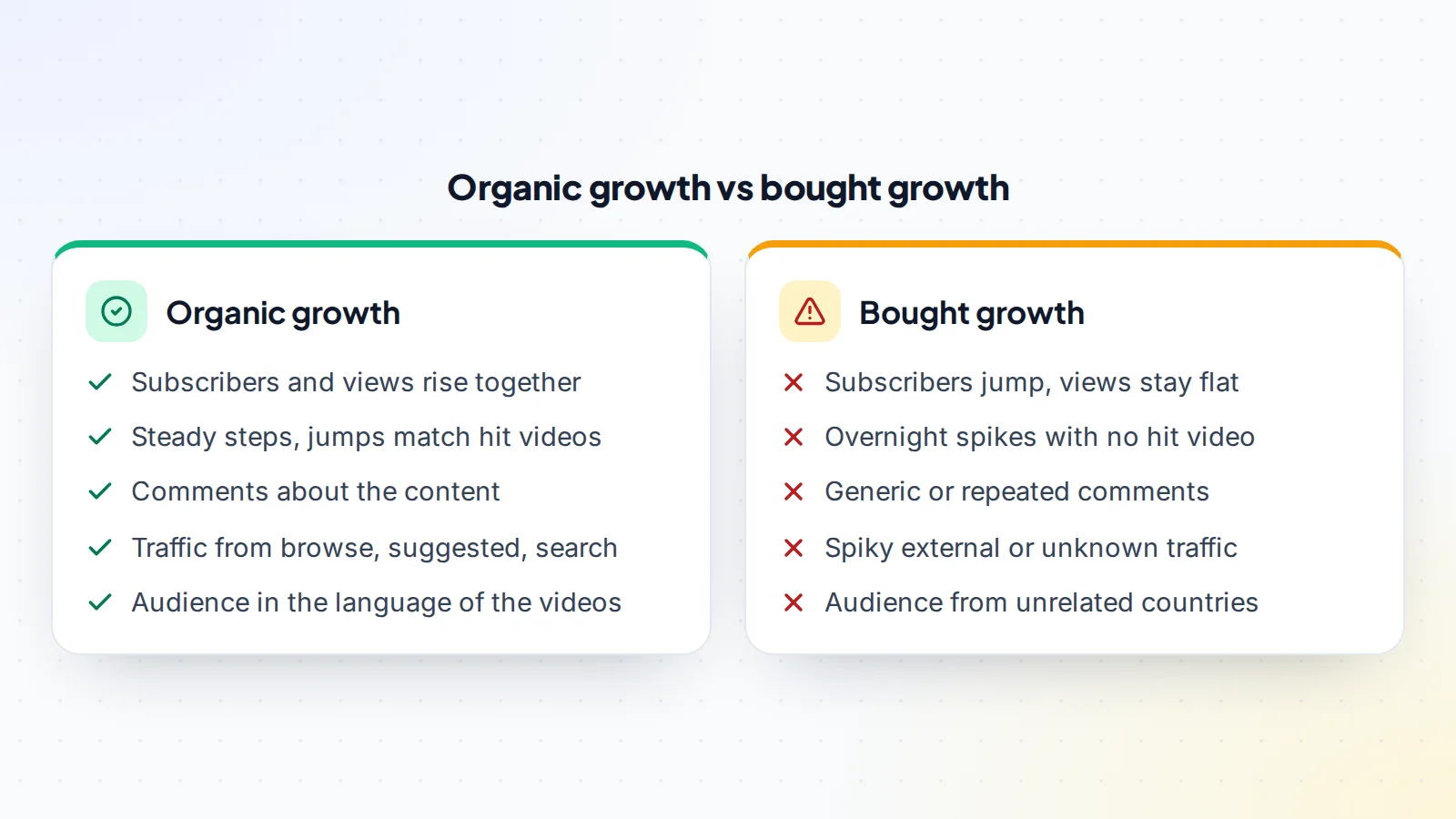
- Traffic sources. Healthy channels get most of their views from inside YouTube: browse features, suggested videos and YouTube search. A large, spiky share of external or “direct or unknown” traffic can point to paid or bot views.
- Audience geography. It drives how much each view earns, and a sudden wave from an unexpected country is a warning sign.
- Revenue. Estimated revenue, RPM, and how many videos actually produce it.
- Subscribers gained and lost over time, not just the total.
Red flags in the numbers
- Subscriber jumps with no matching jump in views. Real growth moves both lines together.
- A channel with 200,000 subscribers whose new videos average 800 views. The audience is either bought or long gone.
- One video earning most of the money. If it stops being recommended, the income goes with it.
- Revenue falling for three to six months while the asking price is based on the best year.
- Comments that are generic, repeated word for word, or in languages the videos aren’t made for.
Step 3: Check the channel’s health and history
This matters most with a monetized YouTube channel for sale: good numbers mean most when the channel’s standing is clean. While you’re still on the screen share, ask the seller to open the channel’s Status and features page and show you:
- Monetization status and which features are switched on.
- Active strikes. You want none. YouTube explains how Community Guidelines strikes and copyright strikes work and when they expire.
- Copyright claims on individual videos. Claims don’t threaten the channel, but they can send a video’s ad money to someone else.
Then look at the content itself. Original content is what keeps monetization strong: channels built on compilations, re-uploads or stock-clip slideshows are judged under YouTube’s reused content rules, so look for videos the channel truly made itself. Ask who owns the music, footage and thumbnails, whether editors were paid in full, and whether the project files are part of the sale. Finally, make sure the channel name and logo don’t borrow someone else’s trademark. That’s a problem you’d inherit.
How much is a YouTube channel worth?
Our full guide to YouTube channel value goes deeper; here are the essentials.
Subscriber count is the number everyone quotes and the one that matters least. Serious buyers price a channel on profit.
The usual method is simple: take the average monthly net profit over the last 6 to 12 months (see trailing twelve months profit) and multiply it by a number both sides agree on. Net profit is revenue minus what it costs to keep the channel running: editors, voice-over, thumbnails, software and music licences.
There’s no official multiple. It moves with risk:
- Higher: steady or growing income for at least a year, a faceless format, several income sources, evergreen videos that keep earning, viewers in well-paying regions, low running costs and a clean record.
- Lower: a host who’s leaving, one viral video carrying the income, a recent drop, reused content risk, heavy reliance on Shorts or a short history.
Here’s a worked example with round numbers. A faceless personal finance channel averages $2,400 a month over the last year: $1,700 from ads and $700 from affiliate links. It spends $500 on an editor, $250 on voice-over and $100 on thumbnails, so $850 a month in costs. That leaves $1,550 a month in net profit.
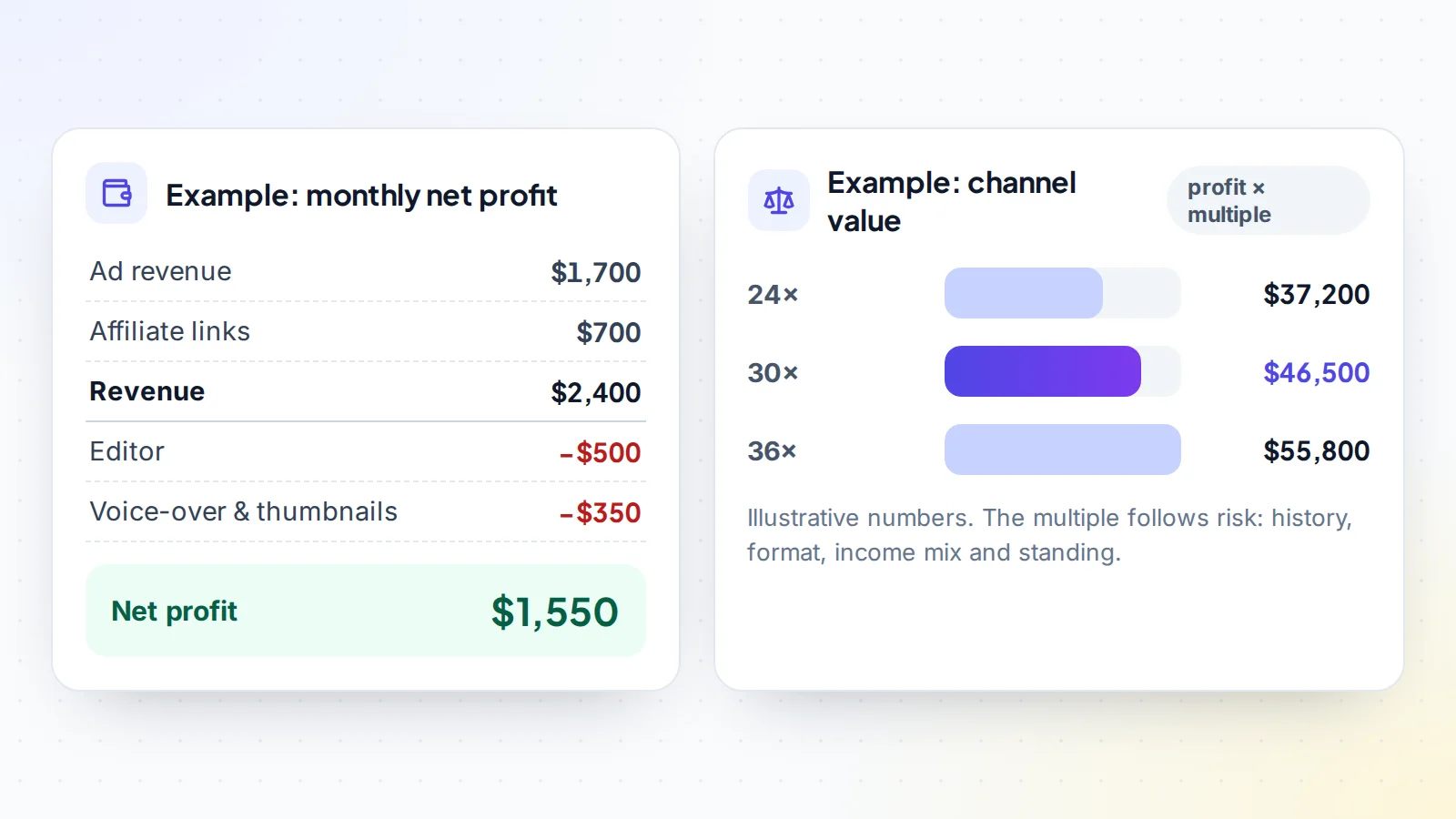
At a 24× multiple the channel is worth $37,200, at 30× it’s $46,500 and at 36× it’s $55,800. Where the deal lands depends on the risk factors above. It’s also why “how much for 100K subscribers?” has no real answer. Two channels with the same subscriber count can differ in price by ten times. For a quick starting point, try our free valuation tool, which estimates a price from sales of similar assets.
Step 4: Put the deal in writing before you pay
Most disputes after a sale come from things nobody wrote down. Agree on these before money moves:
- Price, payment method, and who covers any fees.
- What’s included: the channel, logo and brand files, project files, email list, social profiles, any website or domain, templates, and introductions to sponsors and editors.
- The handover plan, step by step, with dates.
- An inspection period. This is how long you can check everything after the transfer before the payment is released. Make it longer than the 7-day ownership wait covered below.
- What happens if something’s wrong: a refund, a return of the channel, or a price adjustment.
- Seller support after the sale, for example 30 days of answering questions.
- A non-compete, so the seller doesn’t start a copycat channel in the same niche next month.
On digiflippers.com, every deal gets a free Deal Room for exactly this. The agreed terms, a transfer checklist, chat and files all sit in one place, and both sides confirm each step, so there’s a clear record if anything goes wrong later.
Step 5: Pay the safe way
How you pay decides who carries the risk. You have three sensible options:
- Escrow. You pay a licensed escrow company, the seller transfers the channel, you inspect it, and only then is the money released to the seller. For most channel purchases this is the right default.
- A middleman. A trusted third party checks the channel and handles the handover. It’s common for smaller deals and account trades.
- Direct payment. Only with a seller who has a long, verifiable track record, and ideally in parts rather than everything upfront.
Walk away from gift cards, crypto sent to a stranger without escrow, and “friends and family” payments, which strip away buyer protection. Be just as wary of a seller who offers a discount for paying outside the platform. digiflippers.com never holds your money. The ways to pay in a deal are: directly to the seller, through escrow (see how escrow works), and the Deal Room records the deal either way.
Step 6: Transfer the channel so the seller can’t take it back
This is where most scams happen, so go slowly. A YouTube Brand Account transfer lets the whole handover happen without anyone sharing a password:
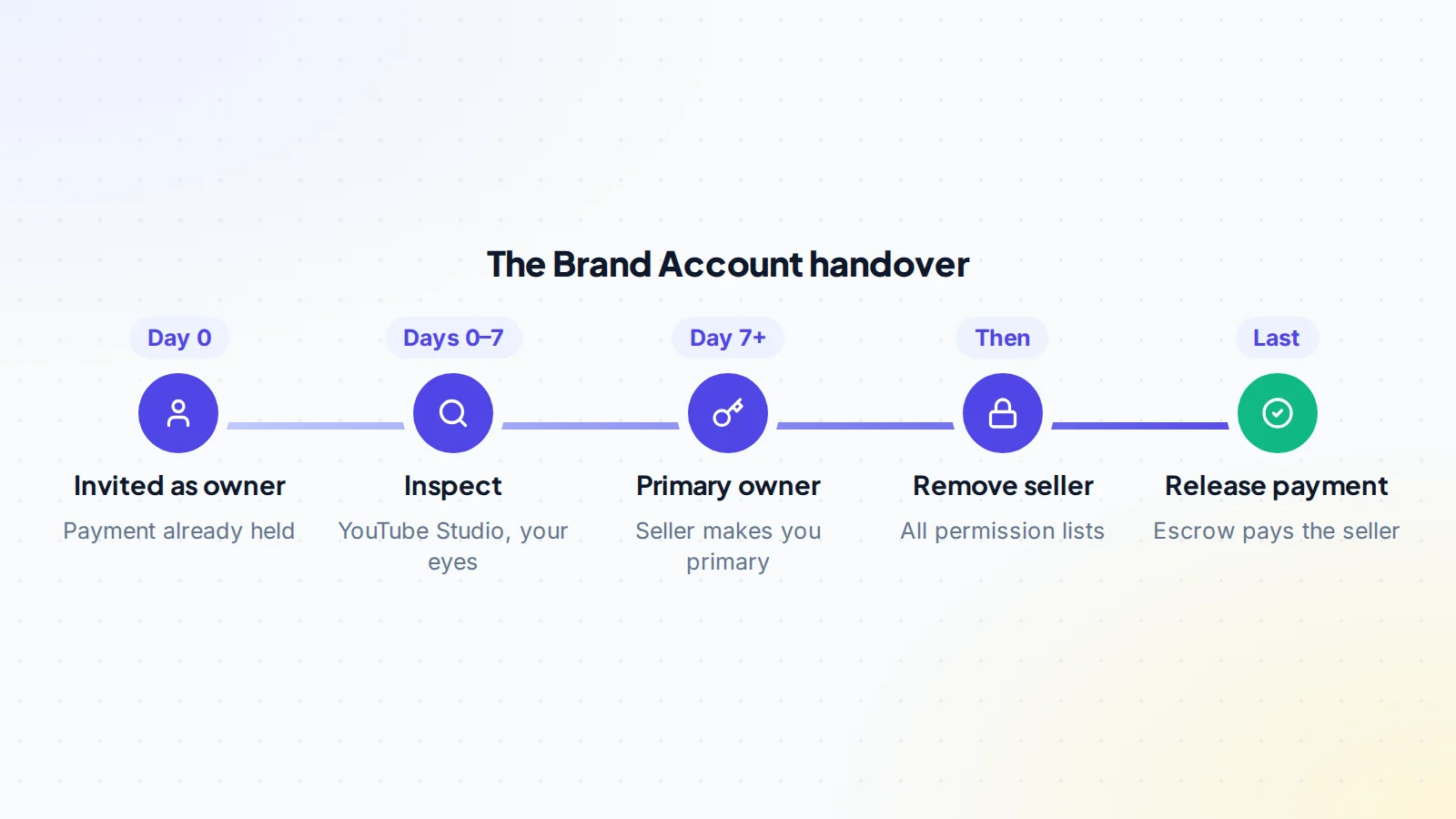
- Confirm the channel is on a Brand Account. If it’s on a personal account, the seller first moves it to a Brand Account from the channel’s advanced settings. That has to happen before any payment is released.
- The seller invites your Google account as an owner from the Brand Account’s permission settings.
- You accept, then wait. Google only lets someone become primary owner after they’ve been an owner for 7 days. Use that week to go through YouTube Studio with your own eyes.
- On day 7 or later, the seller makes you primary owner.
- You remove the seller and anyone else you don’t recognise, both on the Brand Account and under Settings → Permissions in YouTube Studio.
- Lock it down: turn on 2-step verification, sign out unknown devices, remove connected apps you don’t use, and change the business contact email on the channel.
- Link your own AdSense account in the Earn section of YouTube Studio if the channel is monetized.
- Only now confirm the transfer, so the escrow or middleman releases the payment.
The recovery scam, and how to shut it down
Here’s how the classic scam works. The seller hands over the channel but keeps a back door: an old owner role, a manager seat, or the recovery phone and email of the account the channel lives on. A few weeks after the money clears, they take the channel back or tell Google it was “hacked”.
You shut every one of those doors with three habits. Buy only Brand Account channels, so you never need the seller’s login. Refuse deals where the seller “just gives you the Gmail password”, however cheap they are. And don’t release a cent until you’re primary owner and the seller is gone from every permission list. Keep the agreement and chat records too. If a dispute ever reaches Google or a court, that paper trail is your proof.
Your first 90 days as the new owner
- Change nothing big at first. Keep the format, length, upload rhythm and thumbnail style the audience knows.
- Don’t rename the channel yet. You’d lose the badge and confuse viewers while they’re still getting used to you.
- Check analytics every week against the seller’s history, so you catch a drop early.
- Tell sponsors about the new owner and send them the introductions you agreed on.
- Reply to comments. On a face-led channel, a short, honest community post about the change often goes down better than silence.
Checklist: before you buy a YouTube channel
- The channel sits on a Brand Account (or will before you pay).
- You saw the numbers live, or they’re verified through Google.
- 12 months of views, watch time and revenue are steady or growing.
- Most traffic comes from browse, suggested and search.
- No active strikes, and monetization is on.
- No reused content risk, and the music and footage are licensed.
- The price is based on average monthly profit, not subscribers.
- The terms, inclusions and inspection period are in writing.
- Payment goes through escrow or a trusted middleman.
- You’re primary owner and the seller is removed before money is released.
- 2-step verification is on, unknown apps and devices are gone, and your AdSense is linked.
Ready to find your next asset?
Browse listings with verified numbers, ask sellers your questions before you offer, and agree every step in a free Deal Room.
Frequently asked questions
Is it safe to buy a YouTube channel?
It can be, if you verify the numbers at the source, check the channel’s strikes and monetization status, pay through escrow or a middleman, and complete the Brand Account transfer before any money is released. Most losses come from skipping one of those steps, usually the last one.
Can a monetized YouTube channel be transferred?
Yes. The channel itself moves through the Brand Account ownership transfer, and you then link your own AdSense account in YouTube Studio. The seller’s AdSense account never changes hands. The channel still has to follow YouTube’s monetization policies under its new owner.
How long does a YouTube channel transfer take?
Plan for at least a week. A new owner has to wait 7 days before they can be made primary owner, and you’ll want an inspection period on top of that before releasing the payment.
How much does a YouTube channel with 10,000 subscribers cost?
It depends on profit, not subscribers. A monetized channel earning steadily can be worth many times more than an unmonetized one with the same audience. Start from the average monthly net profit and apply a multiple that reflects the risk.
Can I change the channel’s name or topic after buying it?
You can, but wait. Renaming removes the verification badge, and a sudden change of topic usually cuts recommendations, because the audience subscribed for something else. Shift gradually, once the channel is steady under your ownership.
