
Buying Social Media Accounts: The Complete Guide
YouTube, Instagram, TikTok, Facebook and more: how to judge an audience, check the numbers, agree a fair price and take over an account securely.

An audience is the hardest thing to build online. Followers who trust a voice, watch every upload and click the links are worth years of effort, which is why more and more creators, brands and investors choose to buy social media accounts instead of starting from zero.
Done well, buying an account gives you that audience on day one, plus a track record you can study before you commit. Done carelessly, it gives you a number on a profile and not much else. This guide shows you how to tell the two apart and how to complete the purchase safely.
It covers the main platforms (YouTube, Instagram, TikTok, Facebook, X and Pinterest), the checks that matter on each, how accounts are priced, how to pay and, most importantly, how to take over an account so it’s securely yours.
Key takeaways
- Judge an account on engagement, growth pattern and audience location, not follower count.
- See the analytics live, in the platform’s own dashboard, through a screen share or read-only access.
- Price earning accounts on profit; price non-earning accounts on audience quality, niche and content.
- Use the platform’s own ownership tools where they exist, such as YouTube Brand Accounts and Facebook Page access.
- Pay through escrow or a trusted middleman, and release payment only once you control the account and its recovery details.
Why buy a social media account?
Growing an account from nothing takes consistency, luck and time. Most accounts never get past the first few hundred followers. Buying one skips that stage and gives you:
- An audience in a niche you care about, ready for your content, products or partners.
- Income from day one, if the account already earns from sponsors, affiliates or platform payouts.
- Proof of interest: real numbers showing what the audience likes, which is valuable market research in itself.
- A faster route for a brand that wants to reach a community without waiting years.
The key is buying an audience that will stay with you. That means choosing accounts built around a topic rather than one person’s face, and keeping the content close to what followers signed up for.
Step 1: Choose the platform and the kind of account
Each platform works differently, and the right one depends on what you want to do with the audience.
- YouTube. Long videos build deep loyalty and searchable libraries that earn for years. Channels in the YouTube Partner Program share ad revenue, and YouTube’s own help explains the eligibility thresholds. Ownership can be handed over cleanly when the channel is on a Brand Account. Start with how to buy a YouTube channel.
- Instagram. Strong for lifestyle, fashion, food, travel and product niches, with income mostly from brand deals and affiliate links. See buying an Instagram account.
- TikTok. Fast reach and fast growth, with a younger audience in many niches. Read buying a TikTok account.
- Facebook Pages and Groups. Useful for communities, local audiences and older demographics. Pages have built-in access controls; see Facebook Page transfers.
- X (Twitter). Good for news, finance, tech and commentary niches. See buying an X account.
- Pinterest. Drives website traffic for years from a single pin, ideal for content sites and online stores. See Pinterest accounts for sale.
Then decide what kind of account fits you. Theme pages built around a topic (recipes, quotes, finance tips, travel spots) carry over to a new owner well. Personal brands built around one person’s face and life usually don’t, because followers came for that person. Our guide to choosing a social media niche explains which niches tend to hold value.
Step 2: Judge the audience, not the follower count
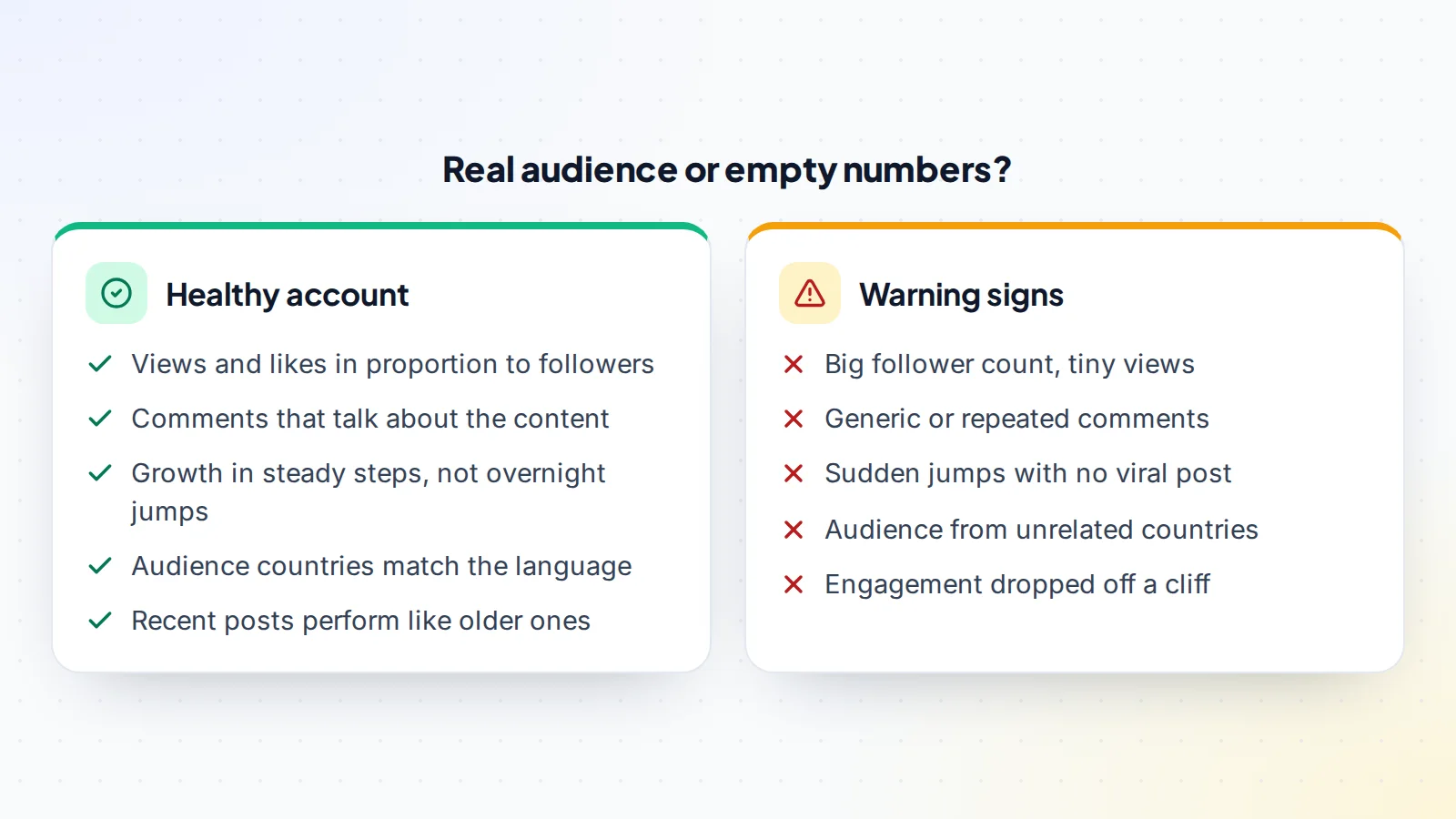
Follower counts are the easiest number to inflate and the least useful one to buy. What you want is an audience that sees and responds to the content.
Engagement
Compare views, likes, comments, shares and saves with the follower count across the last 20 or 30 posts. Our guide to engagement rate shows how to calculate it and what to compare it with. Then read the comments: real followers talk about the content, ask questions and tag friends. Generic praise repeated across posts is a warning sign.
Growth pattern
Look at follower growth over the last year. Healthy accounts grow steadily, with jumps that line up with posts that went viral. A big jump with no matching post, followed by flat engagement, usually means bought followers. Our guide on spotting fake followers covers the tell-tale signs.
Audience location and demographics
The platform’s analytics show where followers are, their age range and when they’re online. Check that it matches the content’s language and the brands or products you plan to promote. An English-language finance account with most followers in unrelated regions is worth far less to advertisers. See why audience demographics affect value.
Step 3: Verify the numbers at the source
Screenshots are easy to edit. Ask the seller for a live screen share of the platform’s analytics (YouTube Studio, Instagram or TikTok professional dashboards, Meta Business Suite), scrolling through the last 12 months while you watch. Better still, ask for read-only access where the platform supports it.
On YouTube, for example, the owner can add you to a Brand Account or give you channel permissions so you can see YouTube Studio yourself. On Facebook Pages, an admin can give you Page access without sharing a password. Listings on digiflippers.com can also show numbers verified through a read-only connection, marked so you can see they weren’t typed by hand. See how verification works.
Ask about the account’s standing too. Platforms show warnings, strikes and restrictions in their dashboards, and you want to see a clean record before you buy.
Step 4: Understand how the account earns
If the account makes money, find out exactly how and whether that income comes with the account.
- Platform payouts, such as YouTube ad revenue. These go to the payout account linked to the channel, so after the sale you link your own.
- Sponsored posts and brand deals. Ask for invoices or payment records for the last 12 months. Some sponsors work with the account; others work with the person, so ask which relationships are likely to continue.
- Affiliate links. You’ll replace the seller’s links with your own; ask for the programmes and their payout history.
- Products and services sold to the audience, which may or may not be part of the sale.
Our guides to YouTube income streams, monetising an Instagram account and TikTok monetisation explain each source in more depth.
Step 5: Agree a fair price
Accounts that earn are usually priced as a multiple of average monthly net profit over the last 6 to 12 months, much like websites. Accounts that don’t earn yet are priced on the quality and size of the audience, the niche and the content library.
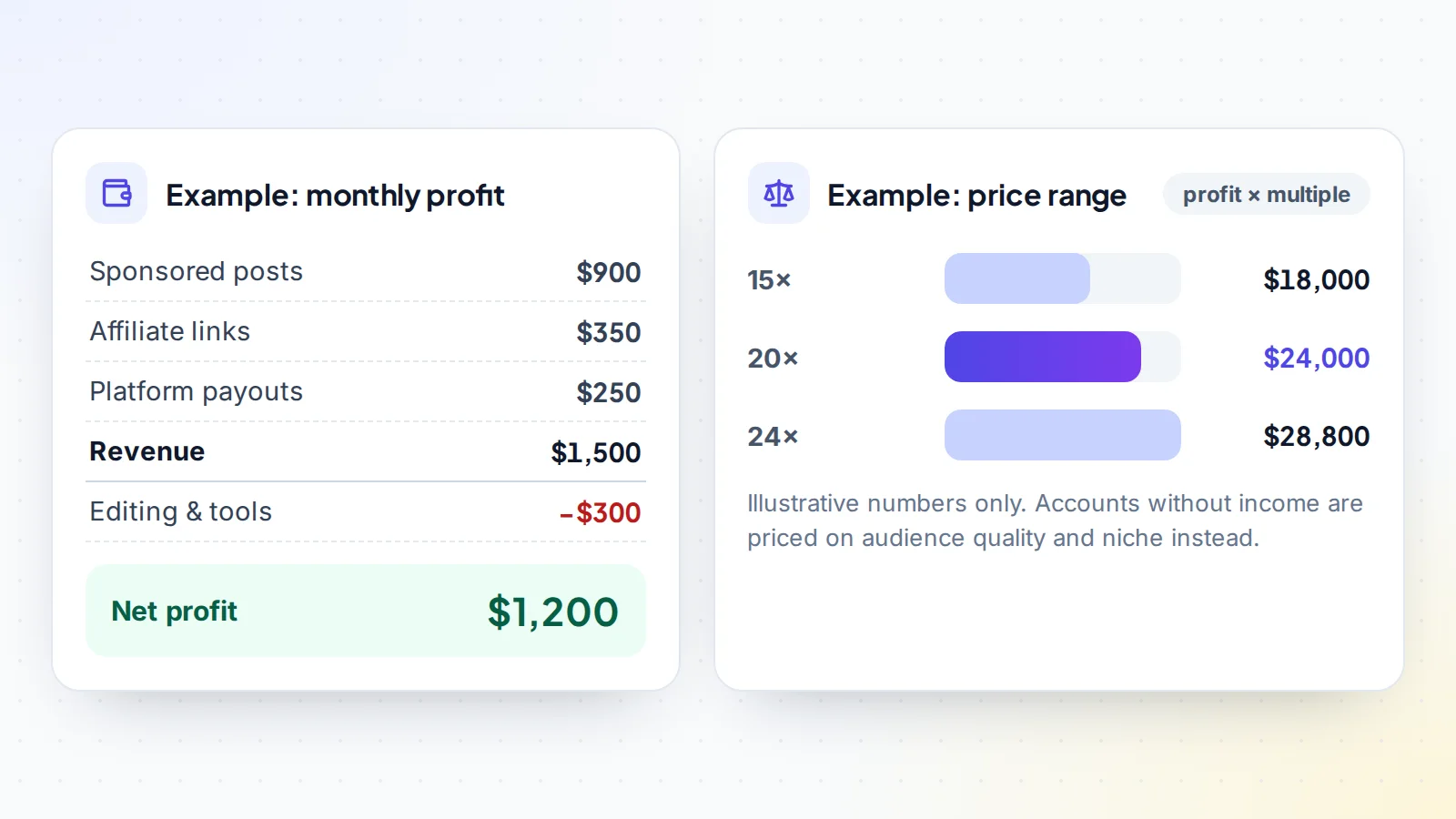
The price goes up with steady growth, strong engagement, an audience advertisers want, several income sources and content that isn’t tied to one person. It goes down when engagement is weak, growth was bought, income depends on the seller personally or the account’s standing has problems. Read how much a YouTube channel is worth and Instagram account value, or get a quick range from the free valuation tool.
Where to buy social media accounts
Where you buy matters as much as what you buy. The safest places to buy social media accounts have three things in common: sellers whose identity has been checked, numbers you can verify, and a payment process that protects you until the handover is complete.
- Marketplaces let you compare many accounts, ask sellers questions in public and see which figures were verified. On digiflippers.com, you can browse social media accounts for sale, ask the seller before you offer, and agree every step in a Deal Room.
- Direct deals with creators you already know can work well, but you take on the checks and the payment safety yourself.
- Private groups and chats are where most trouble starts: no verification, no record and no protection if something goes wrong.
If you can’t find the right account, post what you’re looking for on the Wanted board and let sellers come to you.
Step 6: Pay safely
Never pay the full amount before you have control of the account. The safe structure is escrow: you pay a licensed escrow company, the seller hands over the account, you check it and secure it, and only then is the seller paid. A trusted middleman can play the same role. Read how escrow works for the full process.
On digiflippers.com, the ways to pay in a deal are: directly to the seller, through escrow. The platform never holds the money itself, and the Deal Room keeps the agreed steps and every message in one place.
Step 7: Take over the account securely
The handover is where most problems in this market happen, so do it slowly and in the right order. Our guide to social media account transfers covers each platform; these are the principles.
Use the platform’s ownership tools where they exist
- YouTube: channels on a Brand Account can have several owners. YouTube’s help explains that a person must have been an owner for at least 7 days before they can be made primary owner, and an owner must wait 7 days before removing other managers. That waiting period is part of a safe handover, not a delay to skip. See transferring YouTube channel ownership.
- Facebook Pages: an admin can give you Facebook access with full control from the Page settings or Meta Business Suite. Meta notes that someone with full control can remove anyone else, including the original admin, so full control is exactly what you need at the end of the handover. See Facebook Page transfers and Facebook Group admin transfers.
For accounts that move with their login
Some accounts are handed over with their login details. In that case, make sure you receive the original email account the profile was created with, or change it to your own email straight away, because whoever controls the recovery email can usually take the account back. Read why the original email matters. Then:
- Change the password and the email address to ones only you control.
- Replace the phone number and remove the seller’s recovery options.
- Turn on two-factor authentication, ideally with an authenticator app. Instagram’s help, for example, explains how to use an authentication app and save backup codes.
- Log out of every other session and remove connected apps you don’t recognise.
- Wait a few days and check that nothing changes before you release payment.
Our account security guide has the full checklist for each platform.
After the purchase: keep the audience with you
Followers notice change. For the first weeks, keep posting at the same rhythm, in the same style and on the same topics. Introduce new ideas gradually and watch how engagement responds. Our guides to growing a social media account, growing a YouTube channel and growing an Instagram account cover what to do next.
Checklist: how to buy social media accounts safely
- Platform and niche fit your plans; the account isn’t built on one person’s face.
- Engagement checked across 20–30 recent posts, comments read.
- Growth pattern reviewed for unexplained jumps.
- Audience location and demographics match the content and your plans.
- Analytics seen live or through read-only access, covering 12 months.
- Standing checked: no warnings, strikes or restrictions.
- Income sources and records verified; you know what continues after the sale.
- Price based on profit or on audience quality, agreed in writing.
- Payment through escrow or a trusted middleman.
- Ownership moved with platform tools, or email, password, phone and 2FA changed to yours.
Ready to find your next asset?
Browse listings with verified numbers, ask sellers your questions before you offer, and agree every step in a free Deal Room.
Frequently asked questions
Which social media accounts are best to buy?
Theme accounts built around a topic, with real engagement and a clear audience, carry over to a new owner best. The right platform depends on your goals: YouTube for long-term content libraries, Instagram and TikTok for fast reach and brand deals, Pinterest for website traffic.
How much do social media accounts cost?
Earning accounts are usually priced as a multiple of average monthly profit. Non-earning accounts are priced on audience quality, engagement, niche and content. Two accounts with the same follower count can be worth very different amounts.
How do I know if followers are real?
Compare engagement with follower count, read the comments, check growth for unexplained jumps and look at audience locations in the platform’s analytics. Real audiences react to content in proportion to their size.
How long does a social media account transfer take?
It depends on the platform. A Facebook Page access change can be quick; a YouTube Brand Account handover takes at least a week because of YouTube’s 7-day owner rule. Plan the payment release around the full handover.
Will the account keep earning after I buy it?
Platform payouts and affiliate income usually continue once you connect your own accounts, as long as the content and audience stay strong. Sponsorships depend on whether brands want to keep working with the account under new ownership, so ask the seller about each one.
What’s the biggest risk when buying an account?
Losing control after you’ve paid, because the seller kept a way back in, such as the original email or a recovery phone number. A careful handover and paying through escrow remove most of that risk.