
How to Transfer Ownership of a YouTube Channel (Brand Accounts Explained)
A step-by-step guide to moving a YouTube channel to a new owner through Brand Account roles, with the timings YouTube sets, AdSense changes and a safe order for a sale.

YouTube channels can change hands without anyone sharing a password. If the channel belongs to a Brand Account, Google lets you add people with different roles and hand over the top role, primary owner, after a waiting period. Knowing how to transfer YouTube channel ownership this way makes a sale, a business change or a partnership straightforward and safe for everyone involved.
This guide walks through the whole process: checking that the channel is on a Brand Account, the roles and what each can do, adding the new owner, the 7-day rule, making them primary owner, changing AdSense and finishing cleanly. It also covers the safe order to follow when the channel is being sold.
If you’re still at the pricing stage, see YouTube channel value and how to sell a YouTube channel.
Key takeaways
- Ownership moves through a Brand Account: add the new person as an owner, then make them primary owner.
- Google’s help says the person making the change must have been an owner for at least 7 days, and the new primary owner must have been a manager or owner for at least 7 days.
- An owner must also wait 7 days before removing other owners or managers.
- The new owner links their own AdSense for YouTube account; YouTube allows changing it once every 32 days.
- In a sale, secure the payment first, then follow the steps. No passwords are needed.
Step 1: Check the channel is on a Brand Account
A Brand Account is a Google account type designed for businesses and brands, which can have several owners and managers. Channels on a Brand Account can change owners; channels tied directly to someone’s personal Google account can’t be handed over in the same way.
To check, open YouTube’s channel settings and look for the option to add or remove managers. If it leads to Brand Account permissions, you’re ready. If not, YouTube’s help explains how to move a channel to a Brand Account first. Do this well before any sale, so it doesn’t delay the handover.
Before you start: preparation on both sides
The current owner should check the channel is on a Brand Account, list everything connected to it (AdSense, merchandise, music libraries, scheduling tools, sponsor tools), note any personal details in the channel’s settings or about section, and gather the extras that come with the channel, such as project files and brand assets.
The new owner should prepare the Google account that will own the channel, ideally a dedicated account for the business, protected with two-factor authentication and recovery details. They should also prepare an AdSense for YouTube account, or plan to link an existing one, and decide who on their team needs manager access.
Ten minutes of preparation on each side makes the handover itself quick and uneventful.
Step 2: Understand the roles
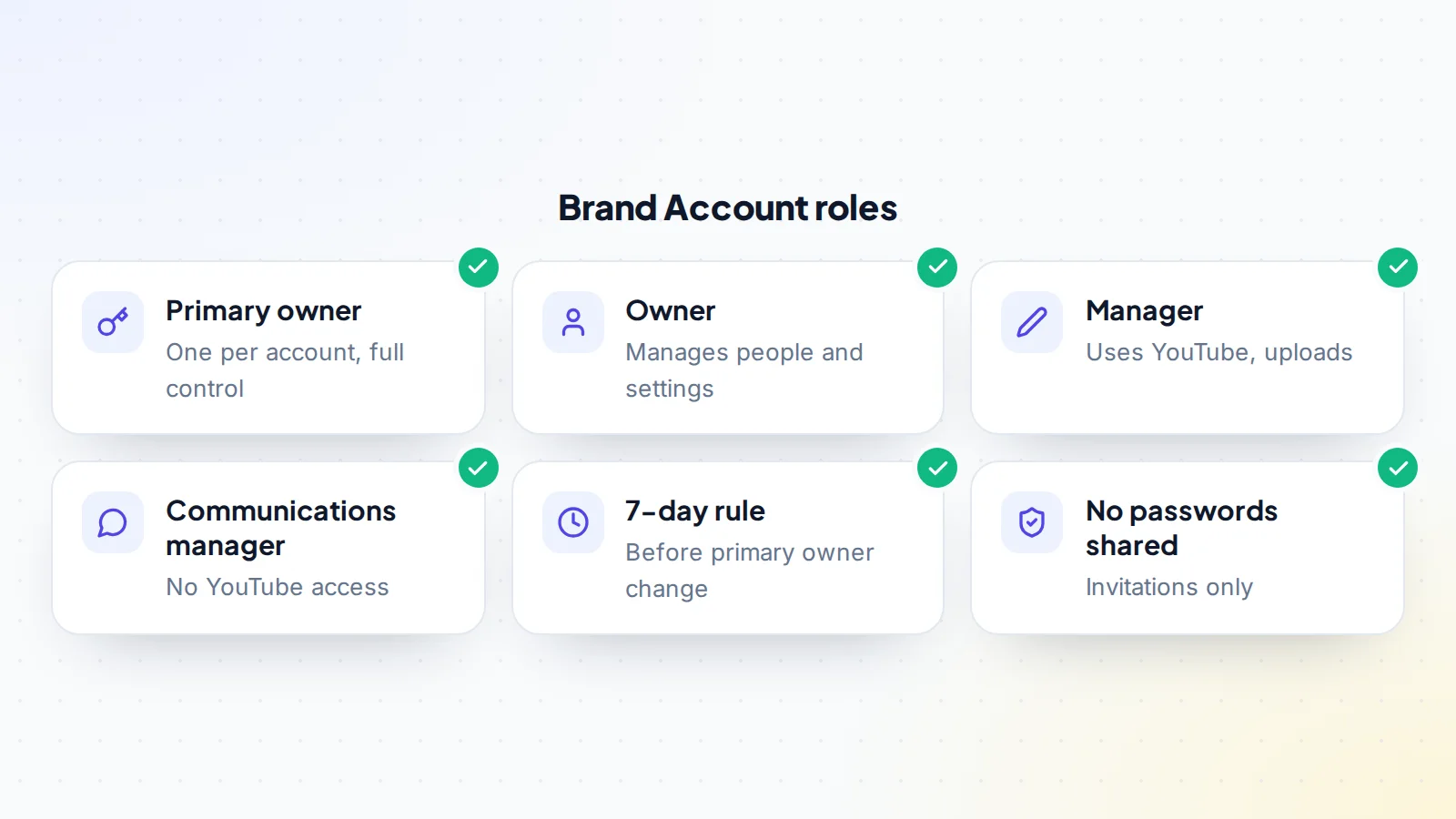
Google’s help describes the Brand Account roles:
- Primary owner: every Brand Account has exactly one. They have full control, including over other owners.
- Owners: can take the most actions, including managing who has access.
- Managers: can use Google services that support Brand Accounts, such as posting videos on YouTube.
- Communications managers: can do the same as managers in some services, but can’t use YouTube.
To transfer YouTube channel ownership completely, the new person needs to end up as primary owner, with the previous owner removed.
Step 3: Invite the new owner
- Open the Brand Account’s permissions from the channel settings or the Brand Accounts section of the Google Account.
- Invite the new person by their Google account email address.
- Choose the Owner role.
- The new person accepts the invitation from their email.
From this point, the new owner can open YouTube Studio for the channel, see the analytics and settings, and start getting familiar with it.
Step 4: The 7-day rule
Google’s help sets out two timings that shape every transfer:
- Making someone primary owner: the person making the change must have been an owner for 7 days or more, and the person becoming primary owner must have been a manager or owner for 7 days or more.
- Removing people: you have to be an owner for 7 days before you can remove managers or owners.
So once the new owner accepts the invitation, there’s a week before primary ownership can move. In a sale, that week is useful: the buyer can review the channel in YouTube Studio while the payment stays secured.
What the new owner should check during the 7 days
- Analytics: views, watch time, traffic sources and audience over the last 12 months, compared with what was shown before the sale.
- Revenue: estimated revenue and RPM by month in YouTube Studio.
- Channel standing: monetisation status and the channel’s status and features page.
- Content: the full video library, playlists, community posts and any scheduled uploads.
- Permissions: who else has access to the Brand Account, and which of them will stay.
- Connections: linked accounts and apps that need moving to the new owner.
Anything that doesn’t match the agreement should be raised before primary ownership moves and before the payment is released.
Step 5: Make the new owner primary owner
- After the 7 days, open the Brand Account permissions.
- Find the new owner in the list of people.
- Change their role to Primary owner and confirm the transfer.
The previous primary owner then becomes a regular owner, and Google’s help notes that a primary owner who wants to leave must first make someone else primary owner.
Step 6: Change AdSense and payments
Monetised channels are paid through an AdSense for YouTube account. YouTube’s help explains that the linked account can be changed from the Earn section of YouTube Studio, where you select the option to change it and sign in to the AdSense account you want to link. It also notes the linked AdSense for YouTube account can only be changed once every 32 days.
In a sale, agree when the AdSense switch happens and how earnings around that date are split, because revenue already earned by the seller is paid to the seller’s account. Our guide to YouTube monetisation after a purchase covers this in detail.
Step 7: Finish the handover
- Remove the previous owner once the new primary owner is in place (after their own 7 days as owner).
- Review connected apps and services, such as scheduling tools, music libraries or merchandise integrations, and reconnect them under the new owner.
- Update the channel’s contact email and business enquiries address.
- Hand over extras: project files, thumbnails, brand assets, social accounts, sponsor introductions.
- Check two-factor authentication on the new owner’s Google account.
Handing over the extras
A channel is more than its YouTube page. When you transfer YouTube channel ownership as part of a sale, the deal usually includes other assets that need their own handover:
- Project files: raw footage, scripts, thumbnail templates and editing project files, shared to the new owner’s storage.
- Brand assets: logos, fonts, colour codes, intro and outro animations, and music licences that cover future use.
- Social accounts on other platforms that promote the channel, each moved through its own platform’s process.
- A website or email list connected to the channel.
- People: introductions to editors, voice-over artists and sponsors who will keep working with the channel.
List each item in the agreement with who hands it over and when, and tick them off before the payment is released. Our asset transfer checklist helps make sure nothing is forgotten.
The safe order in a sale
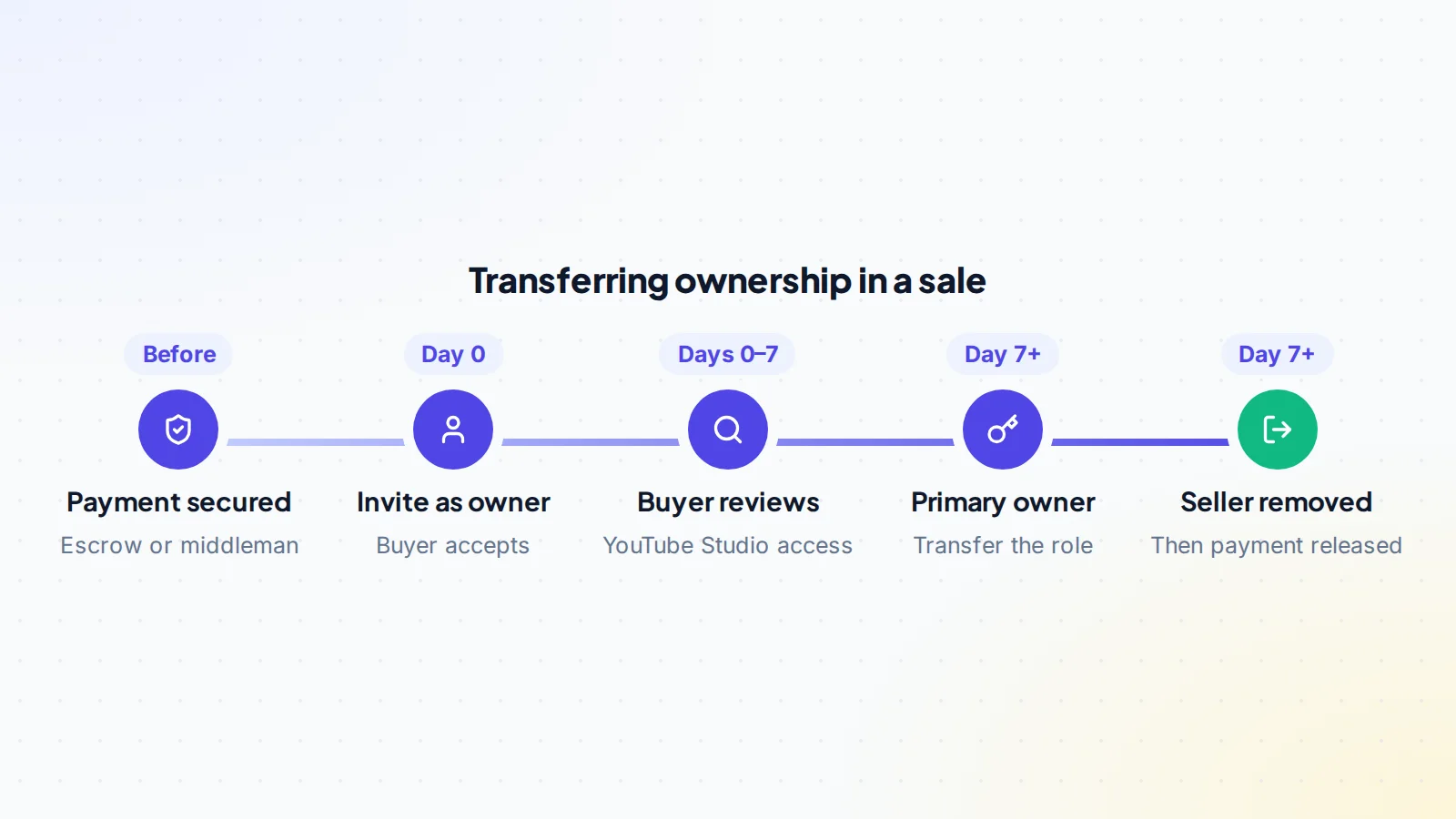
- Terms agreed in writing, including the 7-day wait, AdSense timing and extras.
- Payment secured by escrow or a trusted middleman. On digiflippers.com, the ways to pay in a deal are: directly to the seller, through escrow, and the platform never holds the money itself.
- Buyer invited as owner and accepts.
- Buyer reviews the channel during the 7 days.
- Buyer made primary owner.
- AdSense switched and extras handed over.
- Seller removed, and the payment released.
A worked example
The details below are made up to show the process.
Jordan sells a cooking channel to a food media company. The channel is already on a Brand Account. They agree the price, the extras (project files, two sponsor introductions) and the timeline, and the payment is placed with an escrow service, which confirms it’s held.
On day 0, Jordan invites the company’s Google account as an owner; the company’s channel manager accepts the same day. Over the next week, the manager reviews YouTube Studio, watches the analytics, and confirms everything matches the listing. On day 8, Jordan makes the company’s account primary owner. The company links its own AdSense for YouTube account and receives the project files. Because the company has now been an owner for more than 7 days, it can remove Jordan’s access straight away, and does. The company confirms with escrow, and the payment is released. At no point did anyone share a password.
Security after the transfer
Once the transfer is complete, the new owner should review the Brand Account’s permissions again and remove anyone who shouldn’t have access, check the security settings of the owning Google account, confirm two-factor authentication is on for everyone with owner or manager access, and update the recovery details. Keeping the number of owners small makes the channel easier to protect.
Telling the audience
Viewers usually don’t need to know when ownership changes behind the scenes, especially for channels built around a topic rather than a person. For personality-led channels, a short, honest video or community post introducing the new team helps keep trust. Agree the wording and timing as part of the deal, so both sides are comfortable with it.
Other reasons to transfer ownership
The same steps apply outside a sale: moving a channel into a company’s Google account when a creator incorporates, handing a channel to a co-founder, or passing a community channel to a new organiser. In each case, adding the new person as owner, waiting the 7 days and transferring primary ownership keeps everything clean.
Common problems
- The channel isn’t on a Brand Account: move it first, using YouTube’s process.
- “You can’t change the primary owner yet”: one of the 7-day timers hasn’t finished. Wait and try again.
- The invitation went to the wrong email: remove it and invite the right Google account.
- AdSense won’t change: it may have been changed in the last 32 days.
- Connected services stop working: reconnect them from the new owner’s accounts.
Keep a record of each step
Write down the date and time of each step: the invitation, its acceptance, the primary owner change, the AdSense switch and the removal of the previous owner. Keep the confirmation emails Google sends. In a sale, share each step in the deal messages so the escrow provider or middleman can see exactly when the handover was completed, which makes releasing the payment straightforward.
Transfer YouTube channel ownership: the checklist
- Channel confirmed on a Brand Account.
- Terms agreed, including timings and extras.
- In a sale: payment secured first.
- New owner invited and accepted.
- 7 days passed; new owner made primary owner.
- AdSense for YouTube switched; earnings split agreed.
- Connected services and contact details updated.
- Previous owner removed.
Ready to find your next asset?
Browse listings with verified numbers, ask sellers your questions before you offer, and agree every step in a free Deal Room.
Frequently asked questions
How long does it take to transfer a YouTube channel?
At least 7 days, because of Google’s rules on Brand Account roles, plus any time agreed for the new owner to review the channel.
Do I need to share my password?
No. Brand Account roles let you add the new owner by invitation and transfer primary ownership without sharing any login.
Do subscribers and videos stay with the channel?
Yes. The channel keeps its videos, subscribers, playlists and history; only the people who control it change.
How often can AdSense be changed?
YouTube’s help says the linked AdSense for YouTube account can be changed once every 32 days.
Can a personal channel be transferred?
Move it to a Brand Account first, using YouTube’s process. Then follow the steps above.
Can I transfer YouTube channel ownership to a company account?
Yes. Invite the company’s Google account as an owner and, after the 7 days, make it primary owner. Many businesses use a dedicated Google account for this.
