
Moving Stripe Subscriptions to a New Owner After a SaaS Sale
The two main ways to move paying customers to a new owner after a SaaS sale, what Stripe's data copy includes, and a step-by-step plan that keeps billing uninterrupted.

For a SaaS business, the subscriptions are the business. When it’s sold, the paying customers have to keep paying, on the same dates and prices, to the new owner, without double charges or failed renewals. If billing runs on Stripe, there are two main ways to make that happen, and choosing the right one early makes the handover far smoother. This guide explains how to transfer Stripe subscriptions to a new owner, what Stripe’s tools do and don’t move, and a step-by-step plan.
It’s written for both buyers and sellers, and it builds on our guide to buying a SaaS business. Stripe’s rules and tools change, so check its current documentation and talk to Stripe Support before you commit to a plan.
Key takeaways
- There are two main routes: transfer the Stripe account itself, or copy customers to the buyer’s own account.
- For an account transfer after a sale, Stripe asks you to contact its Support team first.
- Stripe’s data copy moves customers and payment methods, but not subscriptions, charges or invoices.
- Copied subscriptions must be recreated with the same prices and billing dates.
- Stop billing on the old account only after the new subscriptions are confirmed, and tell customers about any visible change.
Why billing is the hardest part of a SaaS handover
Code, domains and servers can be moved and tested at leisure. Billing can’t: renewals happen every day, and a mistake shows up as a failed payment, a double charge or a customer who quietly stops paying. Payment details also carry strict security rules, so card numbers can’t simply be exported to a spreadsheet and imported elsewhere. That’s why payment providers offer their own processes for a change of owner, and why the plan should be agreed before the sale closes. Leaving billing until after the money has changed hands is one of the easiest ways to turn a good deal into a stressful one.
Check the billing data before you buy
The subscription list is also the best evidence of what you’re buying. Before closing, the buyer should review the seller’s Stripe data on a screen-share or with read-only access through a restricted API key: active subscriptions by product, monthly recurring revenue, churn over the last 12 months, refunds and disputes. Compare it with the revenue figures in the listing. Our guides to MRR vs ARR and SaaS due diligence explain what to look for.
The same export you use for the review becomes the master list for the handover, so it’s worth getting right early. When you transfer Stripe subscriptions from a list you’ve already checked, there are fewer surprises on the day.
The two main routes
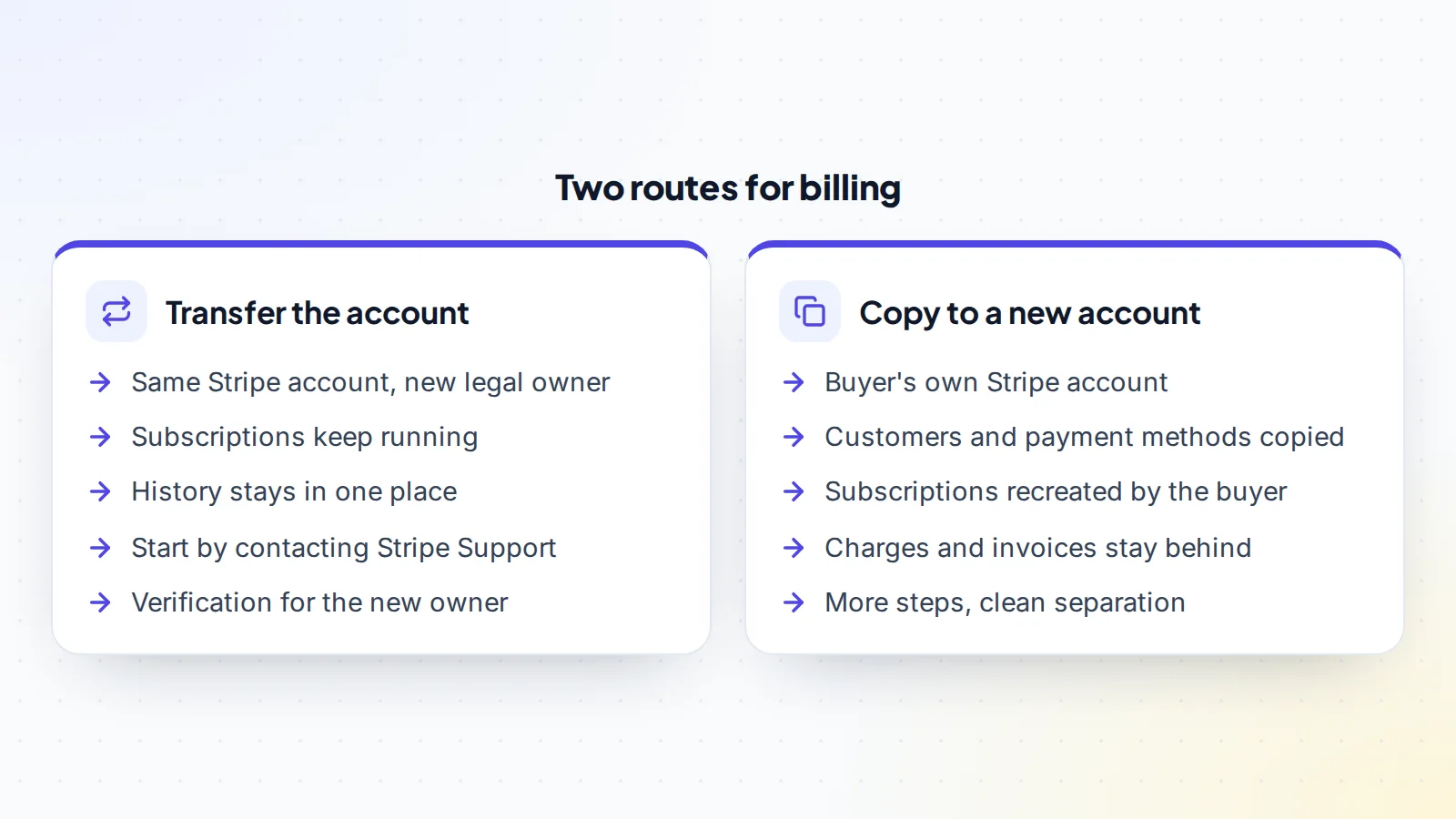
Route 1: transfer the account. If the buyer takes over the business, including the legal entity or its assets, the existing Stripe account may be able to move to the new owner. Stripe’s support article on transferring an account to a different entity after a business sale or acquisition asks you to contact Stripe Support first and explains what changes. When it’s possible, subscriptions keep running and the history stays together, but the new owner must go through Stripe’s verification.
Route 2: copy to the buyer’s account. If the buyer has their own company and Stripe account, Stripe’s self-serve data copy can move customers and payment methods from the seller’s account to the buyer’s. The buyer then recreates the subscriptions. It’s more work, but it gives the buyer a clean account in their own name.
What Stripe’s data copy moves
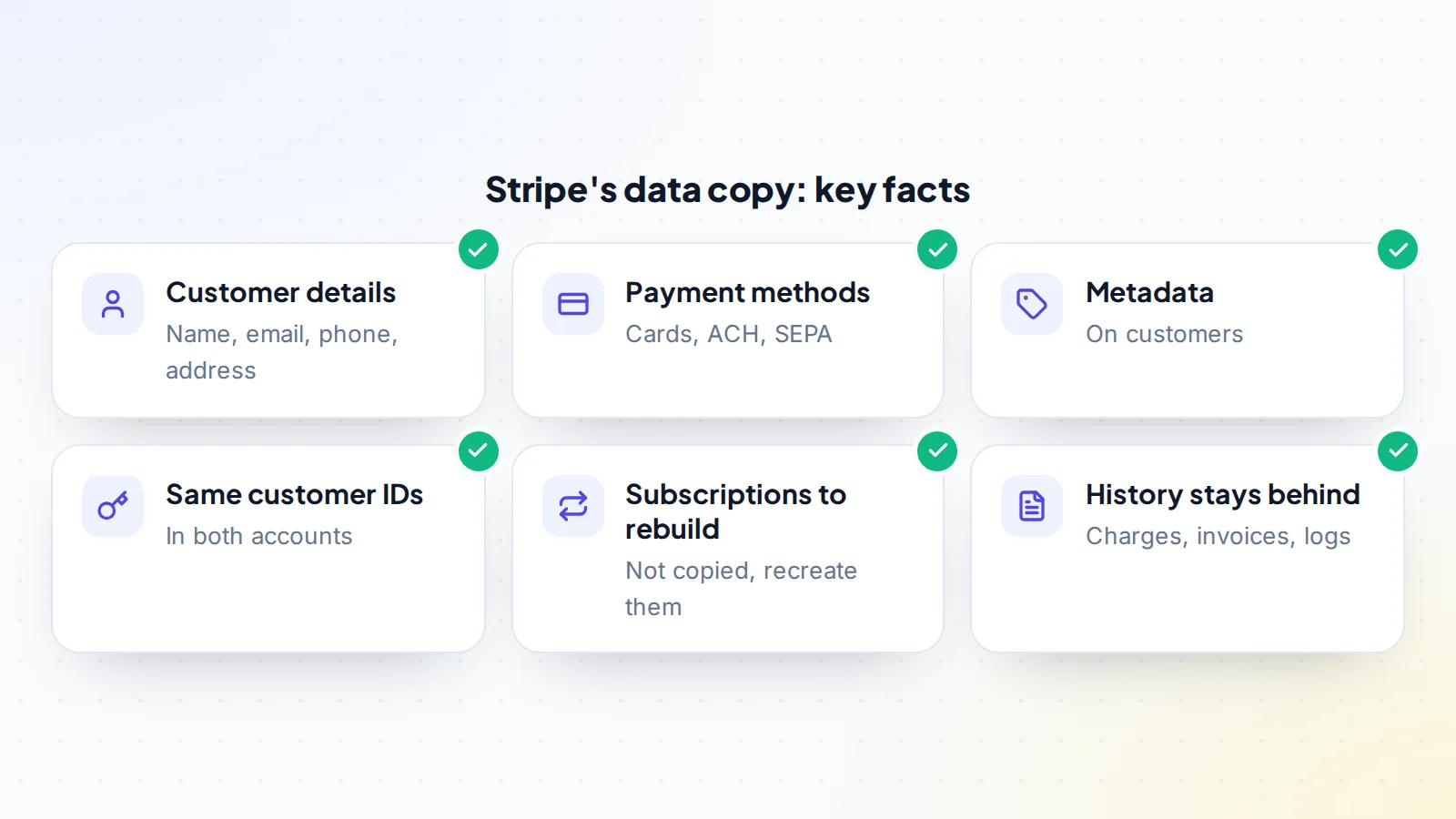
According to Stripe’s documentation, the self-serve copy can include customer details such as name, email, phone, address, default payment method and metadata, and payment methods including cards, ACH and SEPA. It cannot copy charges, payment intents, invoices, plans, subscriptions, coupons, events or logs. After the copy, the data exists in both accounts, and customer IDs stay the same in both.
The process needs both sides: the seller and buyer exchange account IDs, the seller shares the customer data, and the buyer authorises and accepts it. Stripe says most copies finish within 72 hours of acceptance, and copies of fewer than 10,000 customers typically complete within a couple of hours.
Recreating subscriptions
Because subscriptions aren’t copied, the buyer recreates them in their own account, in the Dashboard or through the API. To keep customers’ experience unchanged:
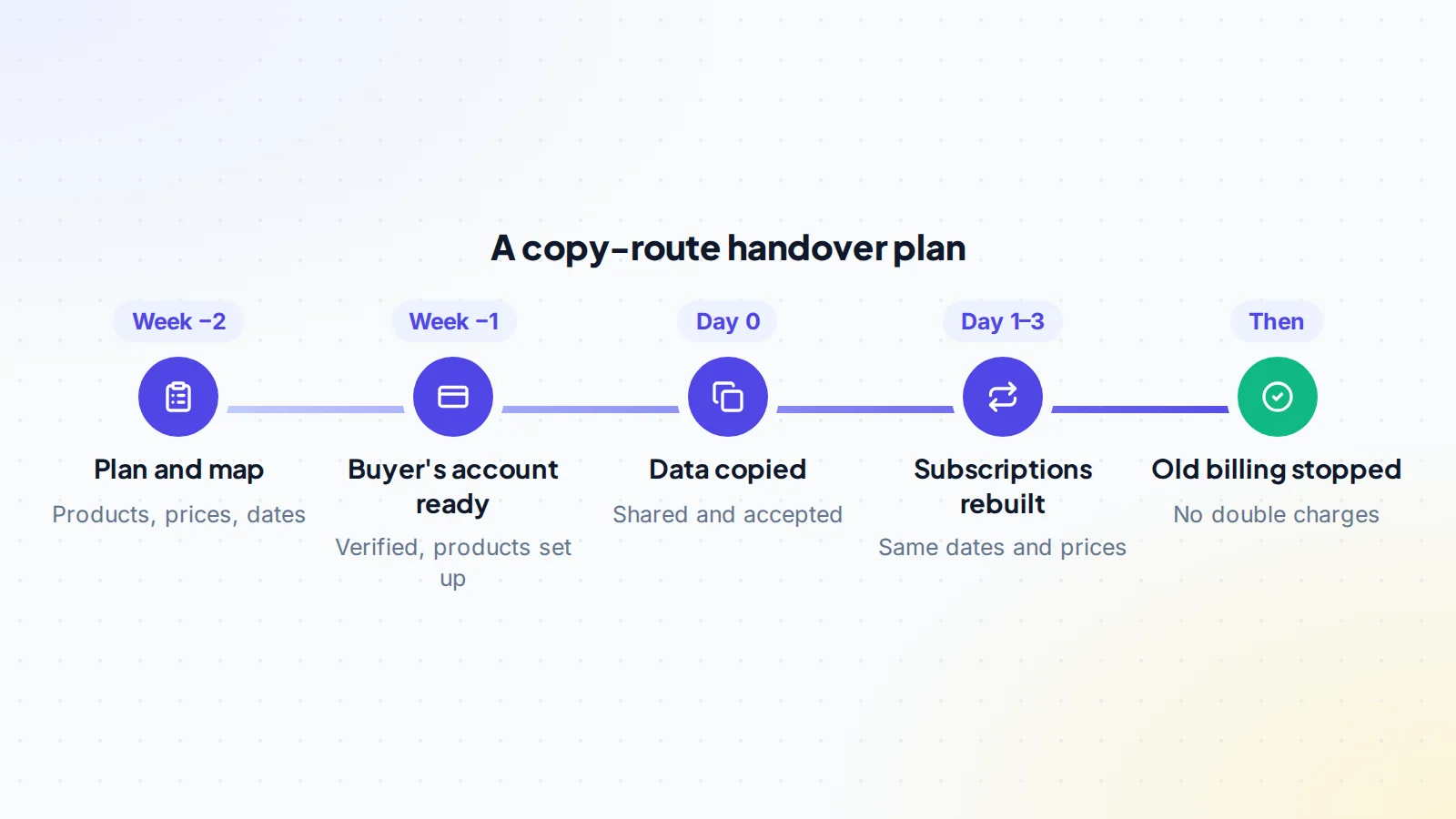
- Recreate products and prices first, matching amounts, currencies, intervals and any tiers.
- Keep each customer’s billing date, so no one is charged early or twice in a cycle.
- Carry over discounts and trials that customers were promised.
- Match taxes and invoice settings, such as tax IDs and invoice footers.
- Test with a few customers first, then run the rest in batches.
Export a list from the seller’s account of every active subscription, with customer ID, price, quantity, next billing date, discount and status. That list becomes the checklist for the rebuild.
Stopping billing on the old account
Timing matters. If the old subscriptions stop too early, customers get a free month; too late, they’re charged twice. A safe approach is to rebuild each subscription so that its next charge on the new account falls on the date the old one would have, then cancel the old subscription before that date. Check the old account each day during the handover for any unexpected charges, and refund promptly if one slips through.
Payment methods outside the copy
Stripe’s documentation lists the payment method types the self-serve copy supports, including cards, ACH and SEPA. If some customers pay another way, check before the handover whether their details can move, or whether they’ll need to add a payment method again in the new account. Contact those customers early with a simple link to update their details, well before their next renewal, so nobody’s access is interrupted.
Failed payments and retries
Every subscription business has some failed payments: expired cards, insufficient funds, bank declines. Before the handover, note which subscriptions are past due or in a retry cycle on the seller’s account, and agree how they’ll be handled. Set up the same retry schedule and reminder emails in the new account, so customers with a failed payment get the same chance to fix it. Watch the first few weeks closely: a spike in failures after the move can point to a missed step, such as a payment method that didn’t copy.
Update the app and webhooks
The product itself usually talks to Stripe: checking subscription status, granting access and reacting to webhooks such as successful payments or cancellations. During the handover:
- Switch API keys in the app to the buyer’s account, using restricted keys where possible.
- Recreate webhook endpoints in the new account and update their signing secrets in the app.
- Map any stored subscription IDs to the new ones, since customer IDs stay the same but subscription IDs change.
- Test sign-up, upgrade, downgrade, cancellation and failed payment flows.
Our guide to SaaS technical due diligence covers the code review that should come first.
Telling customers
Many customers will see a different business name on their card statement or receipts after the change. Send a short, friendly email before the first charge from the new account, explaining that the product has a new owner, that nothing changes in their plan or price, and how to get help. Update the statement descriptor and receipt details in the new account so they’re recognisable. Clear communication prevents confused customers from disputing charges they don’t recognise. Personal data rules also apply to the move; our guide to GDPR in a SaaS sale explains what to check.
Questions to settle before closing
- Is the legal entity part of the sale, or only the assets? This often decides the route.
- Has Stripe Support confirmed what’s possible for this case?
- How many active subscriptions, on which products, prices and intervals?
- Which customers have discounts, trials or custom terms?
- Are any customers on payment methods the copy doesn’t support?
- Who handles refunds and disputes on charges made before the sale?
- How long will the seller keep their Stripe account open after the handover?
Settling these in writing keeps the billing handover predictable for both sides.
If billing isn’t on Stripe
The same principles apply to other payment providers: find out whether the account can move with the business, what customer and payment data the provider can migrate, and what has to be rebuilt. Some providers act as the merchant of record and have their own rules for a change of owner. App store subscriptions follow the app store’s process for transferring the app. In every case, read the provider’s own documentation and talk to its support team before you agree a plan.
A worked example
The details below are made up to show the method.
Nina buys a scheduling SaaS with 1,200 paying customers on monthly and annual plans. The seller’s company isn’t part of the sale, so they choose the copy route. Two weeks before closing, they export every active subscription and map the four products and prices. Nina’s company sets up and verifies its own Stripe account and creates matching products.
On closing day, the seller shares the customer data and Nina accepts. The copy completes the same afternoon. Over the next two days, Nina’s developer recreates each subscription with its original next billing date, starting with a test batch of 20 customers, and switches the app’s API keys and webhooks. The seller cancels each old subscription before its renewal date. Customers receive an email introducing the new owner. After the first full billing cycle runs cleanly on Nina’s account, the final part of the payment held in escrow is released.
Put billing into the deal terms
Write the billing plan into the sale agreement: which route you’ll use, who does each step, how revenue that renews during the handover is split, how refunds and disputes on old charges are handled, and how long the seller will keep their account open to deal with them. Holding part of the price until the first billing cycle completes on the new account protects the buyer. On digiflippers.com, the ways to pay in a deal are: directly to the seller, through escrow, and the platform never holds the money itself. Our guide to the inspection period explains how to set the checking window.
Transfer Stripe subscriptions: the checklist
- Route chosen: account transfer or data copy, after checking with Stripe.
- Active subscriptions exported with prices, dates and discounts.
- Buyer’s account verified and products and prices recreated.
- Customer data shared and accepted; copy confirmed complete.
- Subscriptions recreated with original billing dates, tested in a small batch first.
- App API keys, webhooks and stored IDs updated and tested.
- Old subscriptions cancelled before their renewal dates.
- Customers told about the new owner and statement name.
- Billing plan, refunds and revenue split written into the deal.
- Part of the price held until the first billing cycle completes.
Ready to find your next asset?
Browse listings with verified numbers, ask sellers your questions before you offer, and agree every step in a free Deal Room.
Frequently asked questions
Can I transfer Stripe subscriptions to another account?
Subscriptions themselves aren’t copied by Stripe’s self-serve data copy. You copy customers and payment methods, then recreate the subscriptions in the new account.
Can the whole Stripe account move to the buyer?
Sometimes, after a business sale or acquisition. Stripe asks you to contact its Support team first, and the new owner must complete verification.
Do customer IDs change?
No. Stripe says the copy keeps the same customer IDs in both accounts. Subscription IDs will be new when subscriptions are recreated.
How long does the data copy take?
Stripe says most copies finish within 72 hours of acceptance, and smaller copies, under 10,000 customers, typically within a couple of hours.
Will customers be charged twice?
Not if the new subscriptions keep the original billing dates and the old ones are cancelled before they renew. Check both accounts daily during the handover.
Do I need to tell customers?
Yes, if anything visible changes, such as the name on their statement. A short email before the first new charge prevents confusion and disputes.
Should the seller close their Stripe account straight away?
No. Keep it open for an agreed period to handle refunds, disputes and any charges on old subscriptions, then close it once everything is settled.
