
Verified Metrics: Why Connected Data Beats Screenshots
Screenshots are easy to fake. Here's how connected, read-only data proves traffic and revenue, what each source can confirm, and how buyers and sellers use it.

Every online business listing has numbers: visitors, revenue, subscribers, profit. The question every buyer asks is whether those numbers are real. Verified metrics answer it by reading the figures directly from the source, such as Google Analytics, Search Console, Stripe or YouTube, instead of trusting a screenshot that anyone could edit.
This guide explains why connected data beats screenshots, what each common source can and can’t confirm, how to share access safely without giving away control, how buyers should read verified numbers, and where screenshots still have a role.
Key takeaways
- Screenshots are easy to edit, crop or borrow from another account. Data read from the source is much harder to fake.
- Most platforms offer read-only access: viewer roles in Google tools, restricted keys in Stripe. Use them instead of passwords.
- Each source confirms a different thing: traffic, search performance, revenue, channel data or ad earnings.
- Verified numbers still need reading in context: look at trends, sources and costs, not just totals.
- Verification supports due diligence; it doesn’t replace it.
The problem with screenshots
A screenshot shows what the seller chose to capture. It might be genuine, but there’s no easy way to tell. Common problems include:
- Edited numbers: image editing and browser developer tools make it simple to change a figure before taking a screenshot.
- Selective date ranges: one excellent month presented as typical.
- Borrowed accounts: a dashboard from a different, bigger site.
- Missing context: revenue without refunds, or traffic without the source breakdown.
Our guide to fake revenue screenshots shows the warning signs in detail. The underlying issue is simple: a screenshot is a claim, not evidence.
What verified metrics are
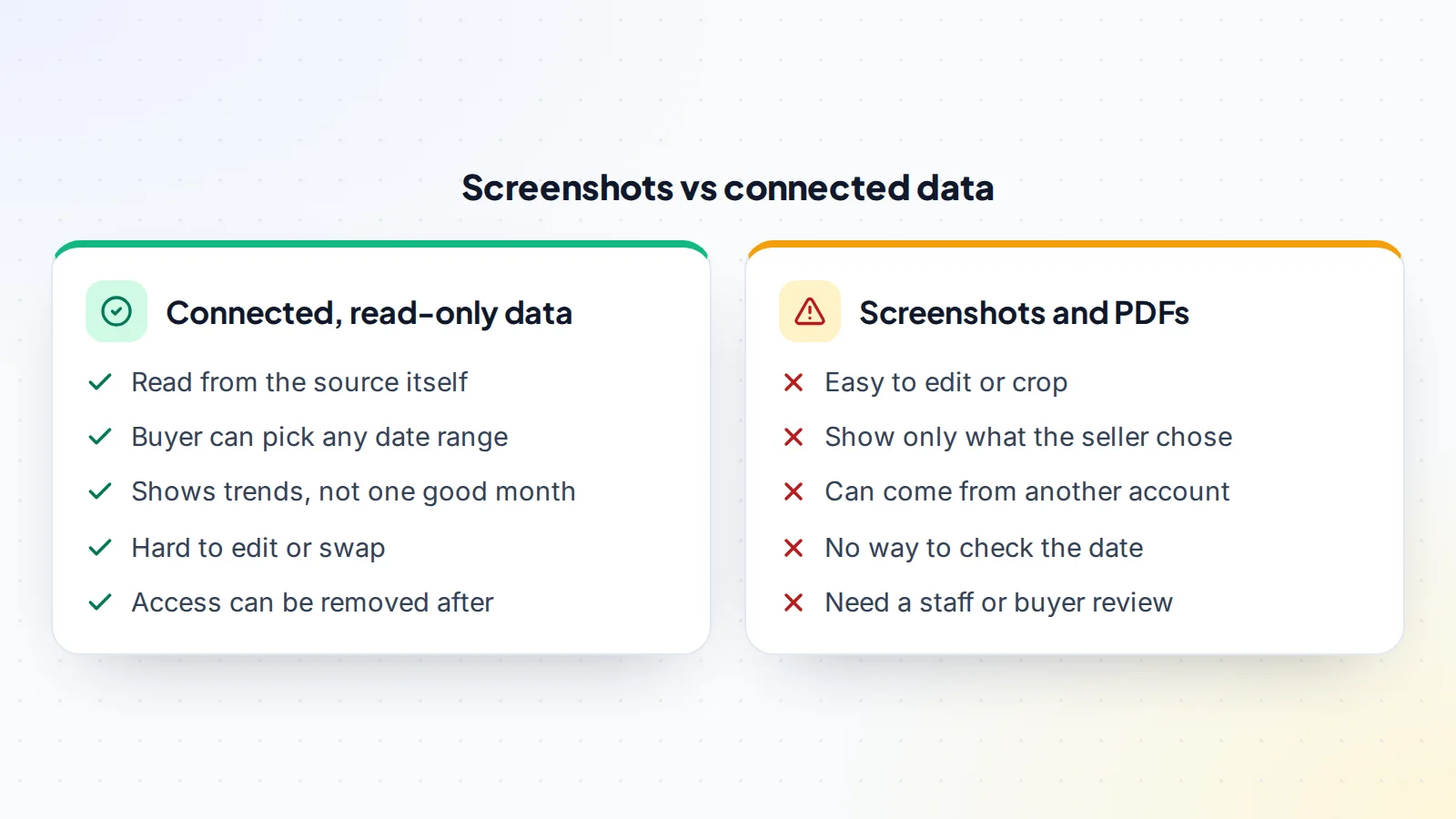
Verified metrics are figures read directly from the system that recorded them, through a connection the owner authorises. Instead of the seller saying “we had 40,000 visitors last month”, the analytics tool itself reports it. The best connections are read-only (they can see data but not change anything) and revocable (the owner can remove them at any time).
Because the data comes from the source, a buyer can trust it far more than an image. And because it usually covers any date range, it shows trends rather than a single chosen moment.
What each source can confirm
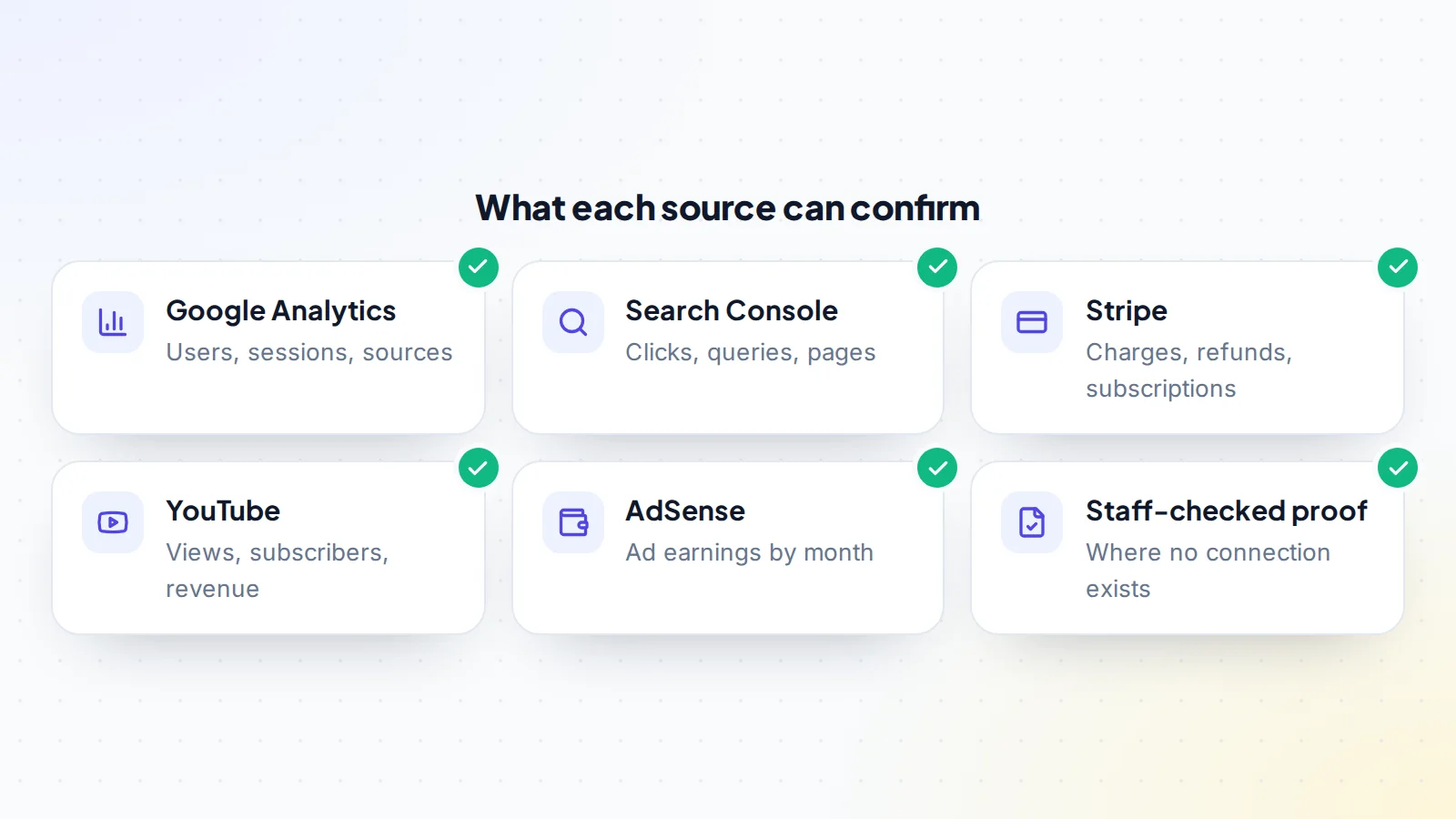
Google Analytics
Confirms traffic: users, sessions, where visitors come from, which pages they view and how this changes over time. Google’s help centre explains how an account owner adds users in the admin area under access management, with roles including Viewer, which can see reports without changing settings.
Google Search Console
Confirms performance in Google Search: clicks, impressions, queries and pages. It’s also the best place to see whether traffic depends on a few search terms. Search Console’s help explains how owners add users from the settings, including restricted users who can view most data.
Stripe
Confirms revenue: charges, refunds, disputes and subscriptions. Stripe’s documentation explains restricted API keys, which can be limited to read access for chosen resources and blocked from everything else. A read-only restricted key is a far safer way to share revenue data than a login.
YouTube
Confirms channel data: subscribers, views, watch time and, for monetised channels, estimated revenue. Read-only connections through Google sign-in can show these numbers directly. See our guide to buying a YouTube channel for what to look for.
AdSense and other ad networks
Confirm display advertising income by month, which matters for content sites. A connection shows earnings over time without the seller having to export reports.
Where no connection exists
Some income doesn’t come through a connectable system: affiliate programmes, sponsorship invoices, marketplace payouts. Here, proof such as statements or exports can be checked by a reviewer, and the buyer can confirm with a live screen share where they choose what to open.
Sharing access safely
For sellers, the goal is to prove the numbers without handing over control. Good practice:
- Never share passwords. Use viewer roles, restricted keys or read-only connections.
- Grant the least access needed: read, not write; reporting, not billing.
- Time-limit access and remove it when the conversation ends, unless the deal goes ahead.
- Keep a record of who has access and when you granted it.
- Be wary of requests for full admin access before any agreement; serious buyers accept read-only.
For buyers, the same principle applies in reverse: don’t ask for more than you need to verify, and be cautious if a seller offers screenshots but refuses any read-only option.
How to read verified numbers
Verified doesn’t mean “good”. It means “real”. A buyer still needs to read the numbers carefully:
- Look at trends, not totals. Twelve months of data shows whether a business is growing, steady or declining. Most buyers base the price on trailing twelve months profit.
- Check sources. Traffic concentrated in one channel, or revenue concentrated in one customer, is a risk even when verified.
- Match the systems. Do traffic, revenue and payouts tell the same story? A spike in revenue with no change in traffic deserves a question.
- Remember costs. Verified revenue isn’t profit. Costs still need checking; see financial due diligence.
- Confirm ownership. Verified data shows the numbers are real; ownership verification shows they belong to the asset being sold.
A worked example
The details below are made up to show the method.
A seller lists a software tool with monthly revenue of $8,200 and 52,000 monthly visitors. In the first listing, the evidence is two screenshots. Several buyers ask questions but none make offers.
The seller then connects Google Analytics with a viewer role and shares a read-only Stripe restricted key. Now the listing shows 12 months of traffic and revenue read from the source. The data reveals something the screenshots didn’t: revenue grew steadily from $6,900 to $8,200, refunds are low, and 60% of traffic comes from search across hundreds of queries. It also shows one weaker point, a dip in month four, which the seller explains with a pricing change.
Within a week, two buyers make offers. The verified data didn’t make the business better; it made it believable, and it let buyers spend their time on the real questions instead of doubting the basic numbers.
Verification for different kinds of assets
What counts as the “source” depends on what’s being sold:
- Content sites and blogs: analytics for traffic, Search Console for search performance, and ad network or affiliate dashboards for income.
- SaaS and subscription products: the payment processor for revenue, refunds and churn, plus product analytics for active users. Our guide to SaaS metrics explains which figures matter most.
- E-commerce and digital product stores: the store platform’s sales reports and the payment processor, checked against each other.
- Newsletters: the newsletter platform’s subscriber, open-rate and paid-subscription reports, shared live or through a team role.
- YouTube channels: YouTube Studio data through a read-only connection or a live screen share.
- Social and game accounts: profile statistics shown live, with the buyer choosing which screens to open, plus ownership checks such as a code placed in the profile.
- Domains: registration data from public lookups, and traffic or offers data where the domain is in use.
The principle is the same everywhere: the closer the evidence is to the system that recorded it, the more it’s worth.
For buyers: asking for verified data
A polite, specific request gets better results than a vague “send me proof”. Ask for:
- Read-only access to named tools, such as a viewer role in Google Analytics or a restricted Stripe key with read access to charges, refunds and subscriptions.
- Twelve months of data, or as much as exists.
- A short live screen share for anything that can’t be connected, where you choose the reports and date ranges.
- Confirmation that you’ll remove or return access if talks end.
Sellers with nothing to hide usually agree quickly. A seller who offers only screenshots and refuses every read-only option isn’t necessarily dishonest, but you should weigh that refusal when you price the risk.
Verified metrics on digiflippers.com
On digiflippers.com, sellers can verify ownership of an asset and back up its numbers. Where the marketplace has connections enabled, sellers can connect sources such as Google Analytics, Search Console, YouTube, AdSense or a read-only Stripe key, and the listing shows which figures were verified, and how. Where no connection exists, sellers can upload proof for staff to check. See how verification works, and our guide to the verified seller badge for how seller identity is checked.
When the numbers don’t match
Sometimes connected data tells a different story from the listing. That isn’t always a sign of dishonesty; there are common, innocent reasons:
- Different definitions: “visitors” in one tool and “users” in another are counted differently, and revenue before and after fees or refunds will differ.
- Different time zones or periods: a month in the payment processor may not line up exactly with a month in analytics.
- Tracking gaps: analytics code missing from some pages, or blocked by some browsers, undercounts traffic.
- Several accounts: a business might use two payment processors or have moved from one to another during the year.
The right response is a question, not an accusation. Ask the seller to explain the difference and show the evidence. Small, explained differences are normal. Large, unexplained ones, especially where the listing is higher than every source, deserve caution and may justify a lower offer or walking away.
What verification can’t tell you
- The future: verified history doesn’t guarantee the next year.
- Quality of traffic: real visitors can still be low-intent or from a source that may change.
- Costs and liabilities: these need separate checks.
- Who you’re dealing with: check the seller too; see how to check an online seller.
- Rights and transferability: covered in full due diligence.
Where screenshots still help
Screenshots aren’t useless. They’re a quick way to show a listing’s highlights, to illustrate something hard to connect, or to document a moment for the record. They just shouldn’t be the only evidence for numbers that set the price. A good rule: use screenshots to illustrate, and connected data or live screen shares to prove.
For sellers: why verification pays
Verified listings answer the first question every buyer has before they ask it. That tends to bring more serious enquiries, shorter due diligence and fewer price reductions for “uncertainty”. If your numbers are good, verification is the cheapest way to get paid for them.
Common mistakes
- Sharing a password instead of a read-only role or key.
- Granting full admin access to someone you haven’t agreed a deal with.
- Treating verified as approved: real numbers can still describe a weak business.
- Checking only one source: traffic without revenue, or revenue without refunds.
- Forgetting to remove access when talks end.
Verified metrics checklist
- Traffic verified through Google Analytics with a viewer role.
- Search performance checked in Search Console.
- Revenue verified through a read-only connection, such as a Stripe restricted key.
- Channel or ad data connected where relevant.
- Other income backed by statements checked by a reviewer or on a live screen share.
- Twelve months reviewed for trends, sources and refunds.
- Ownership of the asset verified separately.
- Access removed when no longer needed.
Ready to find your next asset?
Browse listings with verified numbers, ask sellers your questions before you offer, and agree every step in a free Deal Room.
Frequently asked questions
What does “verified metrics” mean on a listing?
That the figures were read from the source system, such as an analytics tool or payment processor, or checked by a reviewer, rather than typed in or shown in an image by the seller.
Is it safe to connect my accounts?
Yes, when you use read-only roles or restricted keys and remove access afterwards. Never share passwords; good connections can see data but not change anything.
Can verified data still be misleading?
The numbers will be real, but they can still be read wrongly. Check trends, sources, refunds and costs, not just totals.
What if my income comes from affiliates or sponsors?
Upload statements or payout records for review, and offer a live screen share where the buyer chooses what to open.
Do buyers really prefer verified listings?
Verified numbers remove the most basic doubt, so buyers can focus on the business itself. That usually makes conversations faster and offers firmer.
Does verification replace due diligence?
No. It confirms the numbers are real, which is the starting point. Costs, rights, ownership, dependencies and the seller still need checking.
