SEO Due Diligence: How to Check a Website’s Search Health
A practical SEO due diligence checklist for website buyers: Search Console data, manual actions and security issues, core update history, backlinks, content, technical health and how much traffic rests on a few pages.

When you buy a content site or an affiliate site, you’re usually buying search traffic. That traffic is the main reason the site earns, and also its biggest risk: rankings can change with Google updates, past shortcuts can surface, and a few pages can carry most of the income. SEO due diligence is how you check that the traffic is real, healthy and likely to last. This guide walks through what to check, where to find it and how to turn what you find into a fair price.
For the full buying process, see our guide on how to buy a website. If you’re the seller preparing for this review, read how to give Google Analytics access safely.
Key takeaways
- Get direct access to Search Console and Analytics; don’t rely on screenshots.
- Check for manual actions and security issues in Search Console.
- Compare traffic changes with the dates of Google updates.
- Review backlinks for quality and relevance, not just the count.
- Measure how much traffic and income rest on a few pages.
Why SEO due diligence matters
Search traffic is valuable because it arrives without paying for each visitor. But it isn’t guaranteed. Google regularly updates how it ranks results, and sites that were built on thin content or manipulative links can lose much of their traffic at once. A site that looks profitable today might be one update away from a sharp drop. SEO due diligence won’t predict the future, but it shows you how the site has behaved, how it’s built and where the risks are, so you can decide whether to buy and at what price.

Start with direct access
Ask the seller for read-only access to Google Search Console and Google Analytics. In Search Console, a restricted user can see most data. In Analytics, the Viewer role lets you explore reports without changing anything. Direct access lets you look at any period, any page and any query you like, which screenshots can’t do.
If the seller won’t give access, ask for a live screen-share at a minimum, and treat the refusal as part of your risk assessment. On digiflippers.com, some metrics can be verified, and our guide to verified metrics explains what that means for buyers.
Check search performance
Search Console’s Performance report shows clicks, impressions, average position and click-through rate for queries and pages, with up to 16 months of data. Look at:
- The trend: clicks month by month over the full period. Is it rising, steady or falling?
- Top queries: what people search for to find the site, and whether those queries match the site’s topic.
- Top pages: which pages earn the most clicks, and how concentrated that is.
- Countries and devices: where search visitors come from, which affects income.
- Brand vs non-brand: how much traffic comes from people searching for the site by name.
Export the data so you can work with it later, and note any months that stand out. Then compare Search Console clicks with organic traffic in Analytics. The numbers won’t match exactly, because they’re measured differently, but they should move together.
Check manual actions and security issues
Search Console has a Manual actions report, which shows if a human reviewer at Google has found that pages don’t comply with Google’s spam policies. It also has a Security issues report, covering problems such as hacked content or malware. Open both. A clean report today is good, but ask the seller about any past actions too, and how they were resolved.
Google’s spam policies describe practices that can lead to lower rankings or removal, including link spam, scaled content abuse, expired domain abuse and site reputation abuse. Read them once, because they explain what to look for in the rest of your review.
Compare traffic with update history
Google announces core updates and spam updates. Its Search Status Dashboard lists ranking updates with their dates and keeps that history for five years. Lay the site’s monthly clicks alongside those dates. A site that stayed steady or grew through several updates has shown resilience. A site that dropped sharply after an update and hasn’t recovered may have deeper problems.
Google says core updates aren’t aimed at specific sites, and that a drop doesn’t necessarily mean a site has done something wrong. Recovery, when it comes, can take time. So treat update history as evidence to weigh, not a verdict. Our guide to Google algorithm update risk explains how to factor it into the price.

Review the backlinks
Links from other sites help search engines find and understand pages. Use a backlink tool to see which sites link to the site you’re buying, and which pages they link to. Focus on quality and relevance: links from respected sites in the same topic are good signs, while large numbers of links from unrelated sites, link networks or obviously paid placements are a concern. Ask the seller whether they have ever bought links or used link schemes, and get the answer in writing. Our guide to the backlink audit before buying covers this step in detail.
Read the content
Numbers only tell part of the story. Read the top 10 to 20 pages by traffic as a visitor would. Ask yourself whether each page is helpful, original and accurate, and whether it shows real knowledge of the topic. Google’s guidance on creating helpful, reliable, people-first content is a good yardstick. Check when pages were last updated, especially those with prices, rules or dates that change.
Look for signs of mass-produced pages, such as many near-identical articles with little substance. Find out how content is produced: who writes it, how much it costs, and whether those writers will continue after the sale.
Check technical health
Search Console’s indexing reports show which pages Google has indexed and why others aren’t. Look for large numbers of errors or excluded pages that should be indexed. Check Core Web Vitals and page experience reports for speed and usability problems on mobile. Run a crawl with a site crawler to find broken links, redirect chains and missing titles. Most technical issues are fixable, but they cost time or money, so note them for the price. If you are not technical yourself, ask a developer or SEO specialist to review the crawl results and estimate the work, so you can put a real cost against each item rather than guessing.
Measure concentration risk
Many sites earn most of their traffic from a small share of their pages. That’s normal, but it matters. Work out what share of clicks and income comes from the top page, the top 5 and the top 10. If one page brings in half the income, losing its ranking would cut the site’s value in half. Also check how much traffic depends on one search engine or one country. The more concentrated the traffic, the more cautious your price should be.
Look for past migrations and changes
Big changes to a site can explain shifts in traffic, good or bad. Ask whether the site has moved domain, changed its URL structure, switched platform or been redesigned, and when. Look for these moments in the traffic history and in the Internet Archive’s snapshots. A migration done well, with redirects from old pages to matching new ones, usually causes a short dip at most. One done badly can leave lasting damage, such as lost links pointing at pages that no longer exist.
Also ask about plans the seller started but didn’t finish, such as a half-completed redesign or a batch of pages waiting to be published. You’ll inherit those too.
Questions to ask the seller
- How is content created, and by whom?
- Have you ever bought links, used private blog networks or exchanged links?
- Has the site ever had a manual action or security issue?
- How did traffic respond to recent core updates?
- Have there been any migrations, redesigns or domain changes?
- What SEO work do you do each month, and how long does it take?
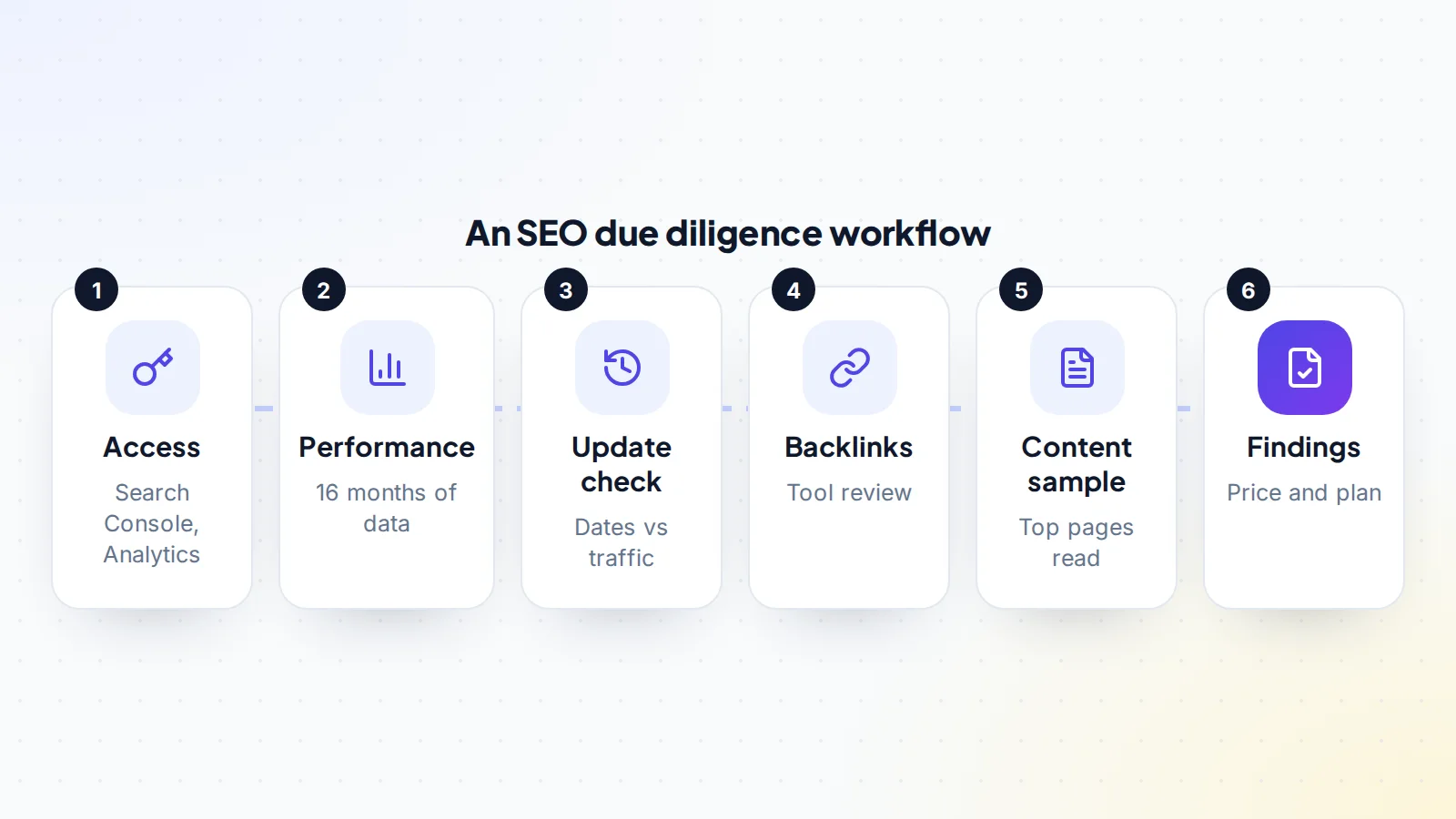
Turning findings into a price
Write down each finding with evidence: a screenshot, a date, a page. Then decide what each one means. Some findings are deal-breakers, such as an unresolved manual action or a heavy reliance on paid links. Others lower the price, such as high concentration, a recent unexplained drop or a backlog of technical fixes. Others are opportunities, such as outdated pages you could refresh. Many buyers summarise this in a short report; our guide to the business valuation report shows how findings feed into value.
Plan the SEO handover
Search traffic depends on a few accounts and settings that must move cleanly. At closing, the buyer should verify ownership of the site in Search Console, for example through DNS once the domain is theirs, and the seller’s access should be removed. Google Analytics can be handed over by moving the property or making the buyer an Administrator. Keep the site on the same domain and URLs during the handover; avoid redesigns or migrations until you’ve seen a few months of steady traffic under your ownership.
Ask for any SEO tools, keyword research and content plans the seller used, and a list of pages they were working on. These save you weeks of getting up to speed.
Common mistakes
- Relying on traffic screenshots instead of direct access.
- Looking only at the last few months instead of the full history.
- Counting backlinks without checking where they come from.
- Ignoring how much income rests on one or two pages.
- Making big site changes straight after the purchase.
A worked example
The details below are made up to show the method.
Noor is buying a travel gear review site earning $3,000 a month. With restricted access to Search Console, Noor sees clicks growing steadily over 16 months, no manual actions and no security issues. Laying the clicks alongside Google’s update list shows a small dip after one core update, recovered within a few months.
A backlink tool shows links from travel blogs and gear forums, plus a cluster of links from unrelated sites. The seller explains these came from an old directory campaign. Noor reads the top 15 pages and finds most are helpful, but four have outdated prices. Concentration analysis shows the top page brings 30% of income.
Noor records each finding, proposes a price that reflects the concentration and the cost of updating content, and agrees terms with the seller. The plan for the first three months: refresh the outdated pages and build more articles around the strongest topics.
SEO due diligence: the checklist
- Read-only access to Search Console and Analytics.
- 16 months of clicks, queries, pages and countries reviewed.
- Manual actions and security issues reports checked.
- Traffic compared with Google’s ranking update dates.
- Backlinks reviewed for quality and relevance.
- Top pages read for helpfulness and accuracy.
- Indexing, page experience and crawl issues noted.
- Concentration of clicks and income measured.
- Seller’s answers on links and content recorded in writing.
Looking for a site to review? Browse websites for sale, or read how it works on digiflippers.com.
Ready to find your next asset?
Browse listings with verified numbers, ask sellers your questions before you offer, and agree every step in a free Deal Room.
Frequently asked questions
What is SEO due diligence?
A review of a website’s search traffic and the factors behind it, such as search performance, manual actions, update history, backlinks, content and technical health, before you buy.
What access should I ask for?
Restricted user access in Search Console and Viewer access in Google Analytics, so you can explore the data yourself.
How far back should I look?
Search Console’s Performance report covers up to 16 months. Use all of it, plus longer history from Analytics if available.
Is a traffic drop after an update a deal-breaker?
Not always. Google says core updates aren’t aimed at specific sites. Look at why the drop happened, whether it recovered, and price the risk.
How do I check backlinks?
Use a backlink tool to see linking sites and pages, focus on quality and relevance, and ask the seller in writing about any paid or exchanged links.
What is concentration risk?
The share of traffic or income from a few pages. High concentration means losing one ranking could cut the site’s value sharply.
Can SEO due diligence guarantee future traffic?
No. It shows how the site has performed and where the risks are, so you can buy at a price that reflects them.