
How to Sell a Mobile App (iOS and Android)
A seller's guide to mobile apps: preparing revenue and user data, pricing, packaging code and backend, handling buyer due diligence and the App Store and Google Play transfer processes.
Selling an app is different from selling a website. Your revenue sits inside App Store Connect and the Google Play Console, the product depends on code and backend services only you fully understand, and the app itself has to move through Apple’s and Google’s official transfer processes. Sellers who prepare well sell faster and argue less about price. This guide explains how to sell a mobile app on iOS and Android: what to prepare, how to price it, what buyers will check and how the transfer works.
If you’re selling web software rather than an app, see our guide to selling a SaaS business. To see the deal from the other side, read our guide to buying a mobile app.
Key takeaways
- Buyers will want to see proceeds, users and reviews live in the store consoles.
- Check Apple’s and Google’s transfer criteria before you list, not at closing.
- Package the code, build steps, backend and third-party services so they can move.
- Price on verified profit and its trend, adjusted for platform and technical risk.
- Start the store transfer only once the buyer’s payment is held.
Why people sell apps
Developers sell apps for many good reasons. Some built several apps and want to focus on the one that grows fastest. Some started a new job or business and no longer have time for updates, reviews and support. Others built an app to a level they’re happy with and would rather take a lump sum now than keep running it. For a buyer, an existing app with downloads, ratings and paying users is often worth more than a fresh start, because discovery in the stores is slow and expensive. That gap is what makes apps saleable.
If you plan to sell a mobile app, knowing your reason helps you plan the sale. If you want a quick exit, prepare everything up front and price realistically. If you can wait for the right buyer, you can hold out for a better offer and spend a few months improving the numbers first.
What buyers look for
Buyers of apps usually want some mix of four things: steady revenue they can verify, an active user base that keeps coming back, a codebase they or their developers can maintain, and room to grow. An app with modest revenue but strong retention and clear growth ideas can attract more interest than one with higher revenue that’s falling. Strategic buyers, such as a company with a related app or product, may also value your users, your store position or your technology for their own plans.
The type of app matters too. Subscription apps are often valued on recurring revenue and churn. Ad-supported apps are valued on active users and ad revenue per user. Paid apps and apps with one-off in-app purchases depend more on a steady flow of new downloads. Be ready to explain which model you use and why it works.
Prepare your store data
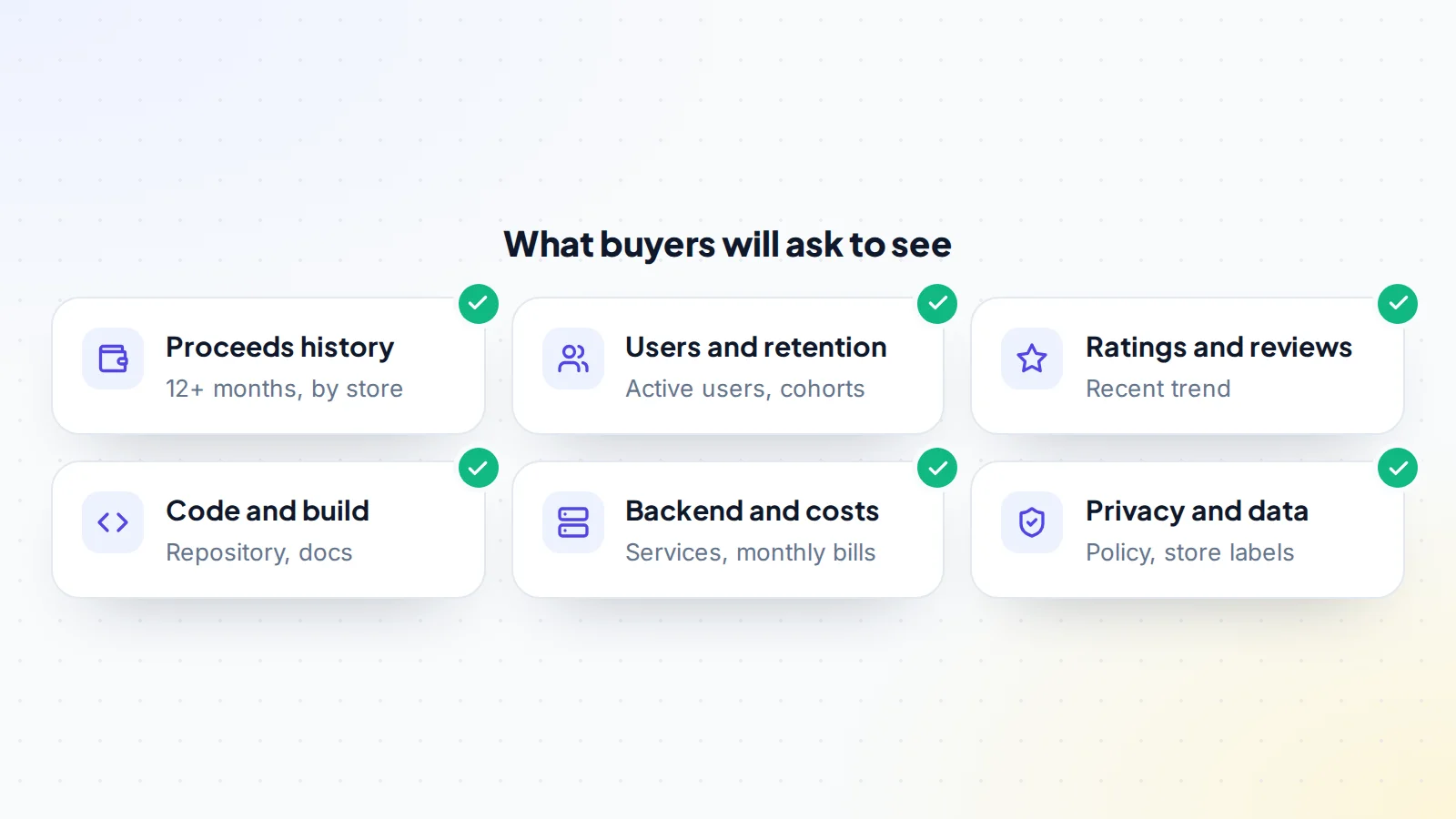
Before you list, gather the numbers buyers will check. Everything should be ready to show live on a screen-share, because screenshots alone won’t convince a careful buyer.
- Proceeds: at least 12 months of monthly proceeds from App Store Connect and the Play Console, after the store’s commission, with matching payout reports.
- Users: downloads, daily and monthly active users, and retention after day 1, day 7 and day 30 if your analytics tool tracks them.
- Subscriptions: active subscribers, trial conversion, renewal rates and churn by month.
- Ratings and reviews: the average rating and the recent trend, plus how you handle complaints.
- Acquisition: where new users come from, such as search in the store, paid ads, referrals or a website.
If you pay for ads to win installs, show the spend and the results. Buyers need to know how much of your growth depends on paid acquisition, because that cost moves with the app.
Package the code and backend
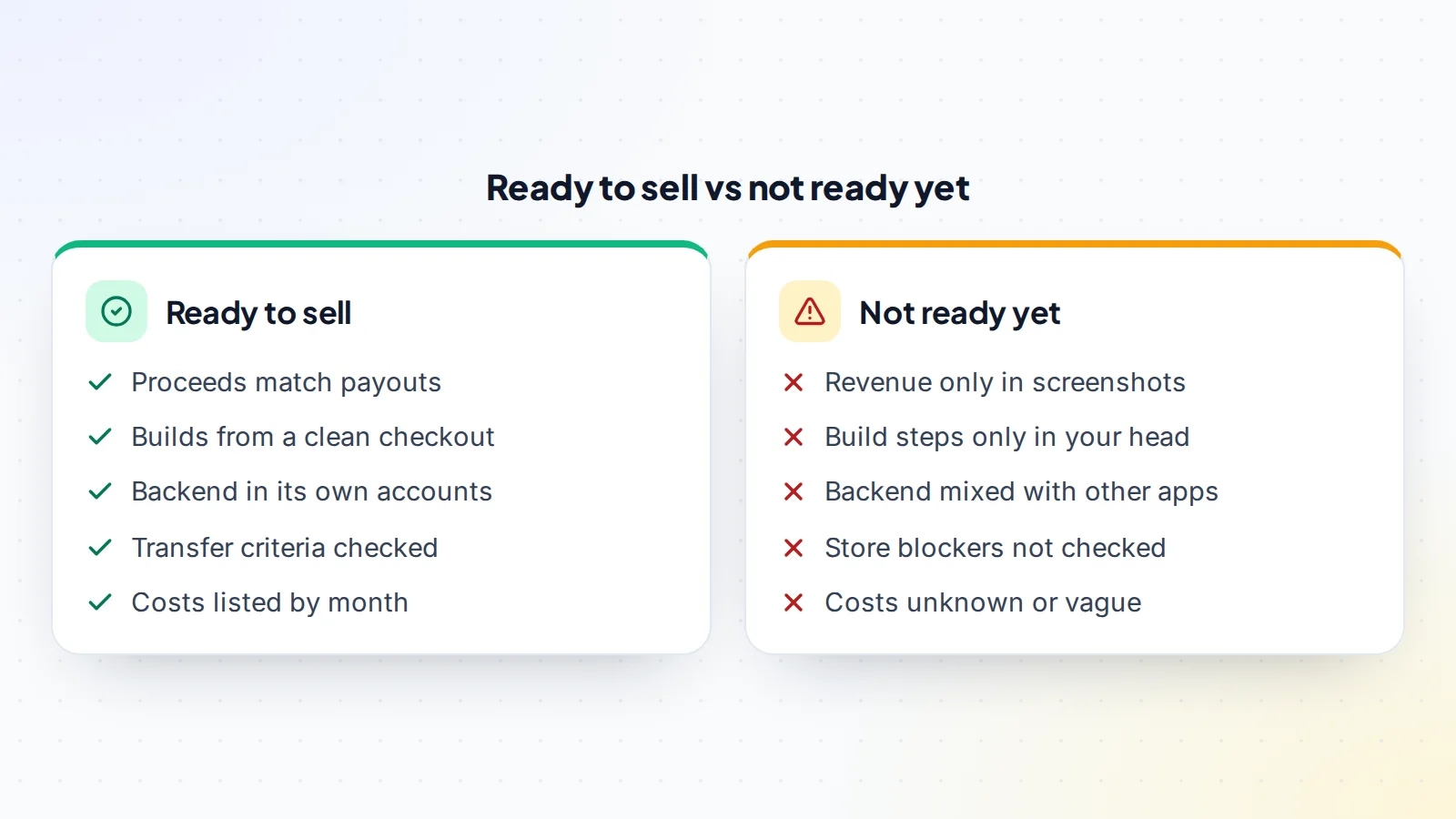
A buyer is paying for a product that must keep working without you. Make sure the full source code is in a repository you can transfer, and write down how to build and release the app from a clean checkout. Then list everything the app depends on:
- Backend servers, databases and cloud accounts.
- Push notification, analytics, crash reporting and authentication services.
- Ad networks, payment and subscription tools.
- API keys, signing details and any licences for paid libraries or assets.
- The app’s website, support email, domain and social accounts.
If the backend shares accounts with your other projects, separate it now. Moving one app’s services out of a shared account during closing is slow and risky. A short handover document covering the build, release, backend and recurring tasks makes your app easier to sell and easier to run.
Check the transfer criteria early
Both stores have official ways to move an app to another developer account, and both set conditions. Apple’s transfer overview says ratings and reviews stay with the app. Its criteria include that the app must have at least one version released, and that apps in certain states, such as those available for pre-order, can’t be transferred. Apple also notes that the recipient needs details such as your app’s shared secret if it uses auto-renewable subscriptions, and that in-app purchase product IDs must not clash with products in the recipient’s account.
Google’s Play Console help explains how to transfer apps to a different developer account. Both the original and target accounts must be registered and active. Users, ratings and reviews move with the app, while some records, such as past payout reports, stay with the original account. If the app is paid or sells in-app products, the receiving account needs a payments profile.
Read both stores’ current criteria before you list, because rules change. A blocker found at closing can delay the deal by weeks. Our guide to app store transfers walks through each process step by step.
How to price a mobile app
Most apps are priced as a multiple of their monthly or annual net profit, after store commissions and running costs. Start with your average profit over the last 12 months, then think about what moves the multiple up or down:
- Trend: rising profit supports a higher multiple, falling profit a lower one.
- Revenue model: recurring subscription revenue is often valued more highly than one-off purchases.
- Retention: users who stay make future revenue more predictable.
- Dependence: heavy reliance on paid ads, one feature or one country adds risk.
- Technical state: outdated libraries, crashes or a hard-to-build codebase lower the price.
- Owner time: the hours you spend each month on support and updates become the buyer’s cost.
Our guide to pricing a business listing explains how to set an asking price buyers take seriously. For a quick starting range, try the free valuation tool.
iOS, Android or both
Many apps exist on both stores, and buyers usually want both versions together. Each store transfer is separate, with its own criteria and timing, so plan for two transfers rather than one. If one platform earns far more than the other, show the split clearly. Some sellers choose to sell only one version, but this can confuse users and split reviews, so think it through and write the decision into the listing.
If your app shares a backend across platforms, it should move as one piece. If you use a cross-platform framework, say so: buyers with matching skills may see that as a plus.
Write a strong listing
When you sell a mobile app, a good listing answers the questions buyers would otherwise ask in messages. Describe what the app does and who uses it, the revenue model, 12 months of proceeds and profit, active users and retention, ratings, the technology stack, running costs, the time it takes you each month and why you’re selling. Mention both platforms and any transfer conditions you’ve already checked.
Be clear about weaknesses as well. A crash spike after a recent update, a dependency on one ad network or a library that needs upgrading are all fine to mention. Buyers will find them anyway, and sellers who disclose early are trusted more. When you’re ready, list your app on digiflippers.com with 0% success fee up to $10,000, then 5% (max $5,000).
Screen buyers before sharing details
Share the headline numbers publicly, but keep deeper details for serious buyers. Before you open App Store Connect or your repository on a call, ask about the buyer’s plans, experience and budget, and ask for a signed non-disclosure agreement if you’ll share code or user data. Never hand over login details. Show your consoles on a screen-share, or give limited read-only access where a service allows it, and keep your own sign-in protected with two-factor authentication.
Support the buyer’s due diligence
Expect a careful buyer to ask to see revenue live in both consoles, to match proceeds to payout reports and bank deposits, to review crash rates and recent reviews, and to have a developer look through the code. They may also ask about privacy: what data the app collects, what your privacy policy says, and whether the store privacy details match what the app actually does.
Answer quickly and consistently. Keep the same numbers in your listing, your data room and your calls. Our guide to the due diligence timeline explains how long each stage usually takes, so you can plan your time and the buyer’s.
Users, data and privacy
An app sale usually includes user accounts and data stored in your backend. Your privacy policy should describe what you collect and how it’s used, and the sale shouldn’t use data in ways users weren’t told about. Where privacy laws apply, a buyer may ask how you meet them. Keep the data secure during the handover: move databases directly between accounts rather than sending exports by email or chat, and remove your own access once the move is done.
Agree the deal and protect the payment
Once you have an offer you like, agree the price, what’s included, the closing date and any support period in writing. List every part of the transfer: both store transfers, the repository, backend accounts, domains, email, social accounts and third-party services. Then agree how the buyer pays. On digiflippers.com, the ways to pay in a deal are: directly to the seller, through escrow, and the platform never holds the money itself.
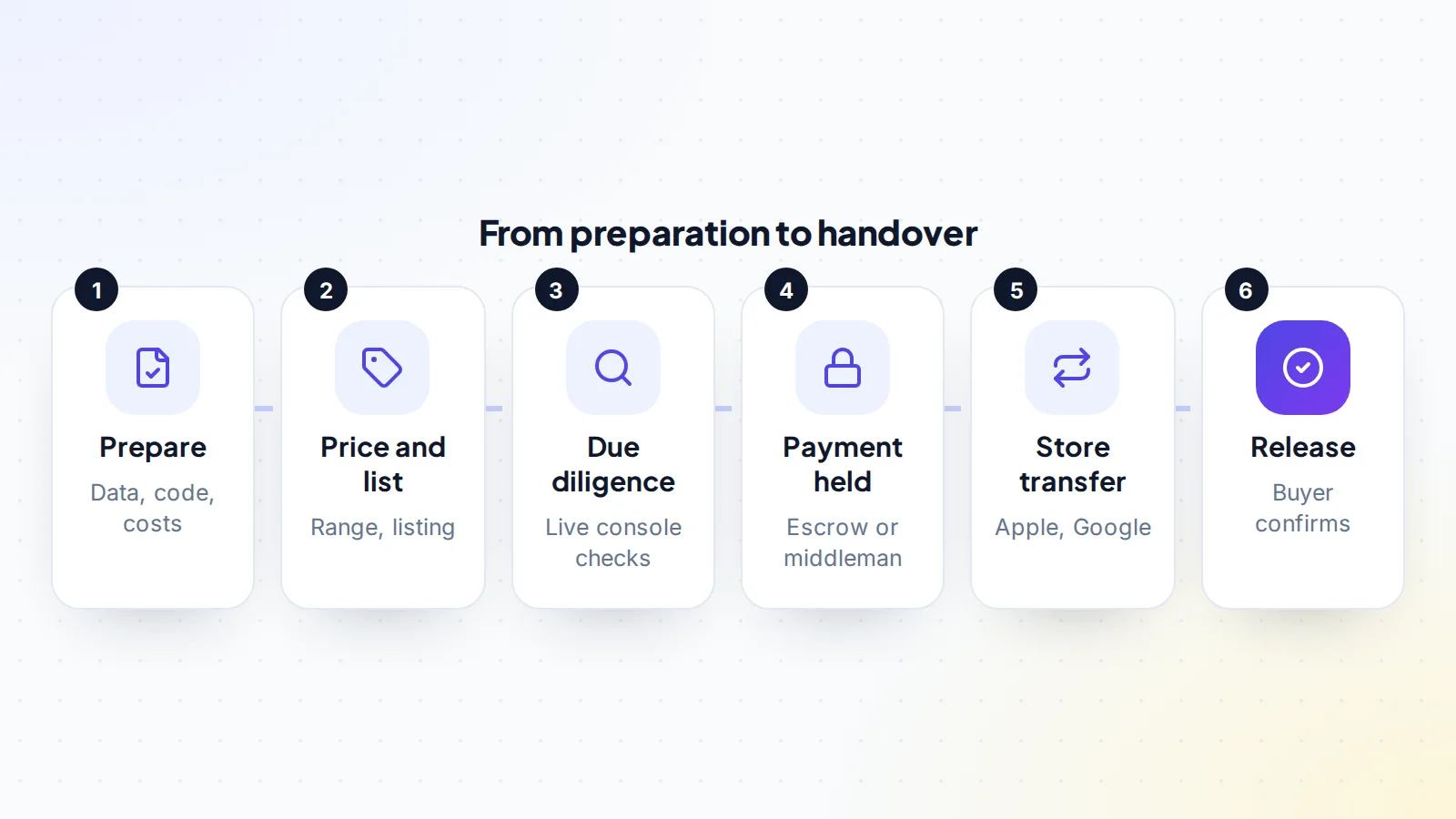
Start the store transfers only after the payment is held. Once you initiate a transfer and the buyer accepts it, the app is theirs, so the order matters.
Carry out the transfer
With the payment held, work through the transfer plan item by item:
- Start the Apple transfer in App Store Connect, with the recipient’s account details the process asks for.
- Start the Google transfer through the Play Console, following its current steps.
- Move the repository, backend accounts and third-party services.
- Hand over domains, email, support inboxes and social accounts.
- Give the buyer any signing details, keys and licences listed in the agreement.
- Help the buyer release an update from their own accounts to confirm everything works.
Keep a written record of each step and confirm it with the buyer as you go. When the buyer confirms everything has arrived, the payment is released.
A worked example
The details below are made up to show the method.
Mia built a recipe app with a monthly subscription, on both iOS and Android. It averages $2,400 a month in proceeds after store commission, with about $350 a month in backend and tool costs, leaving roughly $2,050 a month in profit. Retention is steady, ratings average 4.6, and Mia spends about five hours a month on updates and support.
Before listing, Mia moves the backend into its own cloud account, writes build and release notes, and checks both stores’ transfer criteria. One in-app purchase product ID uses a generic name that could clash with a buyer’s account, so Mia notes it in the listing. Mia lists the app with 12 months of proceeds and a short video of the consoles.
A buyer with two similar apps makes an offer after a live console review and a code check by their developer. They agree terms, the buyer’s payment goes into escrow, and Mia starts both store transfers. The buyer releases a small update from their own accounts, confirms everything works, and the funds are released. The whole process takes about five weeks.
Common mistakes to avoid
- Listing before checking the store transfer criteria.
- Showing revenue only in screenshots.
- Leaving the backend in shared accounts with other projects.
- Forgetting third-party services, such as push notifications or analytics.
- Sharing passwords instead of using screen-shares and proper transfers.
- Starting a store transfer before the payment is held.
After the sale
Agree a short support period in advance, such as a few weeks of answering questions, and keep to it. Once the buyer confirms the handover, remove your own access from backend accounts and services, and update anything that still lists your details. If you build similar apps, check the agreement for any limits on competing products, and respect them.
If you sell other software products too, our guide to browser extensions for sale covers a similar handover for extensions.
Sell a mobile app: the checklist
- 12+ months of proceeds ready to show live, matched to payouts.
- Users, retention, ratings and acquisition data gathered.
- Code in a transferable repository, with build and release notes.
- Backend and third-party services in their own accounts.
- Apple and Google transfer criteria checked.
- Privacy policy and store privacy details reviewed.
- Price based on verified profit, trend and risk.
- Listing written with strengths and weaknesses.
- Transfer plan agreed in writing.
- Store transfers started only after the payment is held.
Ready to sell?
List it on digiflippers.com with verified numbers, answer buyers in one place and agree every step in a free Deal Room. 0% success fee up to $10,000, then 5% (max $5,000).
Frequently asked questions
Can I sell my app to another developer?
Yes. Apple and Google both have official processes to transfer an app from one developer account to another, as long as the app meets their criteria.
Do ratings and reviews transfer with the app?
Yes. Both stores say ratings and reviews stay with the app when it moves to a new account.
How much is my app worth?
Apps are usually priced as a multiple of net profit, adjusted for trend, revenue model, retention, technical state and owner time. A valuation tool gives a quick starting range.
Do I need to sell both the iOS and Android versions?
Not necessarily, but buyers usually prefer both together. Each store transfer is separate, with its own criteria.
How do I prove my revenue?
Show proceeds live in App Store Connect and the Play Console on a screen-share, and match them to payout reports and bank deposits.
What about subscriptions?
For auto-renewable subscriptions, Apple says the recipient should get the app-specific shared secret, so subscription checks keep working after the transfer.
When should I start the store transfer?
Only after the buyer’s payment is held through escrow or a middleman. Once the buyer accepts a transfer, the app is in their account.
Are there fees for selling?
On digiflippers.com, it’s 0% success fee up to $10,000, then 5% (max $5,000). Escrow or middleman fees, if used, are separate.
