
How App Transfers Work on the App Store and Google Play
A step-by-step explainer of App Store and Google Play app transfers: roles and details each store asks for, the 60-day Apple window, Google's transaction IDs, what moves with the app and how to fit it into a deal.
Selling or buying a mobile app means moving it from one developer account to another. Apple and Google both have official processes for this, and both are well documented, but they ask for different details, set different conditions and leave different things behind. Knowing how an app store transfer works before you agree a deal saves weeks of delay at closing. This guide explains both processes, what moves with the app, what doesn’t, and how to fit the transfer into a sale safely.
For the full selling process, see our guide to selling a mobile app. Buyers can read our guide to buying a SaaS business for the checks that apply to software in general.
Key takeaways
- Apple and Google both let you transfer an app to another developer account.
- On Apple, the Account Holder starts the transfer and the recipient has 60 days to accept.
- On Google Play, both accounts must be active and you’ll need registration transaction IDs.
- Ratings and reviews move with the app; payout and earnings reports don’t.
- In a sale, start the transfer only after the buyer’s payment is held.
What is an app store transfer?
An app store transfer moves an app’s listing, and the history attached to it, from one developer account to another. It’s different from simply handing over source code. Without a transfer, a buyer could publish the code as a new app, but it would start with no downloads, no ratings and no position in search. With a transfer, the app keeps its identity in the store, and existing users keep receiving updates as normal.
That’s why the transfer is usually the most important step in an app sale. It’s also why buyers and sellers should understand it early: each store has conditions that must be met, and a single missing detail can hold up an otherwise finished deal.
How Apple app transfers work
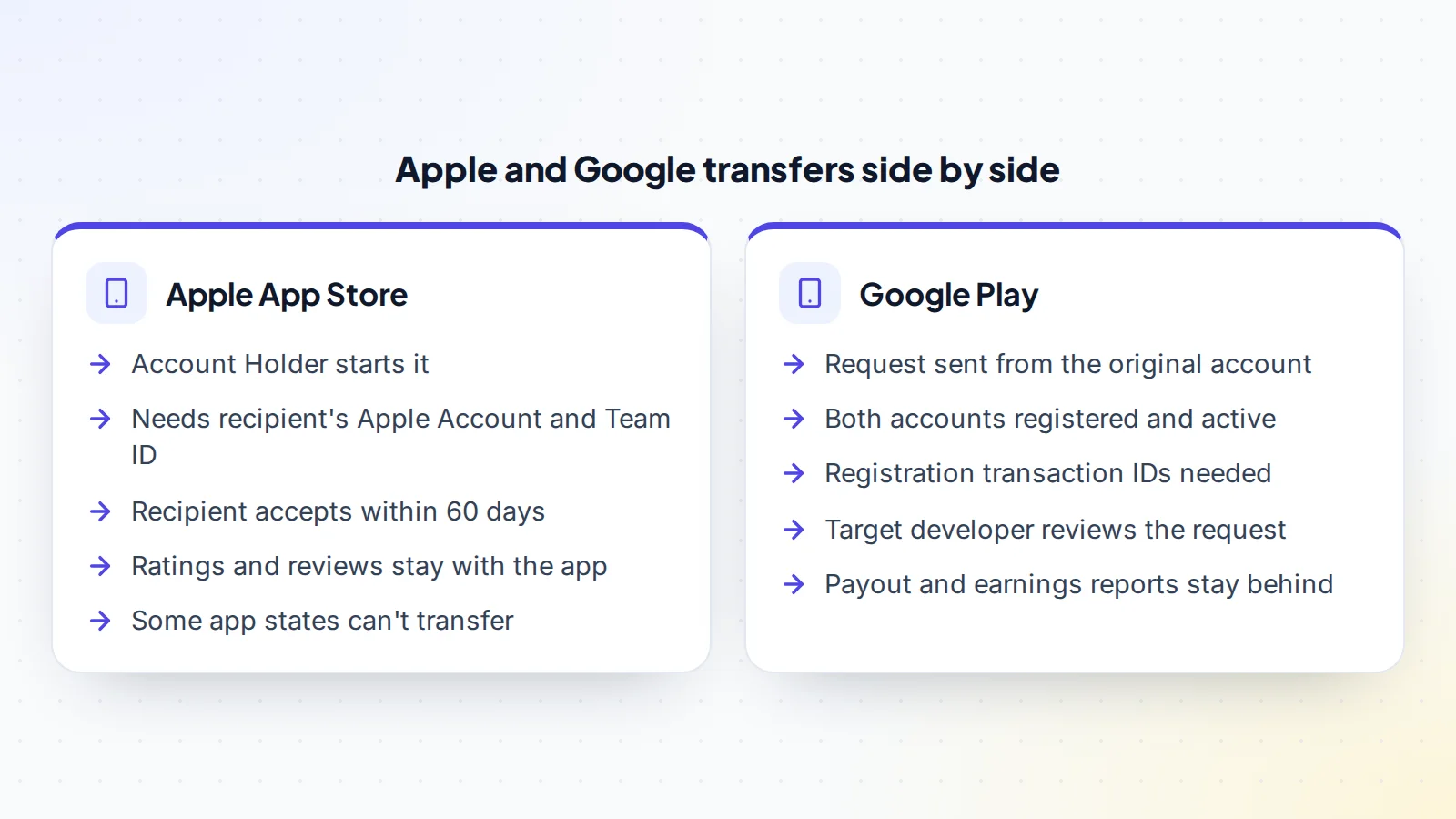
Apple handles transfers in App Store Connect. The process has two sides: the current owner initiates the transfer, and the recipient accepts it.
- Who starts it: the Account Holder of the current developer account.
- What they need: the Apple Account of the recipient’s Account Holder and the recipient’s Team ID.
- While it’s pending: the app stays in its previous status with a pending transfer status added.
- Accepting: the recipient’s Account Holder accepts within 60 days, or the transfer expires.
- On acceptance: the recipient enters new details such as the support URL, marketing URL and privacy policy URL, and chooses who on their team can access the app.
When the transfer completes, both Account Holders are notified and the app no longer appears in the original account. Apple’s overview says ratings and reviews stay with the app.
Apple’s transfer criteria
Apple lists criteria an app must meet before it can be transferred. These include that the app must have at least one version that has been released on the App Store, and that it isn’t in certain states, such as being available for pre-order. Some kinds of apps, such as those in Apple Arcade, can’t be transferred.
Apple also covers in-app purchases and subscriptions. In-app purchase product IDs must not clash with products in the recipient’s account, so a buyer with several apps should check this early. For apps with auto-renewable subscriptions, Apple says the recipient should get the app-specific shared secret before accepting, so subscription receipt checks keep working. Read Apple’s full criteria page before you list or make an offer, because the list is longer than this summary and changes over time.
How Google Play app transfers work
Google’s Play Console help explains how to transfer apps to a different developer account. The main steps are:
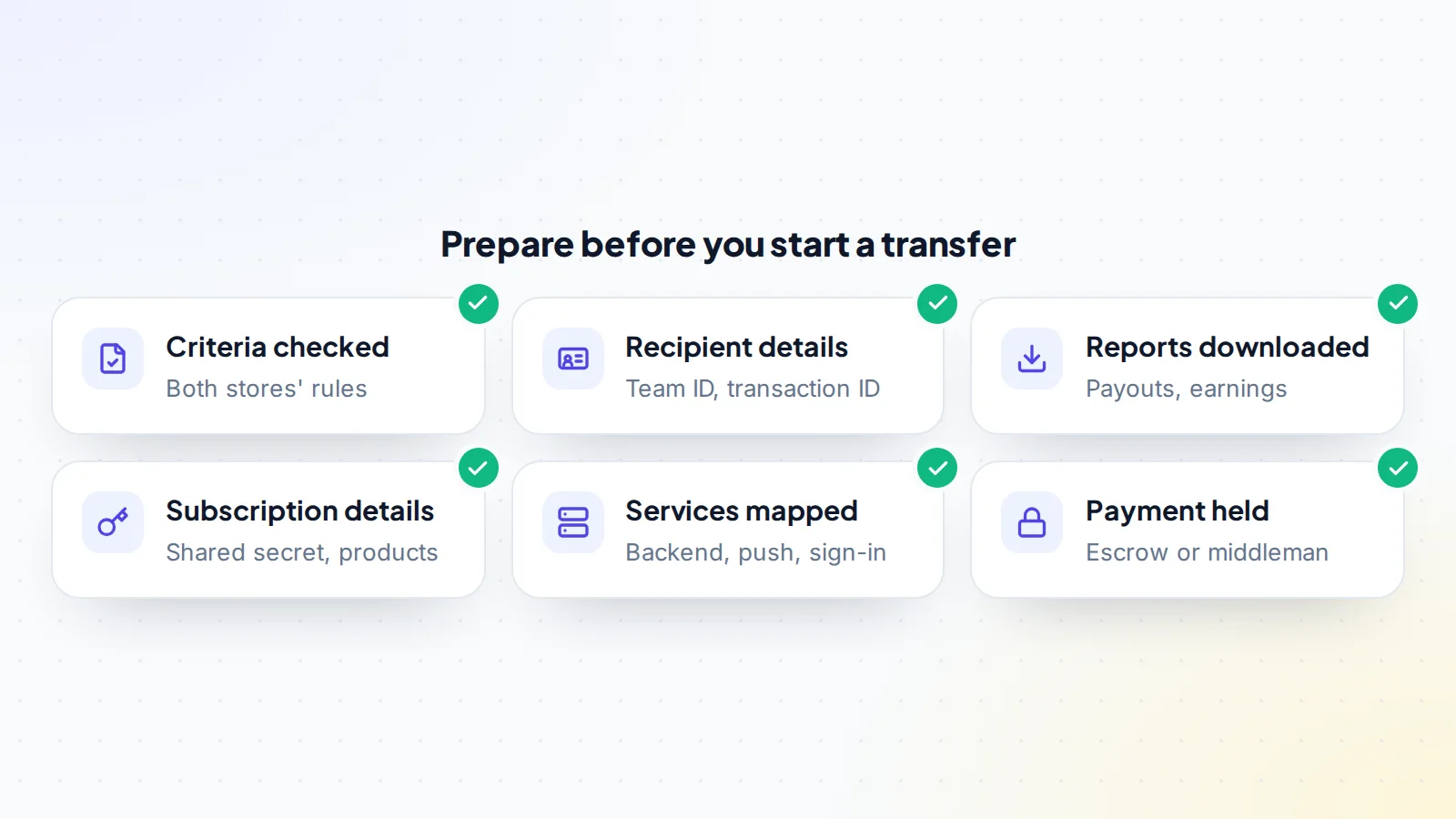
- Review Google’s policy guidelines and the service fee tier for the apps. The original account and the apps being transferred must comply with Google’s policies.
- Download any reports you’ll need later. Bulk export reports, payout reports and earnings reports don’t move with the app.
- Make sure both developer accounts, the original and the target, are registered and active.
- Find the registration transaction IDs for both accounts. Google suggests searching the account owner’s inbox for the developer registration fee receipt, or looking in Google Payments.
- Submit the transfer request. The target developer reviews and approves it, and Google says its support team reviews and replies to transfer requests within two business days.
Google says users, ratings and reviews move with the app. If the app is paid or sells in-app products, the target account needs a payments profile. As with Apple, check Google’s current page before you start: the steps and menu names do change.
What moves, and what stays behind
Across both stores, the app’s listing, its users, ratings and reviews move with the transfer. That’s the core of what a buyer is paying for. Some things don’t move:
- Reports: Google says payout and earnings reports stay behind, so the seller should download them first and share them in due diligence.
- Backend services: servers, databases and cloud accounts sit outside the store and need their own handover.
- Third-party tools: analytics, crash reporting, push notifications, ad networks and sign-in providers usually need moving or reconnecting.
- Code and signing: the repository, build setup and any keys the app needs are handed over separately.
Mapping these before the transfer prevents the most common post-sale problem: an app that has moved in the store but stops working because a service still points at the old owner.
Apps on both iOS and Android
Many apps are on both stores. Each app store transfer is separate, with its own details and timing, so plan two transfers. It helps to start both on the same day once the payment is held, so the buyer takes over both versions together and users don’t see two different owners for long. If the platforms share a backend, move it once, at a time that suits both transfers.
Subscriptions and in-app purchases
Subscriptions are often the most valuable part of an app, so treat them carefully. List every product ID and price, and check for clashes with the buyer’s existing apps. Make sure the buyer has what they need to verify purchases after the move, such as Apple’s shared secret, and that any subscription management tool the app uses is moved or reconnected. Watch renewals closely for the first month after the transfer, and agree in advance who handles refunds or support requests about purchases made before the sale.
Developer accounts: set them up early
A transfer can only go to an account that exists and is ready. On Apple, that means an Apple Developer Program membership with an Account Holder who can accept the transfer. On Google Play, it means a registered, active developer account, with a payments profile if the app is paid or sells in-app products. Both stores ask developers to verify details about themselves, and new accounts can take time to set up and approve.
Buyers who don’t yet have accounts should start the setup as soon as they’re serious about a deal, ideally during due diligence. It costs little to start early and can save days at closing. Sellers can help by asking about the buyer’s accounts before the deal is signed.
Questions to settle before the transfer
- Which apps, on which stores, are included, and are both platforms part of the deal?
- Which account details will the buyer provide, and by when?
- Who handles user support and refunds for purchases made before the transfer?
- Which third-party services move, and which will the buyer replace?
- What counts as a completed handover for releasing the payment?
Writing the answers into the agreement keeps both sides aligned and makes the last week of the deal calm rather than rushed.
Fitting the transfer into a sale
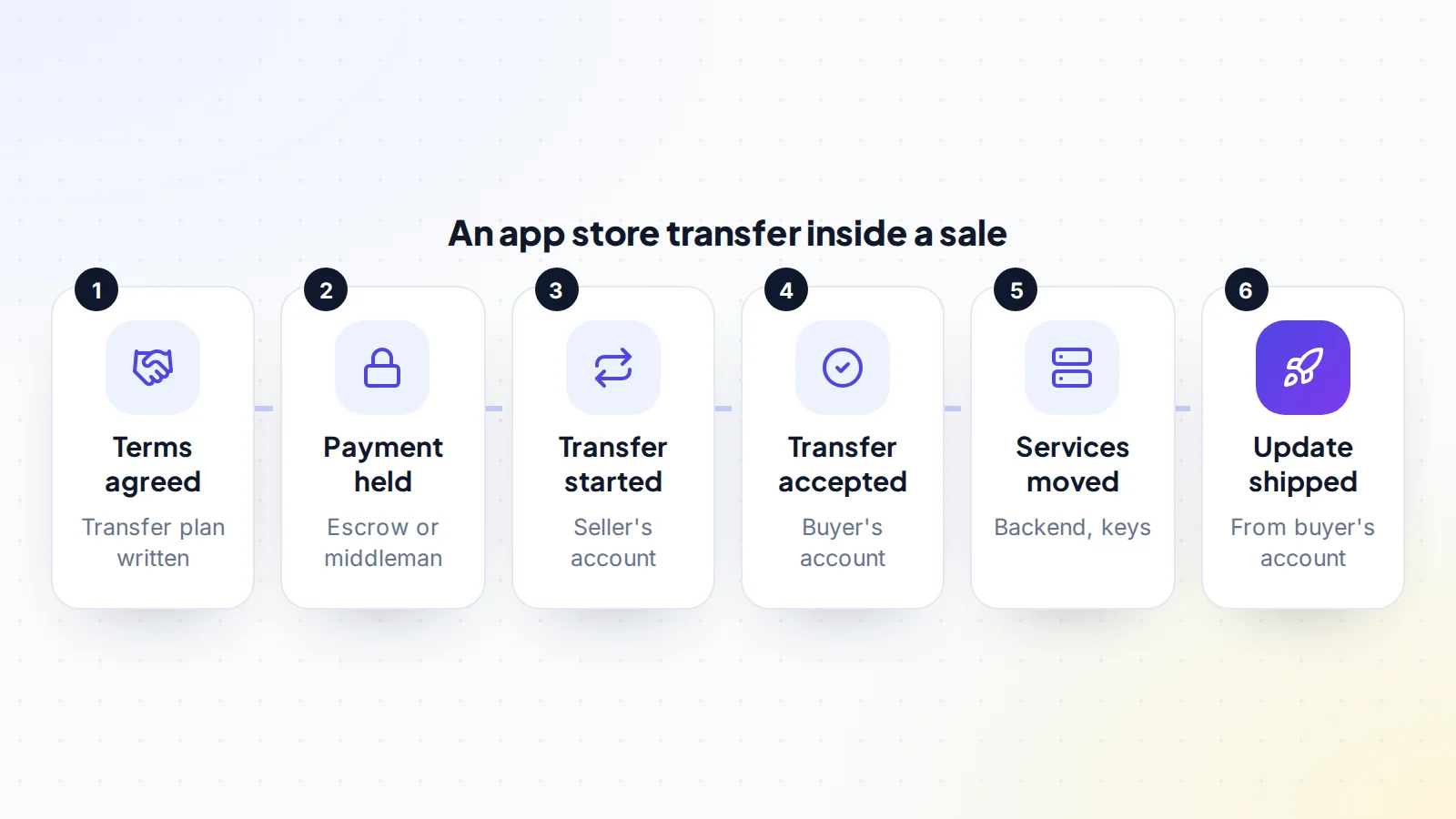
In a sale, timing matters as much as the process. Once the buyer accepts an app store transfer, the app is in their account. So the order should be:
- Agree the price and terms, including a written transfer plan.
- Have the buyer’s payment held through escrow or a middleman.
- Start the transfers from the seller’s account.
- The buyer accepts the transfers in their account.
- Move the backend, code and services.
- The buyer releases an update from their own account, then the payment is released.
On digiflippers.com, the ways to pay in a deal are: directly to the seller, through escrow, and the platform never holds the money itself. You can read how it works before you start.
What usually causes delays
Most delays come from preparation rather than the stores themselves:
- The app doesn’t meet a criterion, such as being in a state that can’t transfer.
- The buyer’s developer account isn’t set up, active or verified yet.
- The recipient’s Team ID or transaction ID is wrong or missing.
- In-app purchase product IDs clash with the buyer’s existing products.
- Agreements in one of the developer accounts need accepting first.
Buyers should set up and check their developer accounts during due diligence, not at closing. Sellers should read both stores’ criteria before they list.
After the transfer
Once the app is in the buyer’s account, update the store listing details, support email and privacy policy to the buyer’s. Release a small update from the new account to prove the build and release process works. Keep an eye on crash reports, reviews and subscription renewals for the first few weeks. The seller should remove their own access from backend services once the buyer confirms everything works, and both sides should keep a record of what was transferred and when.
Buying or selling other software? Our guides to browser extensions and WordPress plugin businesses cover similar handovers.
A worked example
The details below are made up to show the method.
Jordan is buying a language-learning app on both iOS and Android, with a monthly subscription. During due diligence, Jordan sets up an Apple developer account and a Google Play developer account and checks both are active. The seller confirms the iOS app has released versions and isn’t in a state that blocks a transfer, and Jordan checks that none of the app’s product IDs clash with Jordan’s own.
The seller downloads two years of Google payout and earnings reports and shares them in the data room. Jordan sends the Team ID and Account Holder Apple Account, plus the Google registration transaction ID. The seller shares the subscription shared secret.
With the payment held in escrow, the seller initiates the Apple transfer and submits the Google request on the same morning. Jordan accepts the Apple transfer that afternoon, and the Google transfer is approved within two business days. The backend and repository move the same week, Jordan ships a small update from the new accounts, and the escrow funds are released.
App store transfer: the checklist
- Apple and Google criteria read and checked against the app.
- Buyer’s developer accounts set up, active and verified.
- Recipient’s Apple Account and Team ID collected.
- Google registration transaction IDs for both accounts found.
- Payout and earnings reports downloaded.
- Product IDs checked for clashes; shared secret ready.
- Backend, code and third-party services mapped.
- Payment held before any transfer starts.
- Update released from the buyer’s account before funds are released.
Looking for apps? Browse apps and SaaS for sale, or list your app with 0% success fee up to $10,000, then 5% (max $5,000).
Ready to find your next asset?
Browse listings with verified numbers, ask sellers your questions before you offer, and agree every step in a free Deal Room.
Frequently asked questions
Can I transfer an app to another developer account?
Yes. Apple and Google both have official processes, as long as the app meets each store’s criteria.
Who can start an Apple app transfer?
The Account Holder of the current developer account, using the recipient Account Holder’s Apple Account and Team ID.
How long does the recipient have to accept on Apple?
Apple says the transfer must be accepted within 60 days, or it expires.
How long does a Google Play transfer take?
Google says its support team reviews and replies to transfer requests within two business days, after the target developer has reviewed it.
Do ratings and reviews transfer?
Yes. Both stores say ratings and reviews stay with the app.
What doesn’t transfer?
Google says payout, earnings and bulk export reports stay behind. Backend services, code and third-party tools also need their own handover.
When should the transfer start in a sale?
Only after the buyer’s payment is held through escrow or a middleman, because once accepted, the app is in the buyer’s account.
