
How to Transfer Website Hosting After a Sale
A step-by-step guide to moving a website's hosting from seller to buyer: choosing between an account handover and a migration, backups, files and databases, DNS changes and timing, email, SSL, testing, search checks and what to do if something breaks.

After a website sale, the hosting has to move from the seller to the buyer. Done well, visitors notice nothing: pages keep loading, emails keep arriving, and search rankings stay put. Done badly, a site can go offline, lose emails or break its checkout during the switch. This guide explains how to transfer website hosting safely, whether by handing over the hosting account or migrating to new hosting, with the backups, DNS steps, timing and checks that prevent downtime.
For WordPress specifics, read how to transfer a WordPress website. For the wider handover, see how to sell a website.
Key takeaways
- Choose between handing over the hosting account and migrating to new hosting.
- Take full backups of files and database before anything moves.
- Test the site on the new host before changing DNS.
- Plan email separately; it often lives with the hosting or domain.
- Keep the old hosting running until the new setup is confirmed.
Two ways to move hosting
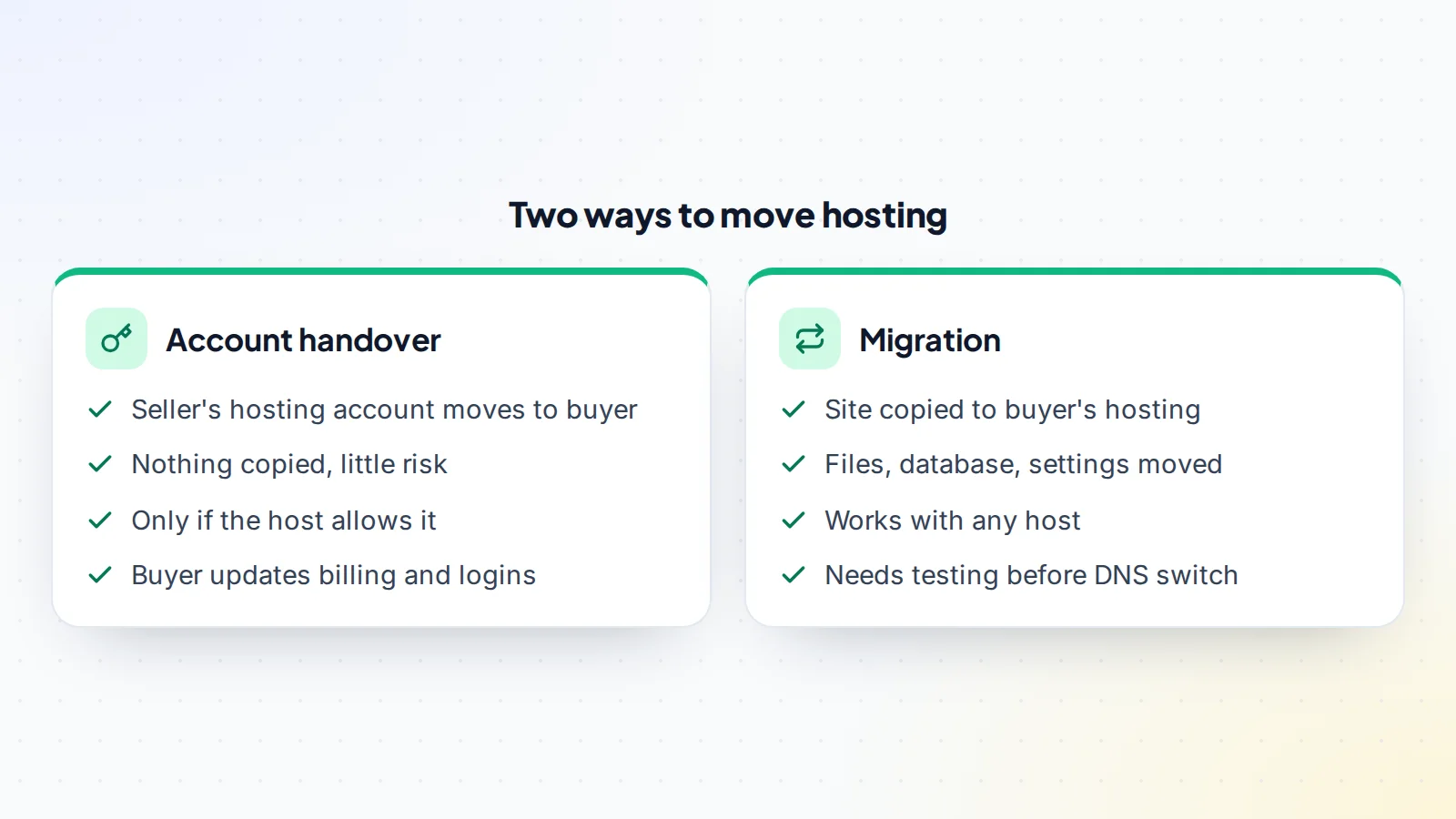
Some hosts let an account, or a single site within an account, be transferred to another person. That’s the simplest route: nothing is copied, so there’s little that can break. If the seller’s hosting is shared with other sites, or the host doesn’t support transfers, the site is migrated: copied to the buyer’s own hosting, tested, then switched over. Agree which route you’ll take before closing, and write it into the handover plan.
When an account handover makes sense
An account handover works well when the hosting account contains only the site being sold, the host allows ownership changes, and the buyer is happy with the host’s service and price. The buyer then updates billing, logins and contact details, and turns on two-step verification. Ask the host’s support how its transfer process works and how long it takes.
When a migration makes sense
Migrate when the seller’s account hosts other sites, the host doesn’t allow transfers, or the buyer prefers their own hosting. Migration gives the buyer a clean account they fully control, with nothing left over from the seller. It needs more care, but it’s routine work for developers and many hosts offer migration help.
Before anything moves
Make a list of everything the site relies on: the domain and its DNS records, hosting, database, email accounts or forwarding, SSL certificates, scheduled tasks, any connected services such as payment processors or email platforms, and content delivery or caching services. Note the software versions the site runs on, so the new hosting can match them. Read the asset transfer checklist.
Take full backups
Before anything changes, take a complete backup of the site’s files and database, and store a copy outside the hosting account. Confirm the backup is complete by checking file counts and database size. Both buyer and seller should keep a copy until the move is confirmed. A good backup turns any mistake into a delay rather than a disaster.
Migrating step by step
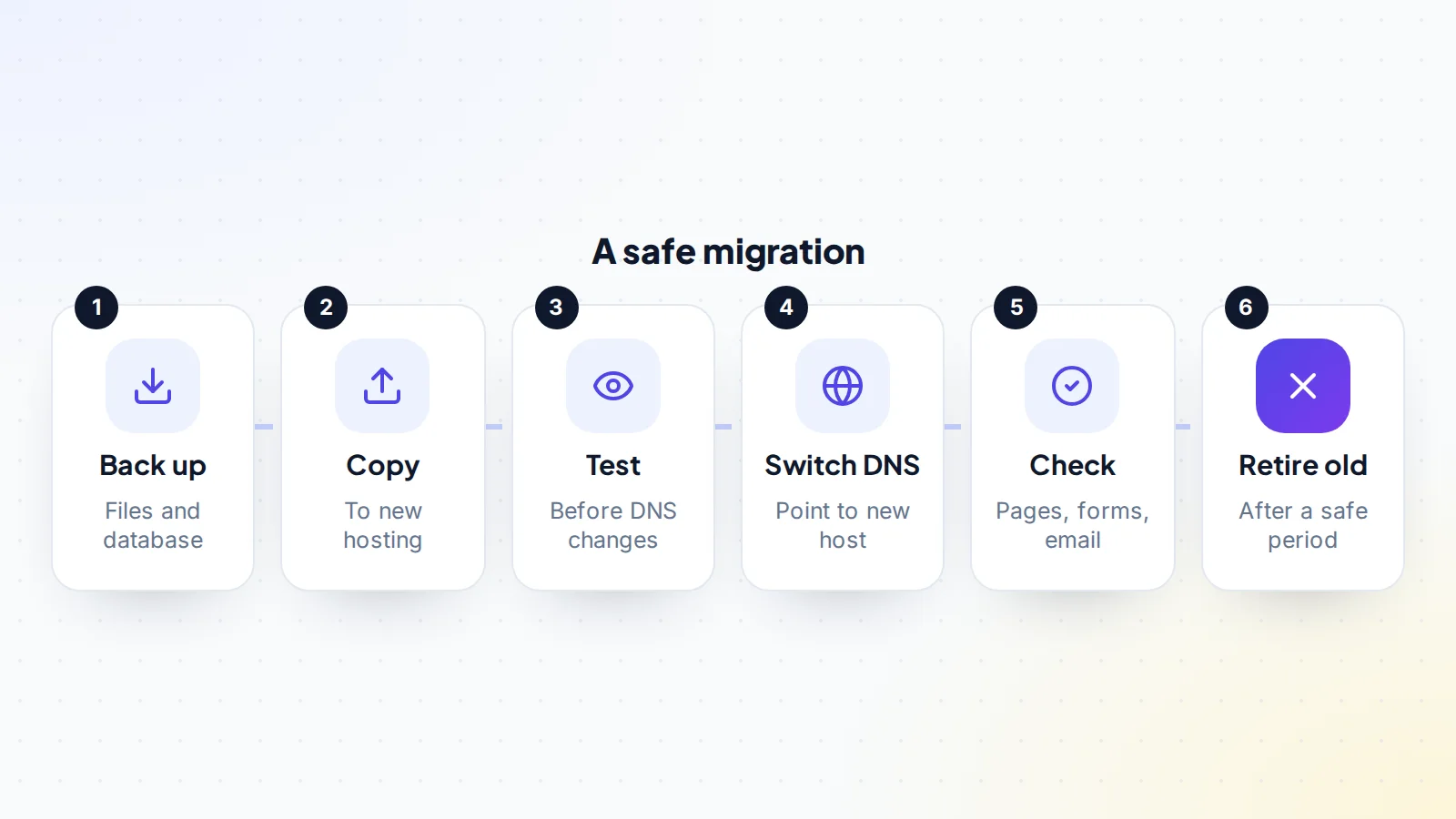
Copy the files and database to the new hosting. Make sure the new server runs compatible software versions. Update any configuration that refers to the old server, such as database names and passwords. For WordPress sites, the official guide to migrating WordPress explains the steps, including what to change if the database details differ.
Test before switching
Before changing DNS, test the site on the new host. Many hosts provide a temporary address, or you can preview it from your own computer by pointing the domain to the new server locally. Check that pages load, images appear, forms submit, logins work and any checkout completes. Fix problems now, while visitors are still seeing the old, working site.
Switching DNS
DNS tells browsers where the site lives. To switch, update the domain’s records (or nameservers) to point to the new hosting. Changes can take time to spread across the internet, so for a while some visitors may reach the old server and some the new. Lowering the records’ time-to-live a day or two before the switch can shorten this window. Make the switch at a quiet time for the site’s audience.
The domain itself
Moving hosting and moving the domain are separate tasks. The domain may already be in the buyer’s registrar account, or it may move at the same time. If it’s moving between registrars, check for transfer locks and plan the order carefully; read the domain transfer lock and the domain transfer process. ICANN’s transfer policy sets the rules for moves between registrars.
Email is the part most often forgotten. If the site’s email accounts live with the hosting, they need their own plan: move mailboxes to the new host or a dedicated email service, update the domain’s mail records, and test sending and receiving. If email runs through a separate provider, check its DNS records survive the switch. Read transferring Google Workspace if the business uses it.
SSL certificates
The site needs a valid certificate on the new host so visitors don’t see security warnings. Many hosts issue free certificates automatically once DNS points to them. Check the certificate is active straight after the switch, and that the site redirects to the secure version of each page.
Checks after the switch
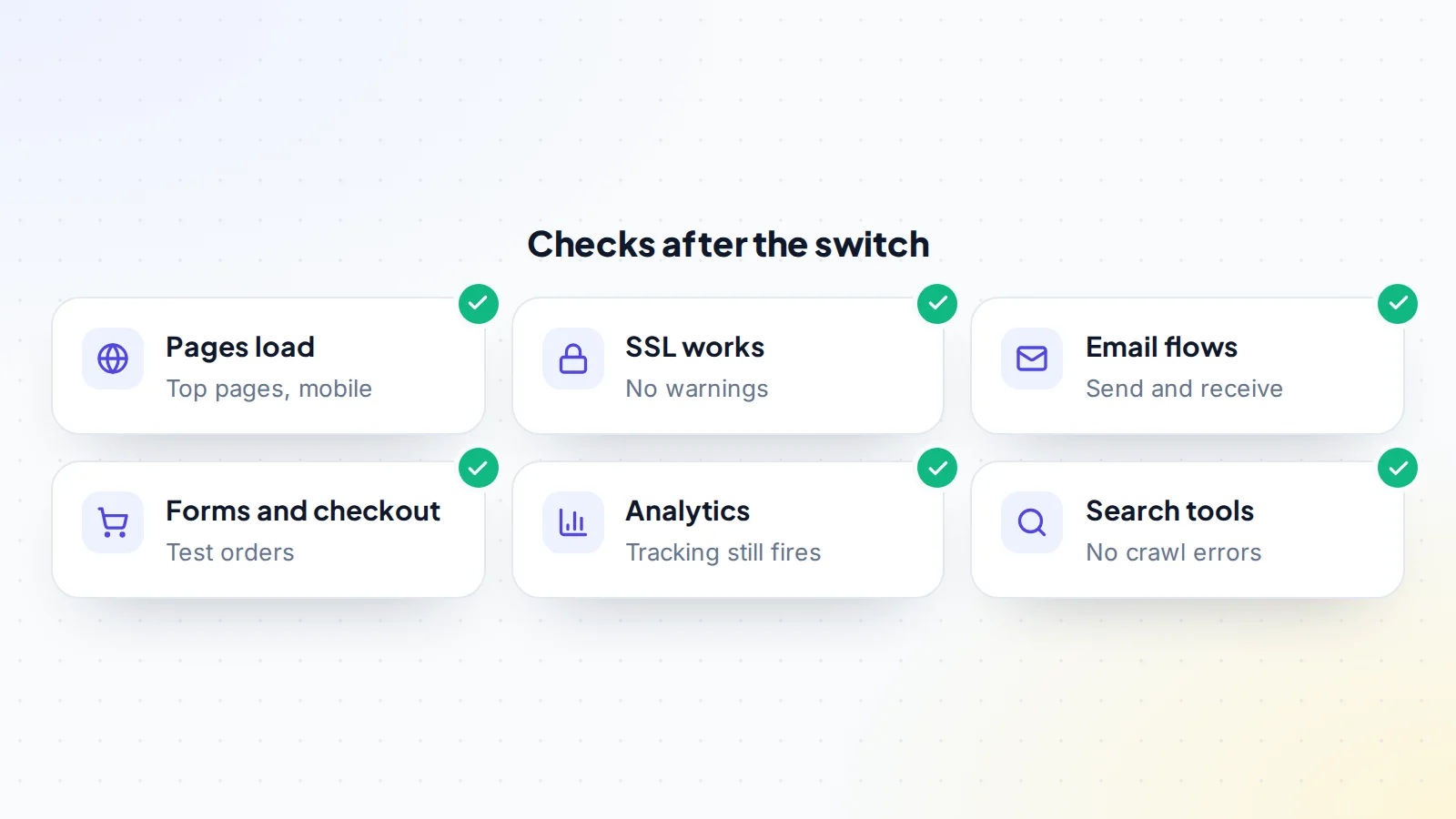
Start with what earns money: checkout, sign-up forms, ad placements and affiliate links. Then check top pages on desktop and mobile, email, analytics and search tools. Keep an eye on error logs for a few days, and ask a friend in another country to load the site, since DNS may update at different times in different places.
Protecting search rankings
If the domain and page addresses stay the same, a hosting move doesn’t change URLs, and rankings usually aren’t affected as long as the site stays fast and available. Avoid changing the site’s structure, content or addresses at the same time. If addresses do change, Google’s guide to site moves with URL changes explains how to redirect old pages to new ones. Check search tools for crawl errors in the weeks after the move.
Speed and uptime
A new host can make a site faster or slower. Compare page load times before and after the move, especially on mobile. Set up uptime monitoring so you hear about outages quickly. If performance drops, check caching, server location and resources before assuming the host is at fault.
Scheduled tasks and integrations
Sites often rely on scheduled jobs (backups, feeds, email digests) and connections to other services through API keys or webhooks. Recreate scheduled tasks on the new server, update any IP allow-lists, and confirm webhooks reach the new address. Rotate keys afterwards so the seller’s copies stop working.
Choosing the new host
If you’re migrating, pick hosting that fits the site’s needs: enough resources for its traffic, the software versions it requires, reliable backups, a server location close to most visitors, and support you can reach quickly. For a site that earns money, paying a little more for stability and good support is usually worth it. Avoid changing hosting type dramatically at the same time as the sale, such as moving from simple shared hosting to a complex cloud setup, unless you have the skills to manage it.
Caching and content delivery
Some sites use a caching plugin or a content delivery network in front of the hosting. These can hide problems during a move, because visitors see cached pages while the server behind them is broken, or they can keep serving old content after the switch. Note every caching layer before you start, clear caches after the switch, and make sure the content delivery account moves to the buyer too.
How long it takes
An account handover can be done in a day if the host supports it. A straightforward migration of a small site often takes a day or two, including testing. Larger sites, online stores and sites with many integrations can take longer. Build in time for DNS changes to settle and for a few days of monitoring. When you plan to transfer website hosting as part of a sale, include these days in the inspection period so the buyer can confirm everything before funds are released.
Retiring the old hosting
Keep the old hosting running for a short safe period after the switch, in case something was missed. Then the seller can cancel it, after confirming nothing still points there and the buyer has a final backup. Agree in advance who pays for any overlap.
Who does what
Agree responsibilities in writing: who takes backups, who migrates, who changes DNS, who tests, and when the seller’s hosting can be cancelled. In many deals, the seller handles the backup and helps during the move, while the buyer sets up the new hosting and confirms everything works. Read letters of intent for where these terms first appear.
Hosting and escrow
Hosting transfer is usually one of the steps checked during the inspection period before escrow releases funds. The buyer should confirm the site runs on hosting they control, with their own logins, before accepting. Read how an inspection period works.
If something breaks
Don’t panic. If the new site has a serious problem, you can point DNS back to the old hosting while you fix it, which is why the old hosting should stay up for a while. Use the backups to restore anything lost. Most migration issues come from mismatched software versions, wrong database settings, missing files or forgotten email records, and all are fixable.
Security during the move
Share access securely, never by plain email. Give the buyer or developer their own logins rather than sharing the seller’s. After the move, change every password, remove unused accounts, and turn on two-step verification. Read security habits that apply to any account handover.
Common mistakes
- No full backup before starting.
- Switching DNS before testing the new host.
- Forgetting email accounts and mail records.
- Changing URLs or design at the same time.
- Cancelling the old hosting too soon.
- Leaving the seller’s logins and keys active.
A worked example
The details below are made up to show the method.
Rowan buys a recipe website hosted on the seller’s shared account alongside three other sites. They agree on a migration. The seller takes a full backup and shares it securely. Rowan sets up new hosting with matching software versions, copies the files and database, and tests the site through a temporary address. Two plugins need updating to work on the new server.
Two days before the switch, the seller lowers the DNS time-to-live. On a quiet Sunday morning, DNS is pointed to Rowan’s hosting. A free certificate activates within the hour. Rowan checks the top twenty pages, the newsletter sign-up form and ad placements, and moves the two email accounts to a separate email service. A week later, with no errors in search tools, the seller removes the site from their old account.
Transfer website hosting: the checklist
- Handover or migration agreed in writing.
- Full backups taken and stored safely.
- Software versions matched on the new host.
- Site tested before DNS changes.
- DNS switched at a quiet time.
- Email, SSL and integrations checked.
- Search tools and analytics checked after the switch.
- Old hosting retired after a safe period.
Browse websites for sale, or sell your website with 0% success fee up to $10,000, then 5% (max $5,000). Read how it works on digiflippers.com.
Ready to find your next asset?
Browse listings with verified numbers, ask sellers your questions before you offer, and agree every step in a free Deal Room.
Frequently asked questions
Can I transfer website hosting without downtime?
Usually, yes: test the new host first, switch DNS at a quiet time, and keep the old hosting running for a while.
Should the hosting account be handed over or the site migrated?
Hand over if the account holds only this site and the host allows it; otherwise migrate.
How long does DNS take to update?
It varies. Lowering the time-to-live in advance shortens the changeover.
Will moving hosting affect SEO?
Not usually, if URLs stay the same and the site stays fast and available.
What about email?
Plan it separately. Move mailboxes and check mail records.
Who should do the migration?
Agree it in the deal. Often the buyer sets up hosting and the seller helps with the backup.
When can the old hosting be cancelled?
After a safe period, once everything is confirmed working on the new host.
What if the new site breaks?
Point DNS back to the old hosting, restore from backups, and fix the issue.
