Impersonation Scams in Marketplace Messages
The impersonation scams that target buyers and sellers in marketplace messages, how to recognise fake staff, fake escrow and copycat accounts, and what to do if you're targeted.
Some of the most convincing scams in digital asset deals don’t come from the buyer or seller at all. They come from someone pretending to be someone else: marketplace “support”, an “escrow agent”, a “trust and safety officer”, or a copy of the person you’ve been talking to. A marketplace impersonation scam works because it borrows trust you already have. This guide explains the common versions, the warning signs, and the simple habits that keep you safe.
For related scams, see our guides to off-platform payment scams and fake escrow scams.
Key takeaways
- Scammers impersonate marketplace staff, escrow agents, middlemen, banks and the other party in a deal.
- The FTC’s impersonation rule, in effect since April 2024, targets scams that falsely pose as businesses or government.
- Real staff never ask for your password, two-factor codes or payment outside the agreed process.
- Check everything yourself by signing in directly, never through a link in a message.
- Report suspected impersonation to the platform straight away.
What an impersonation scam is
An impersonation scam is any attempt to trick you by pretending to be a person or organisation you trust. In the US, the Federal Trade Commission’s rule on impersonation of government and businesses, which took effect in April 2024, prohibits falsely posing as a business or misrepresenting an affiliation with one, including by spoofing business email or web addresses and misusing logos. It doesn’t stop scammers trying, but it shows how seriously regulators take the problem.
In marketplace deals, impersonation usually aims at one of three things: your money, the asset you’re selling, or access to your accounts. Knowing which one a message is after makes it much easier to spot.
Why impersonation works
Impersonation succeeds because it arrives at the right moment with the right story. Scammers watch for listings and active deals, then message when a seller is waiting for payment or a buyer is waiting for a handover. They copy the language, logos and formatting of real services, and they add urgency so you act before you think. Most people who fall for it aren’t careless; they’re busy, expecting a message like this, and the message looks right. That’s why habits matter more than spotting tricks: if you always check by signing in yourself, a convincing message can’t move you.
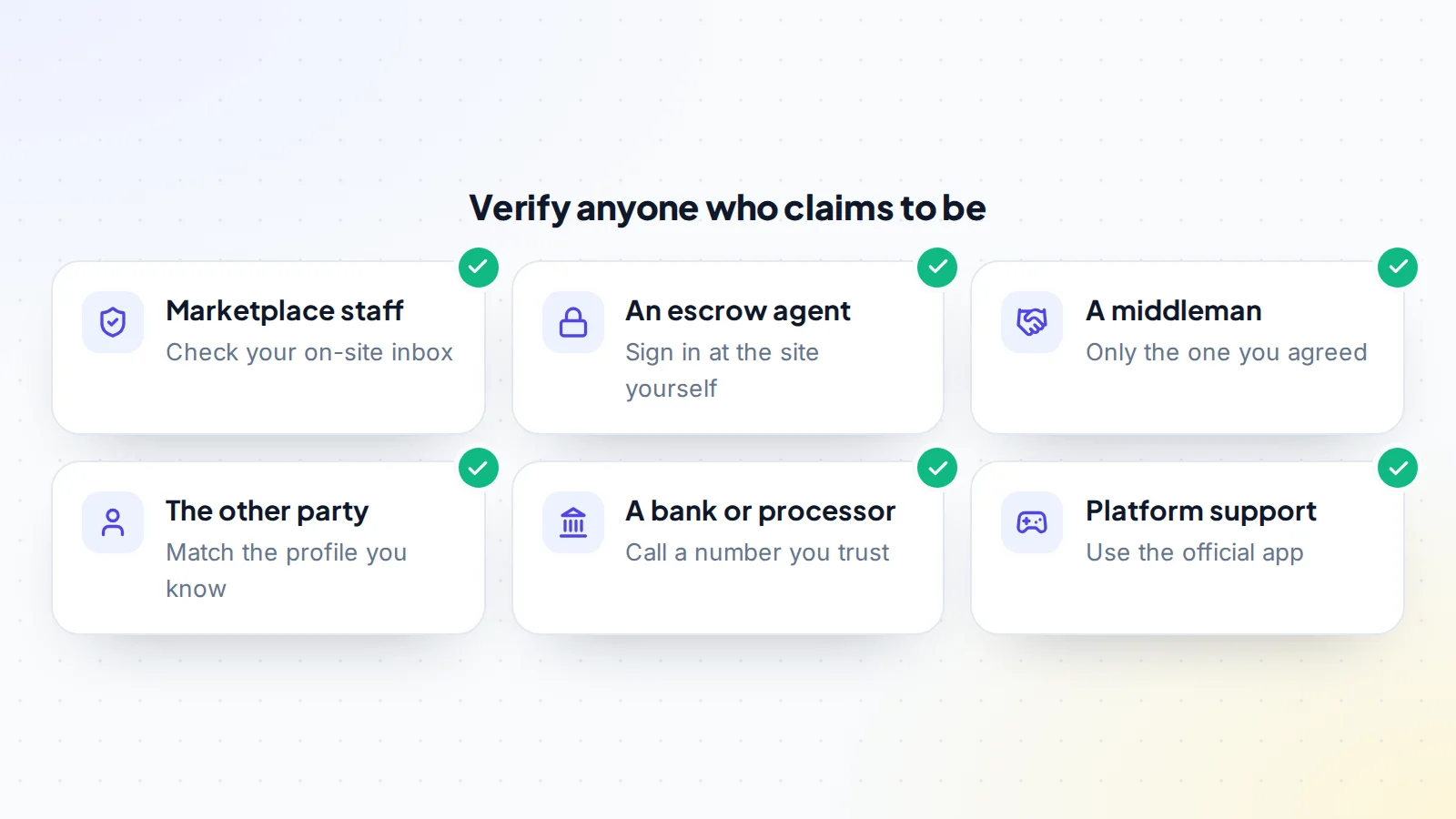
Fake marketplace staff
You receive a message from “Support”, “Trust & Safety” or “Verification Team”, often from an account with an official-looking name and logo. It says your listing has been flagged, your payment is on hold, or your account needs verifying. To fix it, you’re asked to click a link, sign in, pay a fee or share a code.
Real marketplace staff contact you through the platform’s own notifications and inbox, and they don’t ask for your password or two-factor codes. If a message claims to be from staff, open the marketplace yourself, by typing its address, and check your account and notifications there.
Fake escrow and payment notices
A seller receives an email that looks like it’s from an escrow company: “Funds received, please transfer the asset.” The email may come from a look-alike address and link to a convincing copy of the escrow site. Nothing was paid. The FBI warns about the related tactic of business email compromise, where fraudsters imitate or compromise email accounts to redirect payments or trigger actions.
Always confirm funds by signing in to the escrow account yourself, from an address you typed or saved earlier. California’s DFPI advises checking an online escrow company’s licence and never relying on links sent by the other party. Our guide to escrow explains how genuine escrow works, and what you should expect to see in your own account at each step.
Self-appointed middlemen
In account and item deals, someone may offer to act as a “trusted middleman”, or the other party may insist on using a particular one. The middleman is a partner in the scam, or the same person under a different name. Choose any middleman yourself, through the marketplace’s own options, and check their verified history.
Copycat accounts
Scammers sometimes copy the profile of the person you’re dealing with: same photo, almost the same name, a letter changed or added. They message you as if continuing the conversation, often with “new payment details” or a request to move to another app. Look closely at usernames, keep the deal in one thread on the platform, and treat any change of details as suspicious until confirmed.
Fake game and social platform support
Sellers of game and social accounts may be contacted by “platform support” claiming the account will be locked unless they verify it, often during a sale. The aim is to capture the login or two-factor code. Genuine platform support uses its own channels, and its staff don’t ask for your password or codes. Check any notice by signing in to the platform directly.
For sellers: the riskiest moment
Sellers are most exposed just before the handover, when they’re expecting confirmation that the buyer has paid. That’s exactly when fake “funds received” emails and messages arrive. Make a rule: you transfer nothing until your own escrow or marketplace dashboard shows the funds held, and you’ve checked it by signing in directly. Keep logins, two-factor codes and recovery details private throughout; a genuine buyer gets access during the agreed handover, not before.
For buyers: protecting your payment
Buyers are most exposed when paying. Fake payment instructions, a copycat seller with “new bank details” or a fake middleman can all redirect money. Pay only through the method agreed in the deal, use instructions shown inside your own escrow account, and confirm any change by phone on a number you already know. Our guide to wire transfer safety has the full routine.
If you have a team
If others help run your business, make sure they know the rules too: staff never share codes, payment details never change by email, and anything unusual is checked by signing in directly. Impersonators often target the person who isn’t expecting it, such as an assistant handling support or a contractor with admin access.
Messages outside the marketplace
Impersonators often move the conversation somewhere else: email, a messaging app, a social media DM or a phone call. Each move makes it harder to check who you’re talking to and removes the record the marketplace keeps. A buyer who suddenly asks to continue on another app, or a “support agent” who calls you, should be treated with caution. If you do need to talk outside the platform, for example on a video call for a screen-share, keep the agreement, payment details and confirmations inside the marketplace thread, and confirm anything important there afterwards.
More convincing fakes
Fake messages are getting more polished: correct spelling, real logos, realistic order numbers and even cloned voices on calls. You can’t rely on mistakes to spot them. The defences that work are the same as always: check by signing in yourself, never share codes, never pay outside the agreed process and confirm changes through a channel you already trust. The FTC has also proposed protections against impersonation of individuals using AI, which shows how quickly these tactics are evolving.
Warning signs
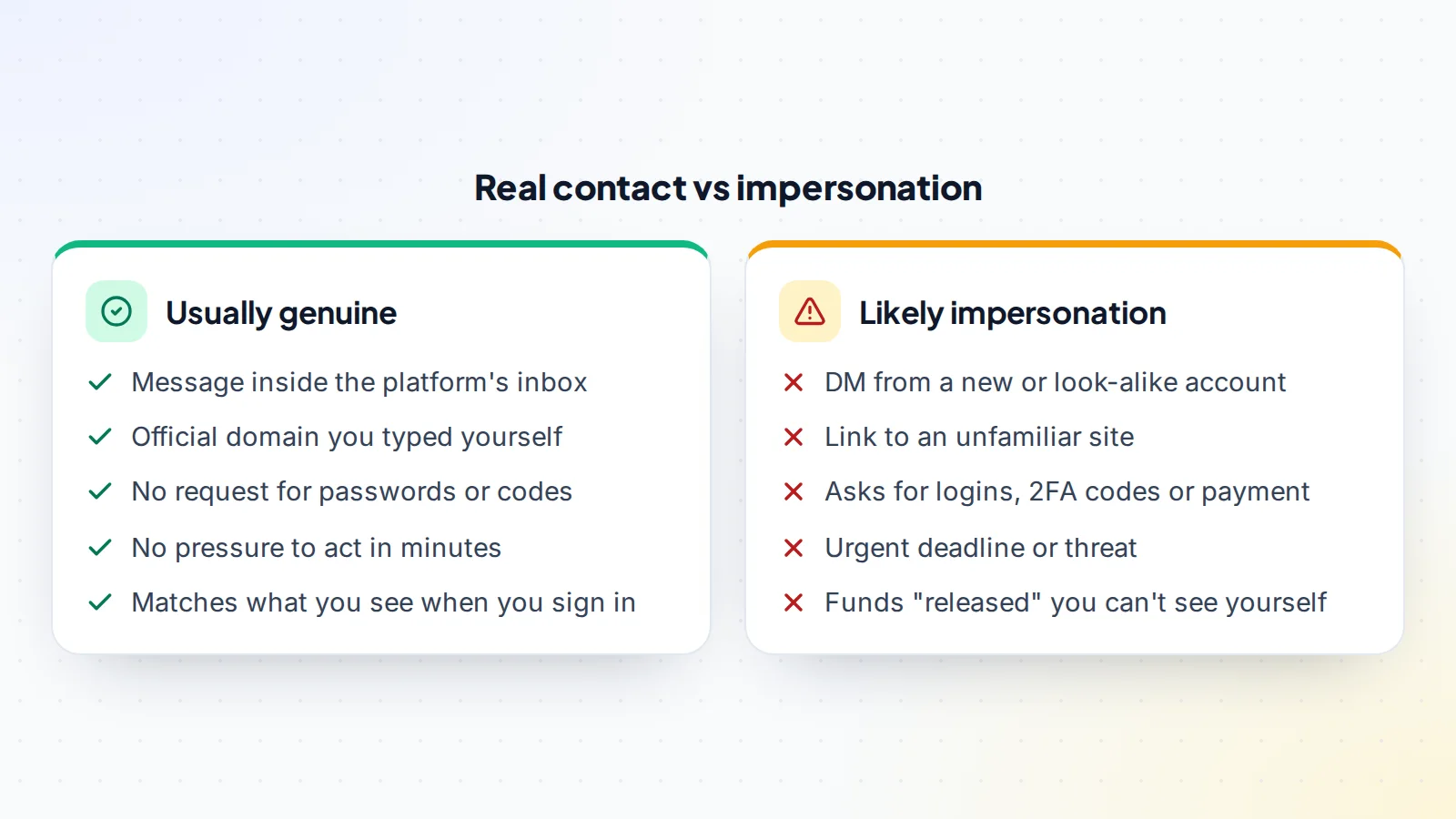
- A message arrives outside the platform’s own inbox, or from a new or look-alike account.
- It asks for your password, a two-factor code, a recovery code or remote access.
- It asks for payment of a “verification”, “release” or “unlock” fee.
- It includes a link to a site whose address isn’t exactly the official one.
- It sets an urgent deadline or threatens suspension.
- It claims something happened, such as funds released, that you can’t see when you sign in.
The FTC’s advice on avoiding scams makes the same points: scammers pretend to be from organisations you know, say there’s a problem or a prize, pressure you to act immediately and tell you to pay in a specific way.
Habits that keep you safe
- Keep the deal on the platform. One thread, one inbox, a full record.
- Type addresses yourself for the marketplace, escrow service and any platform you sign in to.
- Never share codes. Two-factor and recovery codes are for you alone.
- Check, don’t trust: confirm payments, flags and notices by signing in directly.
- Turn on two-step sign-in for your marketplace, email and payment accounts.
- Verify the other party and prefer verified profiles. On digiflippers.com, members can verify their identity.
If you think you’re being targeted
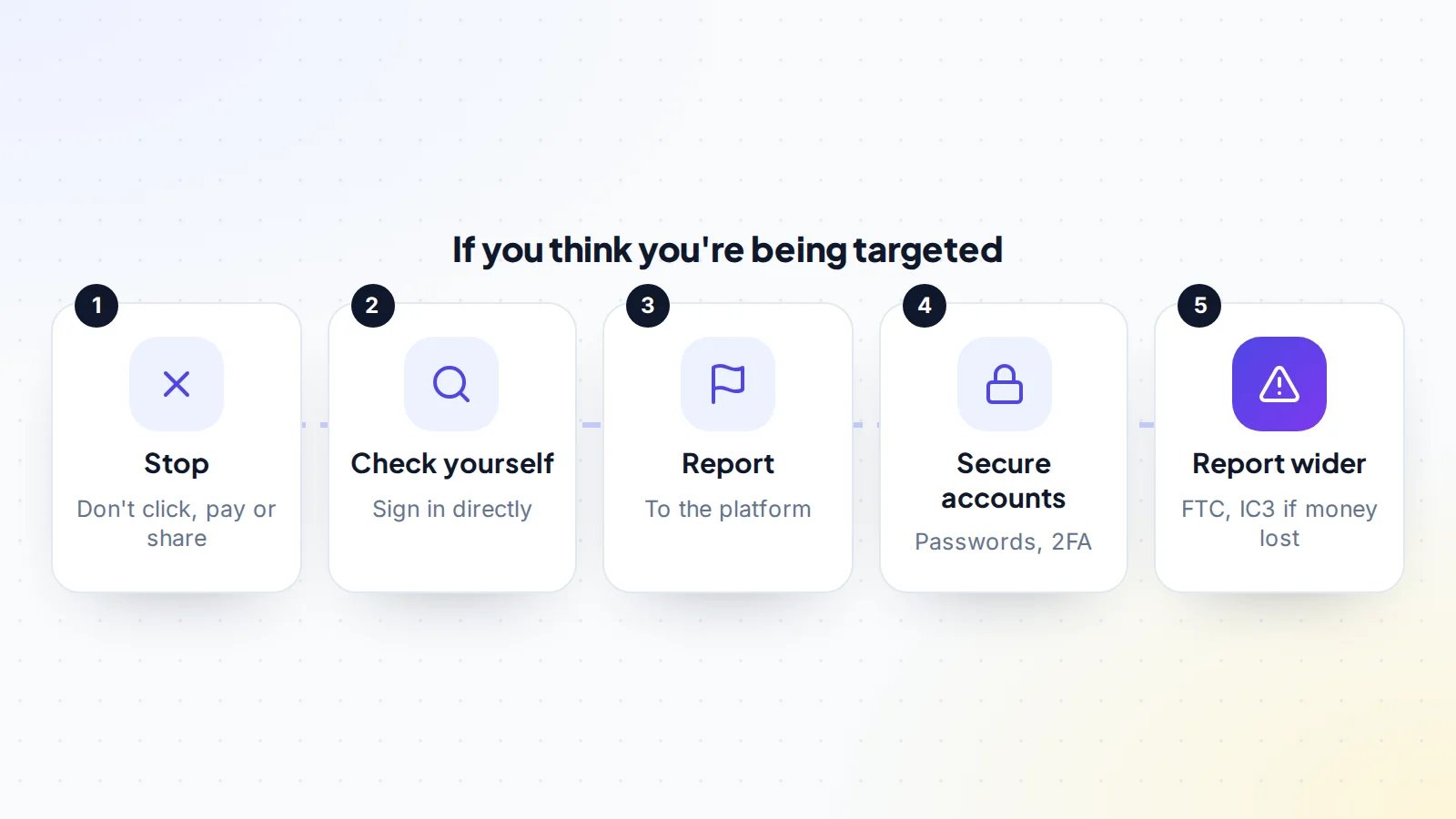
Stop and don’t click, pay or share anything, even if the message says you’ll lose the deal or your account. Sign in to the marketplace, escrow service or platform directly to check. Report the message or account to the platform, so it can act and warn others. If you’ve shared a password or code, change it immediately, turn on two-step sign-in and sign out other sessions. If money was lost, contact your bank or payment provider straight away and report it to the FTC at ReportFraud.ftc.gov and, in the US, the FBI’s IC3.
Why reporting matters
Reporting a suspicious message takes a minute and helps more people than you. Platforms can remove impersonating accounts, block look-alike domains and warn other members who may have been contacted. Regulators use reports to spot patterns and act against repeat offenders. Even if you didn’t lose anything, a report about a convincing marketplace impersonation scam can stop the next person from losing money.
How marketplaces protect members
Good marketplaces make impersonation harder: verified badges for staff and members, messages kept in one inbox, clear notices that staff never ask for passwords, and payment status visible only inside your account. On digiflippers.com, the ways to pay in a deal are: directly to the seller, through escrow, and the platform never holds the money itself, so you should never pay “digiflippers.com” anything outside the deal’s agreed payment process. Read our trust and safety page to see how the platform works.
A worked example
The details below are made up to show the method.
Maya is selling a domain. Halfway through the deal, Maya receives an email from “Escrow Support” saying the buyer’s payment has been received and the domain should be pushed now. The email address has one letter different from the escrow company’s real domain. Instead of clicking, Maya types the escrow company’s address directly and signs in: the transaction shows “awaiting payment”. Maya reports the email to the marketplace and the escrow company, and continues the deal only once the real dashboard shows the funds held.
Marketplace impersonation scam: the checklist
- Deal conversation kept in one thread on the platform.
- Marketplace and escrow addresses typed or saved by you.
- Passwords, two-factor and recovery codes never shared.
- Payment and notices confirmed by signing in directly.
- Usernames and email addresses checked letter by letter.
- Middlemen chosen through the marketplace, not suggested in DMs.
- Two-step sign-in on for marketplace, email and payment accounts.
- Suspicious messages reported to the platform.
Ready to find your next asset?
Browse listings with verified numbers, ask sellers your questions before you offer, and agree every step in a free Deal Room.
Frequently asked questions
What is a marketplace impersonation scam?
A scam where someone pretends to be marketplace staff, an escrow agent, a middleman, a bank or the other party in your deal, to get money, the asset or access to your accounts.
Will marketplace staff ever ask for my password?
No. Genuine staff don’t ask for passwords, two-factor codes or recovery codes.
How do I check if a payment notice is real?
Sign in to the escrow service or marketplace yourself, using an address you typed, and check the transaction there.
What should I do if I clicked a suspicious link?
Don’t enter anything further. If you entered a password or code, change it, turn on two-step sign-in, sign out other sessions and report it to the platform.
Where do I report impersonation?
To the platform first, then to the FTC at ReportFraud.ftc.gov and, in the US, the FBI’s IC3 if money was lost.
Can scammers copy someone’s profile exactly?
They can come close, with the same photo and a nearly identical name. Check usernames carefully and keep the deal in one thread.
Why do scammers target active deals?
Because buyers and sellers are expecting payment or handover messages, so a fake one is more likely to be believed.