Aged Domains: Do They Really Help SEO?
An honest look at aged domains and SEO: what Google's own documentation says, what an old domain can and can't bring, the expired domain abuse policy, and how to check a domain's history before you pay.

Aged domains are often sold with a promise: an old domain will rank faster than a new one. The truth is more useful and less magical. Age by itself isn’t something Google says it rewards, but some old domains do carry real value, such as a good name, relevant links and people who already know the brand. Others carry a history you’d rather not inherit. This guide looks at aged domains SEO claims honestly: what Google’s own documentation says, what can carry over, what can’t, and how to check a domain before you pay.
For the wider topic, see our guide to expired domains. If the name you want is already registered, read how to buy a domain name that is taken.
Key takeaways
- Google’s guide to its ranking systems doesn’t list domain age as one of them.
- Value comes from a good name, relevant links and real brand recognition, not the date.
- Google’s spam policies name expired domain abuse: repurposing an old domain to manipulate rankings.
- Google also says it’s fine to use an old domain for a new, original, people-first site.
- Check archived history, links, reputation and trademarks before buying.
What is an aged domain?
An aged domain is simply a domain name that was registered some time ago, often years. Some have been held by the same owner all along, sometimes with a live website and sometimes parked. Others expired, were deleted and were registered again by someone new, which resets the registration but not the name’s past. Sellers often market both kinds as “aged”, so the first job is to find out which one you’re looking at, because the history behind them can be very different.
When people talk about aged domains SEO benefits, they usually mean one of three hopes: that age is a ranking signal, that the old site’s links will help a new site, or that past rankings will return. Each needs a different answer.
Is domain age a ranking factor?
Google publishes a guide to its ranking systems. It describes systems such as link analysis, freshness, reliable information and spam detection, and it doesn’t list domain age among them. Google doesn’t publish every detail of how ranking works, so no one outside Google can prove a negative. But there’s no official support for the idea that a registration date, on its own, lifts a site in results.
What can make an older site perform well is what it has built over time: useful content, links earned from other sites, and people searching for it by name. A new site on an old domain doesn’t automatically inherit those things. The useful question about aged domains SEO isn’t “how old is it?” but “what has this name earned, and will it still count for what I plan to build?”
What can carry real value
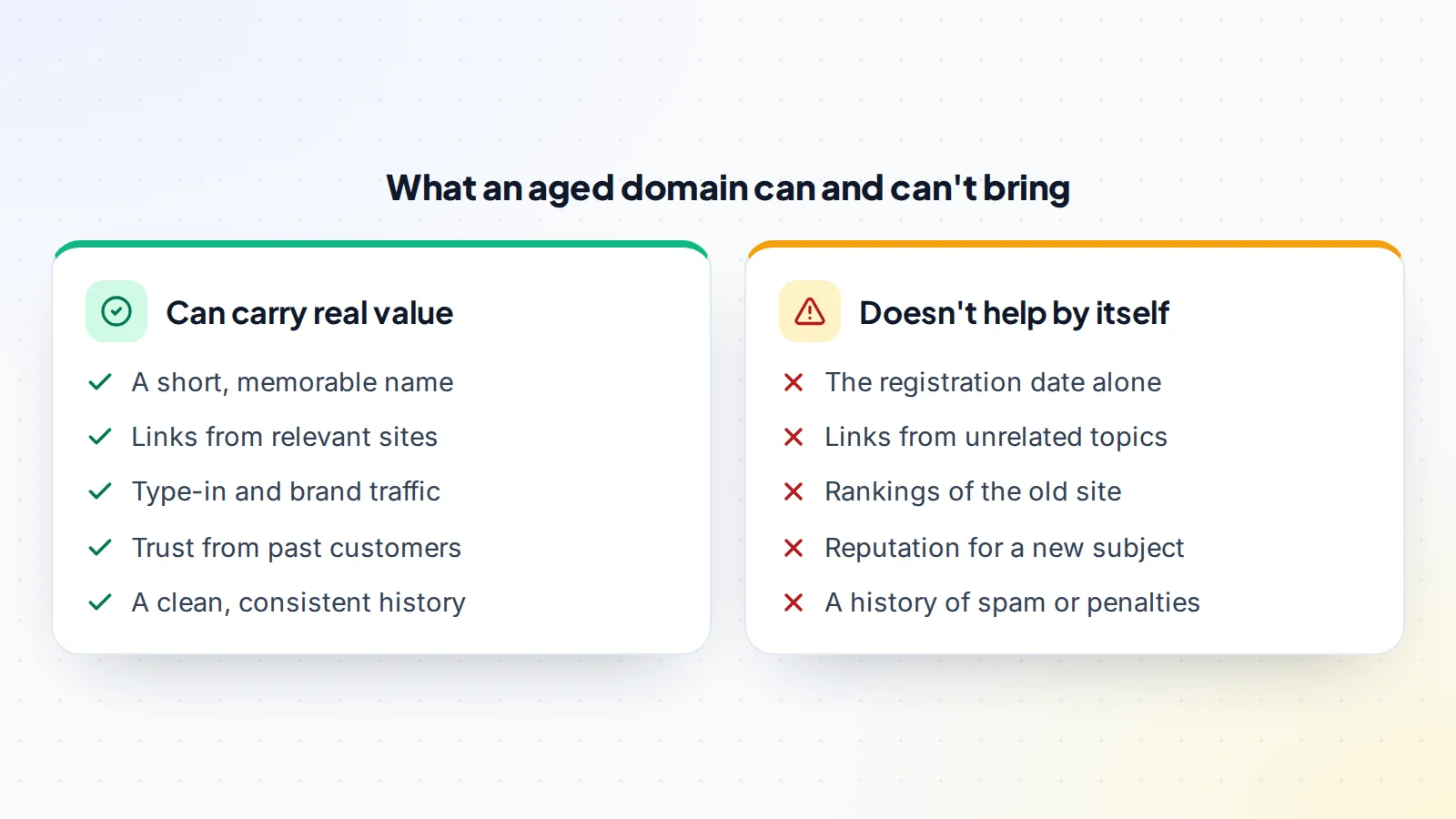
Some old domains are genuinely valuable, for reasons that have little to do with the date:
- The name itself: short, memorable and brandable names are scarce, and many were registered long ago. Our guide to brandable domain names explains what makes a name worth paying for.
- Relevant links: links from respected sites in your topic can still point at pages you rebuild or redirect, if the content they recommended still makes sense.
- Type-in and brand traffic: people who remember the name and type it, or search for it, bring visits that a new name wouldn’t.
- Customer trust: if you buy a domain together with the business behind it, existing customers and partners recognise it.
Notice that most of this value depends on continuity. Links and trust tend to matter most when the new site serves the same people with the same kind of content.
What doesn’t carry over
An old site’s rankings belong to the old site’s pages, not to the name. If you build a different site, on a different subject, there’s no reason to expect those rankings to return. Links from unrelated topics are unlikely to help a site that no longer matches what they recommended. And if the domain spent time hosting spam, malware or thin content, that history can count against it rather than for it.
Be wary of sellers who quote old traffic or “authority” scores from third-party tools as if they will transfer. Those tools estimate; they don’t measure what Google thinks, and the numbers often describe a site that no longer exists.
Expired domain abuse and Google’s spam policies
In March 2024, Google announced new spam policies, including one on expired domain abuse. Its spam policies describe this as buying an expired domain and repurposing it primarily to manipulate search rankings by hosting content that provides little to no value to users. Google’s example is a domain once used by a medical site being used for low-quality casino content, hoping to benefit from the old reputation.
Google also says sites that violate its spam policies may rank lower or not appear in results at all. The same announcement makes an important point for honest buyers: it’s fine to use an old domain name for a new, original site that’s designed to serve people first. So the line isn’t about age. It’s about whether you’re trying to borrow a reputation for something unrelated, or building something useful.
Good reasons to buy an old domain
There are plenty of sound reasons to buy an aged domain:
- You want a better brand name than anything available new.
- You’re buying a business, and the domain is part of its identity.
- The domain belonged to a project in your field, and you’ll continue serving the same audience.
- You’re consolidating a competitor or related site into yours, with genuine content and clear redirects.
In each case, the value would still exist if search engines ignored age completely, which is the right test. If the only reason to buy is a promised ranking boost, think again.
Check the archived history
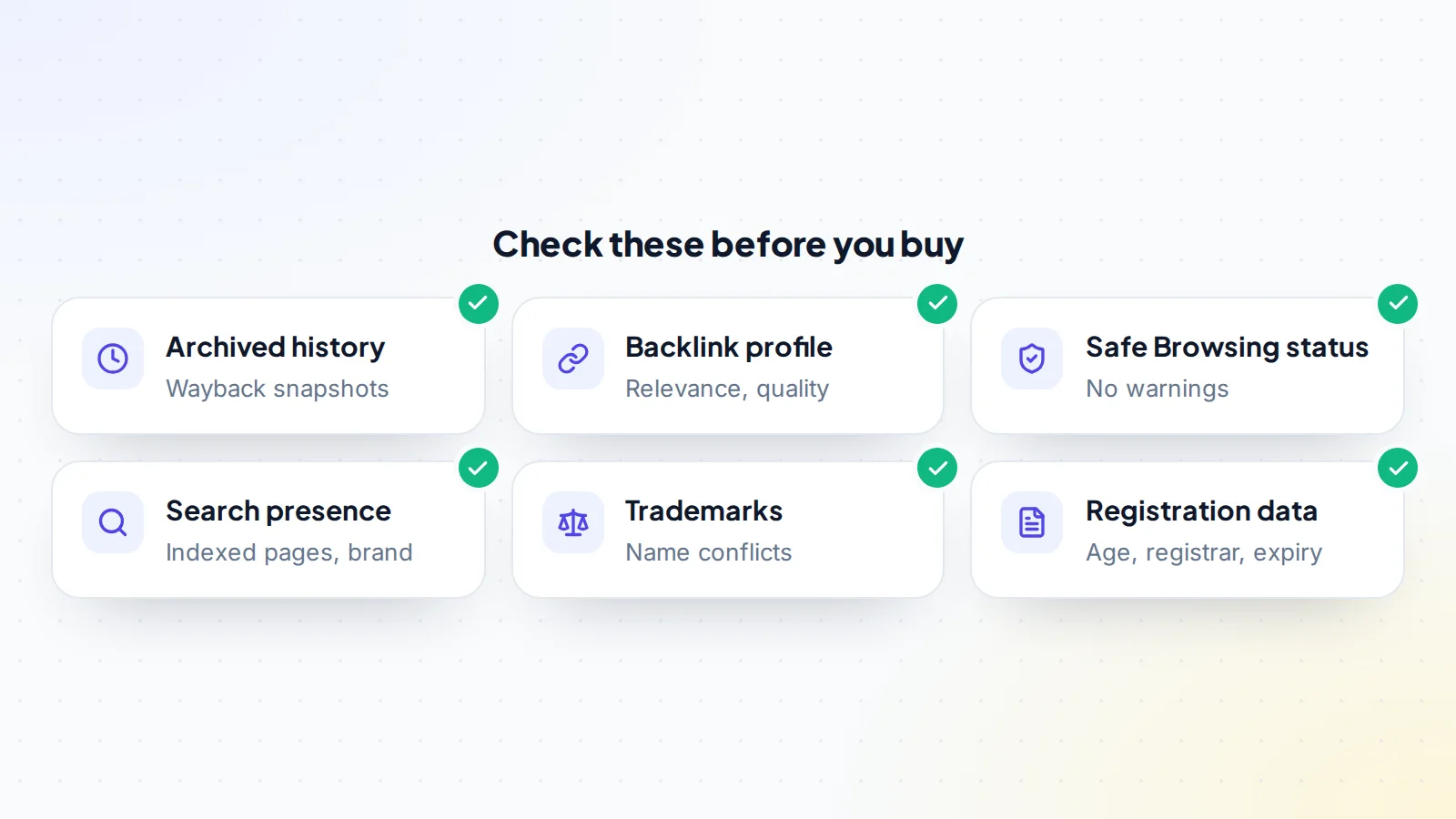
The Internet Archive’s Wayback Machine shows snapshots of many websites over the years. Look through the domain’s snapshots for what it hosted, when, and whether the topic changed. A long history as a real site in your topic is a good sign. Gaps are normal, but sudden switches to unrelated subjects, foreign-language pages that don’t fit, or pages full of ads and links deserve questions.
Snapshots aren’t complete, so treat them as evidence rather than proof. If the domain is part of a larger sale, ask the seller to explain each period of its history.
Review the backlinks
Use a backlink tool to see which sites link to the domain and to which pages. Look at relevance and quality rather than the count. A handful of links from respected sites in your field is worth more than thousands from unrelated directories, comment spam or link networks. Note which old pages those good links point to, because if you build a new site, you’ll want to recreate or redirect those pages sensibly.
Google’s spam policies also cover link spam, so a profile full of paid or manipulative links is a warning sign. Unnatural links are something you might inherit and have to deal with.
Check reputation and search presence
Check the domain in Google’s Safe Browsing status page to see whether it’s currently flagged as unsafe. Search for the domain name and the brand to see what people say about it, and whether it’s associated with scams or complaints. If the domain still has a live site and the seller can give you access, look at Google Search Console for manual actions and security issues; if not, ask what the seller knows.
Also look at its registration data through an RDAP lookup, such as ICANN’s lookup tool. This shows details such as the creation date, registrar and expiry, though, as noted above, a domain that expired and was registered again may show a recent creation date despite a long past.
Check the name for trademarks
An old name may match a brand, past or present. If it does, you could face a dispute regardless of how long the domain has existed. Search the relevant trademark databases, and read our guide to domain trademark and UDRP issues to understand the risks before you pay.
How to price an aged domain
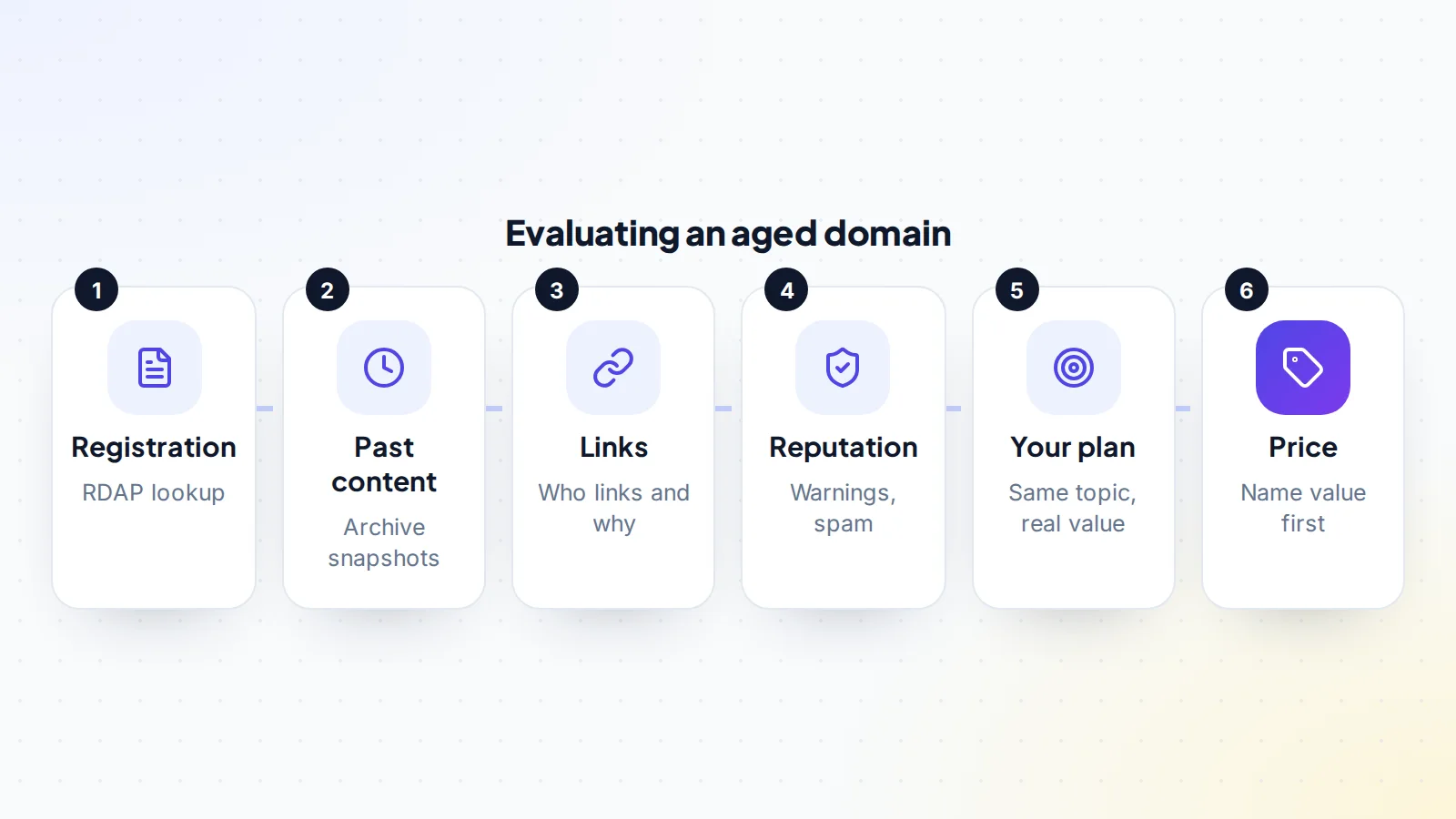
Price an aged domain mainly on the name: its length, clarity, brandability, extension and how many buyers could use it. Add value for genuinely relevant links and real type-in or brand traffic you can verify. Don’t pay extra for the registration date alone, or for third-party scores that may not reflect anything search engines use.
If the seller’s price rests on promised rankings, ask for evidence and negotiate. Our guide to negotiating a domain purchase covers how to make an offer, and the growth trend valuation guide explains how buyers weigh traffic that’s rising or falling when a site is part of the sale.
Using an aged domain well
If you buy an old domain, plan the new site to deserve the links and visitors it already has. Where good links point to old pages, rebuild useful versions of that content or redirect them to the closest relevant pages on your site. Don’t redirect everything to the home page, and don’t fill old addresses with unrelated content. If you’re moving an existing site onto the domain, follow Google’s guidance on site moves with URL changes, using permanent redirects and Search Console’s change of address tool where it applies.
Then build the site the same way you would on any domain: original, useful content, a clear purpose and a good experience for visitors. Give it time, and measure what actually happens rather than relying on what the domain was supposed to do.
A worked example
The details below are made up to show the method.
Sam runs a small cycling repairs business and finds an aged domain for sale: a short name about bike maintenance, first registered many years ago. The seller asks a high price and points to an “authority” score.
Sam checks the Wayback Machine: for several years the domain hosted a real bike maintenance blog, then it went quiet, and more recently it showed a page of unrelated ads. A backlink tool shows a few dozen links from cycling clubs and forums to old repair guides, plus a large number of low-quality directory links. Safe Browsing shows no warnings and a trademark search finds no conflicts.
Sam values the domain mainly as a good brand name for the business, adds some value for the relevant cycling links, and ignores the authority score. The seller accepts a lower offer. After the transfer, Sam rebuilds the most-linked repair guides with fresh, accurate content and redirects other old guide addresses to the closest new pages. The domain works because the new site continues to serve the same audience.
Buying safely
Domain sales carry their own risks: a seller who doesn’t really control the domain, a transfer that stalls or a payment that can’t be recovered. Confirm the seller can transfer the domain, agree terms in writing and keep the payment protected until the domain is in your registrar account. Our guide to buyer protection for digital assets explains the options. On digiflippers.com, sellers can verify ownership, and you can see how verification works before you make an offer. When you’re ready to look, browse domains for sale.
Aged domains SEO: the checklist
- Clear reason to buy beyond a hoped-for ranking boost.
- Archived history reviewed for topic changes and spam.
- Backlinks checked for relevance and quality.
- Safe Browsing status checked and brand searched.
- Registration data looked up through RDAP.
- Trademark conflicts ruled out.
- Price based on the name and verified value, not age.
- Plan to serve the same audience with original content.
- Payment protected until the domain is in your account.
Ready to find your next asset?
Browse listings with verified numbers, ask sellers your questions before you offer, and agree every step in a free Deal Room.
Frequently asked questions
Do aged domains rank better?
Not because of age alone. Google’s ranking systems guide doesn’t list domain age. Older sites often rank well because of the content, links and recognition they’ve built, which a new owner doesn’t automatically inherit.
Is it allowed to buy an expired domain for a new site?
Yes. Google says it’s fine to use an old domain for a new, original site designed to serve people first. Its spam policies target repurposing expired domains mainly to manipulate rankings with low-value content.
Do backlinks transfer with a domain?
Links point to the domain, so they stay in place after a sale. Whether they help depends on whether the pages they link to still exist and still match what the links recommended.
How can I see what an old domain was used for?
Look through its snapshots in the Internet Archive’s Wayback Machine, and search for the name to see how people describe it.
Should I pay more for an older registration date?
Not for the date alone. Pay for the name’s quality, verified relevant links and real traffic.
What’s the biggest risk with aged domains?
Inheriting a bad history, such as spam, malware or manipulative links, or buying a name that conflicts with a trademark.
Can I redirect an aged domain to my site?
You can redirect relevant pages to closely matching pages on your site. Redirecting everything, or using unrelated content to benefit from an old reputation, isn’t a good use of a domain.