
How to Buy a Domain Name That’s Already Taken
The domain you want is registered. Here's how to find out who owns it, what it's worth, how to approach the owner and how to buy it safely.
You’ve found the perfect name, typed it into a registrar and seen the words nobody wants to see: already taken. It feels final, but it rarely is. Domains change hands every day, and with the right approach you can often buy a domain name that is taken for a fair price, without overpaying or being scammed.
This guide shows you how. You’ll learn how to find out who owns a domain and whether it’s for sale, how to judge what it’s worth, how to approach the owner, how to negotiate, how to pay safely and how the transfer works. It also covers the other routes, such as backorders when a domain is about to expire, and when it’s smarter to choose a different name.
Everything here applies to the common generic extensions such as .com, .net and .org. Country-code domains follow similar steps but can have their own registry rules, which we’ll point out.
Key takeaways
- Look the domain up with ICANN Lookup to see its registrar, creation date, expiry date and status.
- Check what the domain was used for before you make an offer, and avoid names that copy someone else’s trademark.
- Decide your maximum price before you contact the owner, and keep your first message short and neutral.
- Pay through escrow so the seller is paid only once the domain is in your account.
- A registrar must give the owner the transfer code within five calendar days of a request, so a transfer shouldn’t stall for long.
Step 1: Check the domain’s status
Start with the facts. ICANN’s free ICANN Lookup tool shows the current registration data for a domain using RDAP, the protocol that replaced WHOIS for generic domains. Since 28 January 2025, ICANN treats RDAP as the definitive source for that data. Look for:
- The registrar: the company the domain is registered with.
- The creation date: how long it has existed.
- The expiry date: when it needs to be renewed.
- Status codes, such as clientTransferProhibited (normal transfer lock) or redemptionPeriod (expired and deleted, but still recoverable by the owner).
Owner details are usually hidden behind privacy services, but the registrar and dates already tell you a lot. Then visit the domain itself. What you see falls into one of four situations, and each leads to a different route.
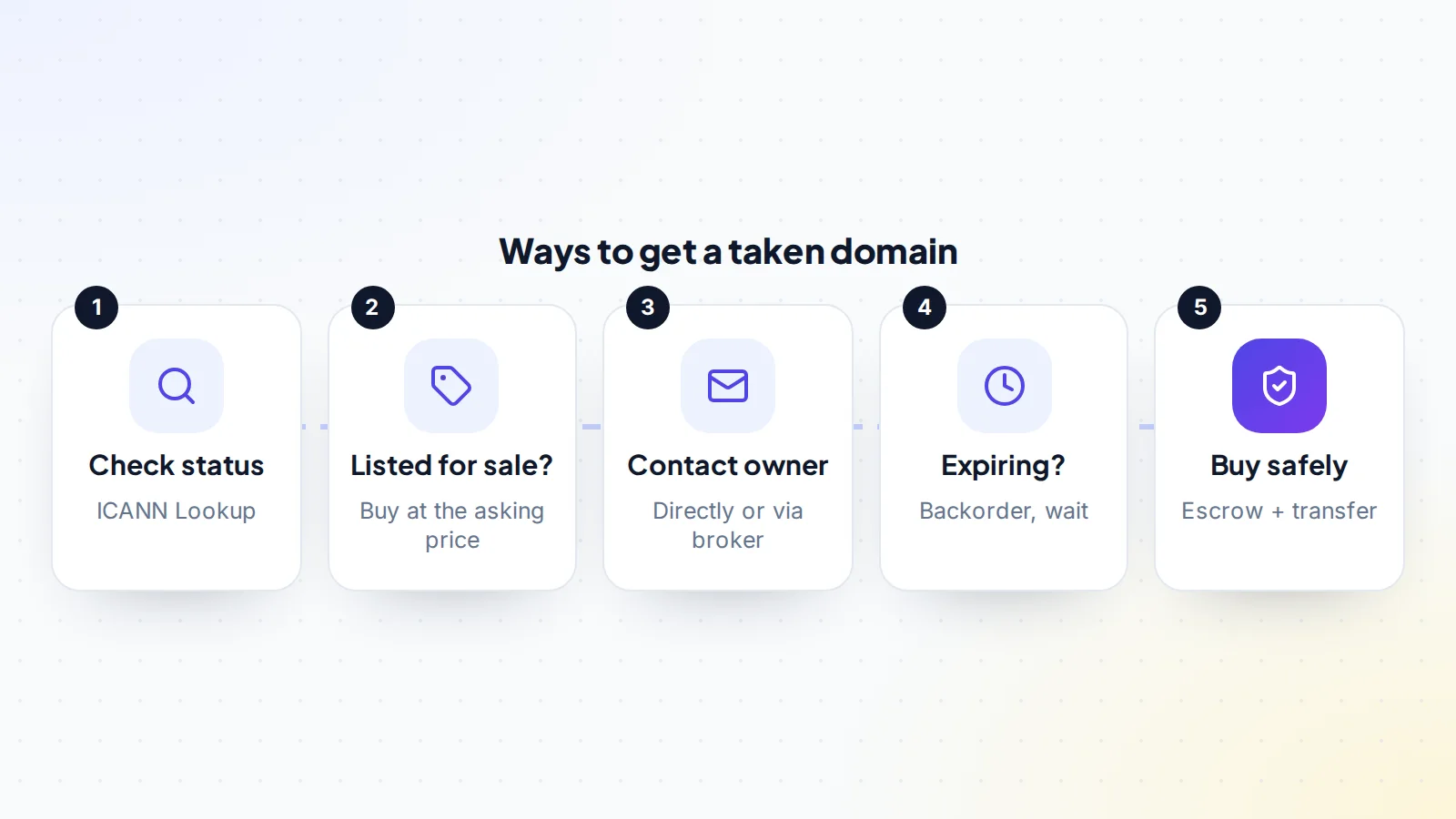
Step 2: Work out which situation you’re in
The domain is listed for sale
If the domain shows a “for sale” page or is listed on a marketplace, the owner has already decided to sell. You can buy at the asking price or make an offer. This is the simplest route, but check the price against the factors in Step 4 before you pay it.
The domain is parked
A page of ads or a holding page usually means the owner is a domain investor or someone who registered it and never used it. Both are often open to offers. See our guide to domain parking for how parked domains earn and what that means for price.
The domain is a live website
If a real business or project uses the domain, buying it is harder and more expensive, because you’re asking them to change their address. Unless the name is essential to you, a different name may be wiser.
The domain is about to expire
If the expiry date is close and nothing is happening on the domain, the owner may not renew. For generic domains, ICANN describes a set sequence after a domain is deleted: a 30-day redemption grace period during which the owner can still restore it, then five days of pending delete, after which the name is released and can be registered on a first-come, first-served basis. A backorder service tries to register the name the moment it’s released.
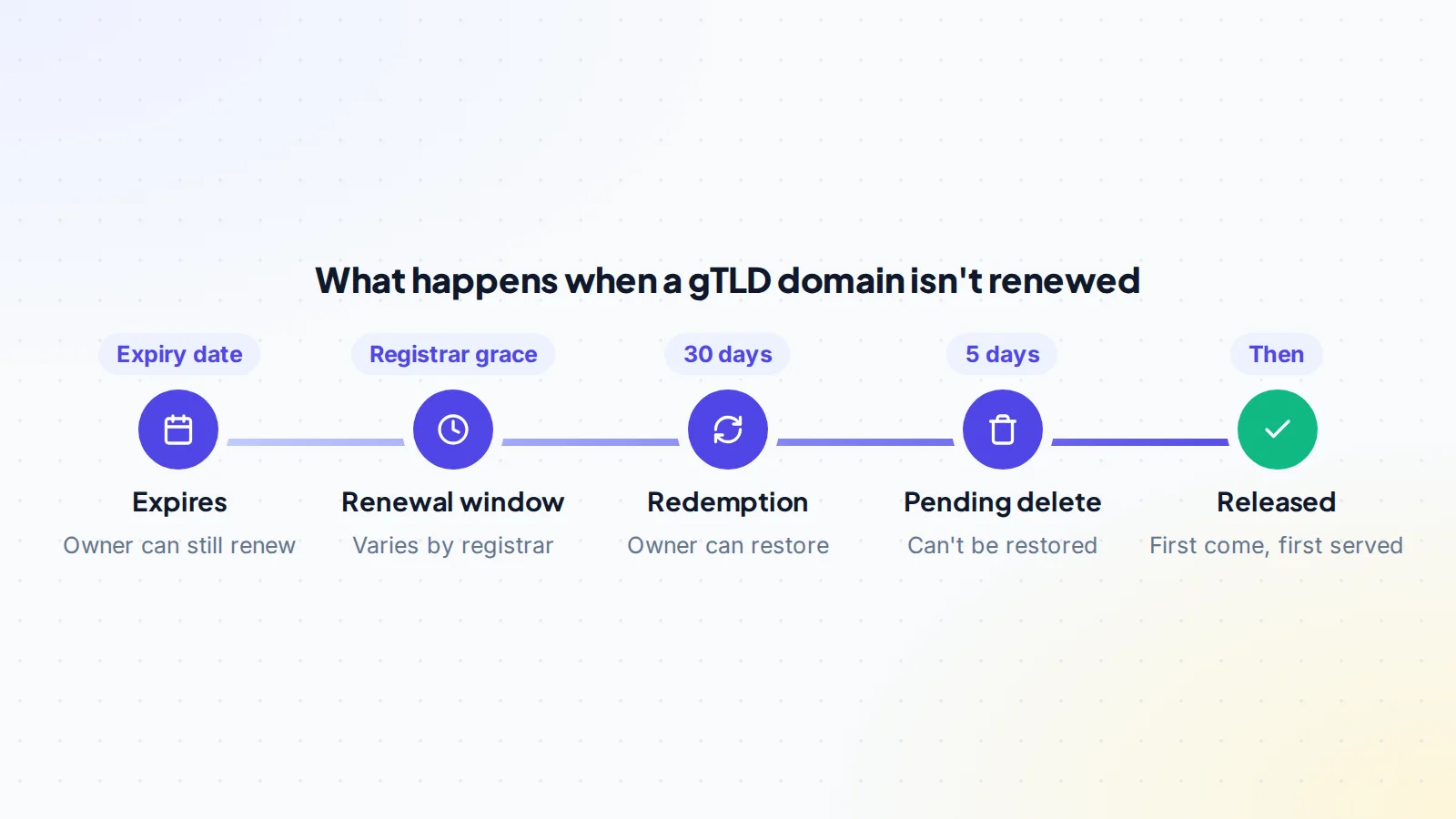
Most domains are renewed, though, so don’t rely on this route for a name you really need. Our guide to expired domains explains how drops and backorders work.
Step 3: Check the domain’s history and risks
Before you spend money, make sure the domain doesn’t come with problems.
- Past use. Look the domain up on the Internet Archive’s Wayback Machine. A domain previously used for spam or unrelated content can carry baggage with email providers and search engines. Our domain history check covers the details.
- Trademarks. If the name copies a well-known brand, the brand owner may be able to take it under ICANN’s Uniform Domain-Name Dispute-Resolution Policy (UDRP), which every registrar of generic domains must follow. Search the trademark databases in the countries that matter to you and read our guide to trademarks and the UDRP.
- Email reputation. If you plan to send email from the domain, check it against common blocklists before you buy.
Step 4: Decide what the domain is worth to you
Domain prices are set by negotiation, not formulas, which is why it helps to know your own number before you start. Consider:
- Length and clarity: short, easy-to-spell names that pass the “radio test” (you can say it and people type it correctly) are worth more.
- The extension: .com usually commands the highest prices for global brands. See our guide to domain extensions.
- Commercial meaning: names that match valuable products or services attract more buyers.
- Brandability: invented or brandable names can be valuable to the right company.
- Comparable sales: what similar names have sold for publicly.
- What it’s worth to you: the cost of rebranding later, or of losing customers who type the .com, can justify paying more.
Our guide to how much a domain name is worth explains each factor, and premium domains covers names priced in the thousands and above. Write down two numbers: your opening offer and your walk-away price.
Step 5: Contact the owner
If the domain isn’t listed, you need to reach the owner. Our guide on how to find a domain owner covers every method, but the main ones are:
- The registration data. If contact details aren’t public, many registrars and privacy services offer a contact form or a forwarding email address.
- The website itself: a contact page, an email address or a “make an offer” form on a parked page.
- A domain broker, who contacts the owner for you, usually for a fee or a commission. Brokers are useful when you want to stay anonymous; a large company asking directly tends to push prices up.
Keep your first message short and neutral. Say you’re interested in the domain and ask whether they’d consider selling and at what price. Don’t explain your plans, your budget or how important the name is to you.
Step 6: Negotiate
Negotiating a domain is mostly patience. A few practical rules:
- Let the owner name a price first if you can. If they insist you make an offer, start reasonably below your target, but not so low that you end the conversation.
- Justify your offer with neutral facts: comparable sales, the extension, the length.
- Move in decreasing steps. Big jumps signal there’s plenty more room.
- Be ready to walk away at your limit. Sometimes the owner comes back weeks later.
- Agree the details, not just the price: who pays escrow fees, how the transfer happens and the timeline.
Our guide to negotiating a domain purchase includes example messages for each stage.
Step 7: Pay through escrow
Never send money and hope the domain follows. With domain escrow, you pay a licensed escrow company, the seller transfers the domain to you, you confirm it’s in your account, and only then is the seller paid. Read how domain escrow works for the full process.
On digiflippers.com, the ways to pay in a deal are: directly to the seller, through escrow. Our escrow partner is Escrow.com, a licensed escrow company, and the platform never holds the money itself. Check the escrow website’s address carefully: fake escrow sites are one of the most common domain scams.
Step 8: Get the domain transferred to you
There are two common ways to move a domain to a new owner. Our guide to push vs transfer compares them in detail.
- A push (internal move). If you both use the same registrar, the seller can move the domain to your account there. It’s usually quick and doesn’t change the expiry date.
- A registrar transfer. If you use different registrars, the seller unlocks the domain and gives you the authorisation code (also called the auth code or EPP code). You start the transfer at your registrar. ICANN says the code exists to prevent unauthorised transfers, and that the registrar must provide it to the owner within five calendar days of the request. For many generic domains, a transfer between registrars also adds a year to the registration.
Registrars can refuse a transfer for a period after a domain is newly registered or recently transferred, and some registries have their own rules, especially for country-code domains. Ask the seller about any recent changes before you agree a timeline; our guide to the domain transfer lock explains how these locks work. Step-by-step instructions are in the domain transfer process and how to get a domain auth code.
When the domain is in your account, check that you’re listed as the registrant, change the account password, turn on two-factor authentication and set it to auto-renew.
Scams to watch for
When you try to buy a domain name that is taken, you become a target for a few well-known scams. They’re easy to avoid once you know them:
- Fake escrow websites. The “seller” suggests an escrow service you’ve never heard of, with a professional-looking site. It’s theirs. Use only an escrow company you’ve checked independently, and type its address yourself.
- Owners who aren’t owners. Someone offers you a domain they don’t control. Before you pay, ask them to prove control, for example by adding a text record to the domain’s DNS or changing the page on it to a phrase you choose.
- Appraisal scams. An unsolicited “buyer” offers a high price for one of your domains, then insists you get a paid appraisal from a specific site first. The appraisal fee is the scam.
- Transfer first, pay later. In a genuine deal the domain moves only while the payment is secured. Anyone who wants the money sent first, or the domain sent first, outside escrow, is asking one side to take all the risk.
Our domain escrow guide explains how to tell a real escrow process from a fake one.
When to choose a different name instead
Sometimes the right move is to let the domain go. Consider an alternative when:
- The owner uses it for an active business and the price is far above your budget.
- The name is close to someone else’s trademark.
- The domain’s history would hurt your email or search reputation.
- A slightly different name, or a different extension, works almost as well.
Our guide to choosing a domain name has practical ideas for finding a strong alternative, and you can also browse domains for sale from owners who are ready to sell today.
Checklist: how to buy a domain name that is taken
- Registrar, creation date, expiry date and status checked with ICANN Lookup.
- Current use identified: listed, parked, live site or expiring.
- History checked on the Wayback Machine.
- Trademark conflicts ruled out.
- Opening offer and walk-away price decided in advance.
- First message short, neutral and without your budget.
- Price, fees, transfer method and timeline agreed in writing.
- Payment through escrow, on a verified escrow website.
- Domain pushed or transferred into your account; you’re the registrant.
- Password changed, two-factor on, auto-renew set.
Ready to find your next asset?
Browse listings with verified numbers, ask sellers your questions before you offer, and agree every step in a free Deal Room.
Frequently asked questions
Can I buy a domain name that is taken?
Often, yes. Many owners will sell for the right price, especially if the domain is parked or unused. If it’s a live business website, buying it is harder and usually more expensive.
How do I find out who owns a domain?
Start with ICANN Lookup to see the registrar and dates. Personal details are often hidden for privacy, but registrars and privacy services usually provide a way to contact the owner, and parked pages often have an offer form.
How much should I offer for a taken domain?
It depends on length, extension, meaning, comparable sales and how much the name is worth to you. Decide your maximum before you make contact, and start below it to leave room to negotiate.
How long does a domain transfer take?
A push between accounts at the same registrar can take minutes. A transfer between registrars commonly takes several days. The owner’s registrar must provide the auth code within five calendar days of a request.
What if the domain expires — can I just register it?
For generic domains, a deleted name goes through a 30-day redemption grace period and five days of pending delete before it’s released, and most owners renew long before that. A backorder service gives you the best chance if it does drop.
Is it safe to pay a domain owner directly?
Only if you already trust them completely. Escrow protects both sides: the seller sees the funds are secured, and you only release them once the domain is in your account.
