
How Domain Transfers Work: Registrar Changes Step by Step
How a domain moves between registrars or owners: unlock, auth code, approval, waiting periods, keeping DNS working, and the safe order for a sale.
A domain name can change hands in minutes or take a week, depending on where it’s going and how it’s moved. Whether you’re moving your own domain to a better registrar or handing one over after a sale, the domain transfer process follows the same rules, set by ICANN and carried out by registrars. Knowing those rules saves time, avoids downtime and keeps both sides of a sale safe.
This guide explains the steps one by one: unlocking, the auth code, approving the transfer, waiting periods, keeping a website and email working during the move, and the safe order to follow when a domain is being sold.
If you’re buying a domain someone else owns, start with how to buy a domain name that’s taken.
Key takeaways
- Most generic domains move between registrars with an auth code (also called an EPP or transfer code) after the domain is unlocked.
- ICANN says registrars must give the registrant the auth code within 5 calendar days of a request.
- Registrars may restrict transfers for a period after registration, after a previous transfer and, under long-standing rules, after a change of registrant details.
- Copy every DNS record before the move so the website and email keep working.
- In a sale, the auth code should only reach the buyer once payment is held by escrow or a middleman.
Two kinds of transfer
People use “domain transfer” for two different things, and it helps to keep them apart:
- A registrar transfer moves the domain from one registrar (the company you register it with) to another. The owner may stay the same.
- A change of owner (ICANN calls it a change of registrant) changes who the domain belongs to. It can happen at the same registrar, without any registrar transfer.
A sale usually involves a change of owner and often a registrar transfer too, because the buyer wants the domain in their own registrar account. Some registrars also offer an internal “push” between accounts at the same registrar, which can be faster; see domain push vs transfer.
Before you start
Check these first, because each one can block or slow a transfer:
- Expiry date: a domain close to expiry, or already expired, may not transfer cleanly. Renew it first if needed.
- Contact email: make sure the registrant email is current and you can receive mail there; approvals are often sent to it.
- Recent changes: recent registration, a recent transfer or a recent change of registrant details can trigger a waiting period (see below).
- Privacy service: some registrars need privacy or proxy services turned off before a transfer.
- DNS records: write down every record (website, email, verification) before anything changes.
The domain transfer process, step by step
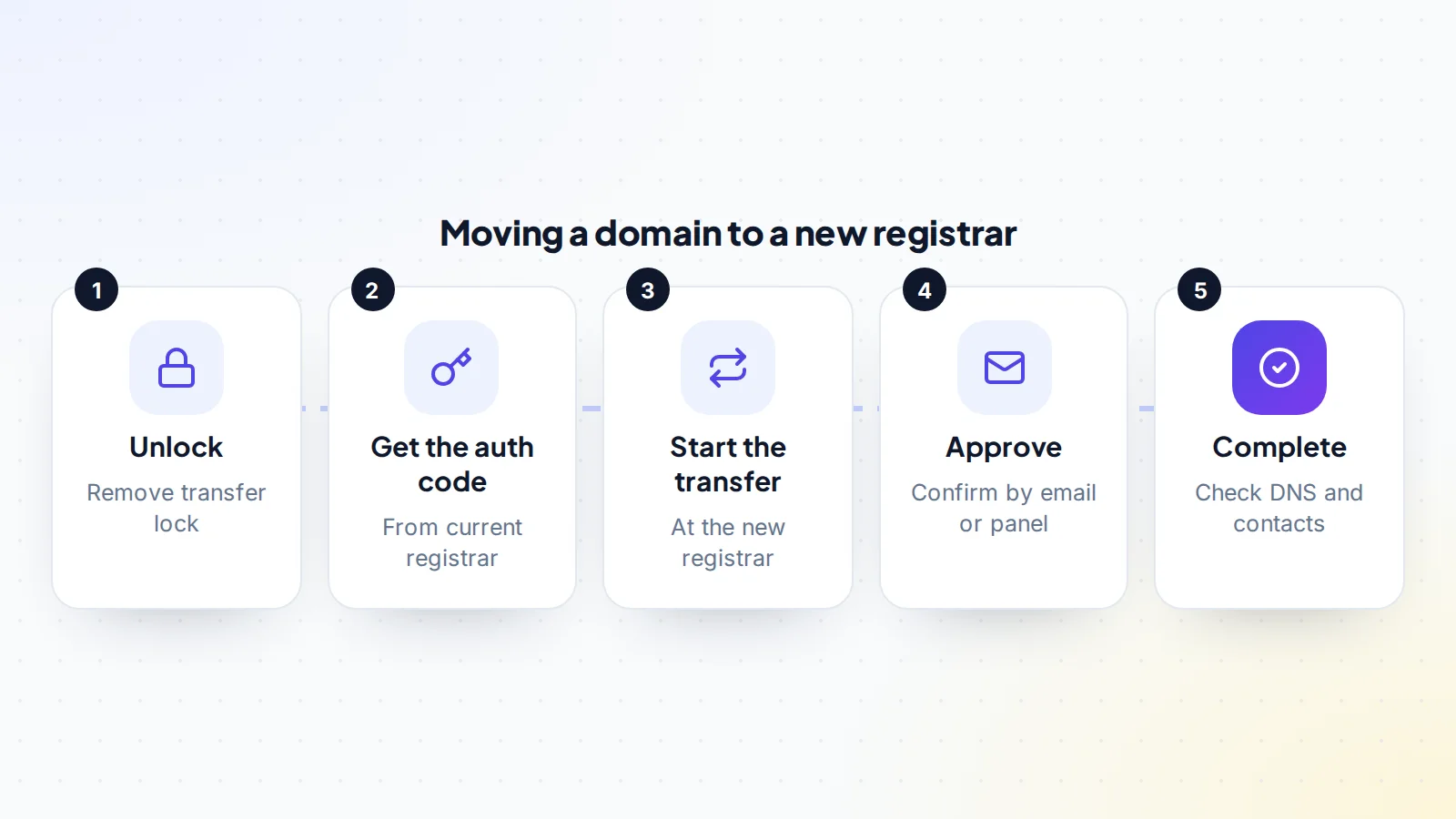
- Unlock the domain. Most registrars apply a transfer lock by default to stop unauthorised moves. Turn it off in the domain settings.
- Get the auth code. Request the authorisation code from the current registrar. ICANN explains that the registrar must provide it within 5 calendar days of the request, and that the code helps confirm the transfer is authorised by the registrant. Our guide to the domain auth code explains it in detail.
- Start the transfer at the new registrar. Enter the domain and the auth code. A transfer usually includes a year of renewal, paid to the new registrar.
- Approve the transfer. Depending on the registrars, you may need to confirm by email or in your account. Some registrars let you approve immediately; otherwise the transfer completes after a short waiting period.
- Check everything once it completes. Confirm the domain appears in the new account, the contact details are correct, the lock is back on and DNS still resolves.
For many generic domains such as .com, the process takes from a few hours to about a week, depending mostly on step 4. Country-code domains (such as .uk or .de) often follow their own registry’s rules, which can be quite different, so check the registry’s guidance first.
Waiting periods and locks
Transfers can be blocked for a time in a few situations. Under ICANN’s Transfer Policy as it has applied for many years:
- After a change of registrant: ICANN’s change of registrant rules say registrars must apply a 60-day lock on transfers to another registrar after a material change to the registrant’s name, organisation or email address, unless the registrant opted out beforehand where the registrar allows it.
- After registration or a previous transfer: registrars may refuse a transfer to another registrar within 60 days of the initial registration or a previous registrar transfer.
ICANN’s policy-making body has reviewed these rules and recommended changes, including a standard 30-day (720-hour) restriction after a registrar transfer and removing the lock that follows a change of registrant. Rules can change as updates are put into effect, so check which rules your registrar applies today before you plan a timeline.
ICANN notes that it doesn’t place or lift these locks itself; registrars do. If a lock applies, ask the registrar whether any option exists, or plan the handover around it, for example with an internal push to the buyer’s account at the same registrar.
Keeping the website and email working
A domain transfer moves registration, not necessarily DNS. Whether the website and email keep working depends on where the domain’s DNS is hosted:
- If DNS is hosted elsewhere (for example with the hosting company or a DNS service), the nameservers usually stay the same during a registrar transfer, and nothing changes for visitors.
- If DNS is hosted at the old registrar, the records may stop working when the domain leaves. Recreate them at the new provider and point the nameservers there before or during the move.
Either way, copy every record first: the website’s records, mail records, and the authentication records that protect email deliverability. Missing mail records are the most common cause of problems after a transfer.
The safe order for a domain sale
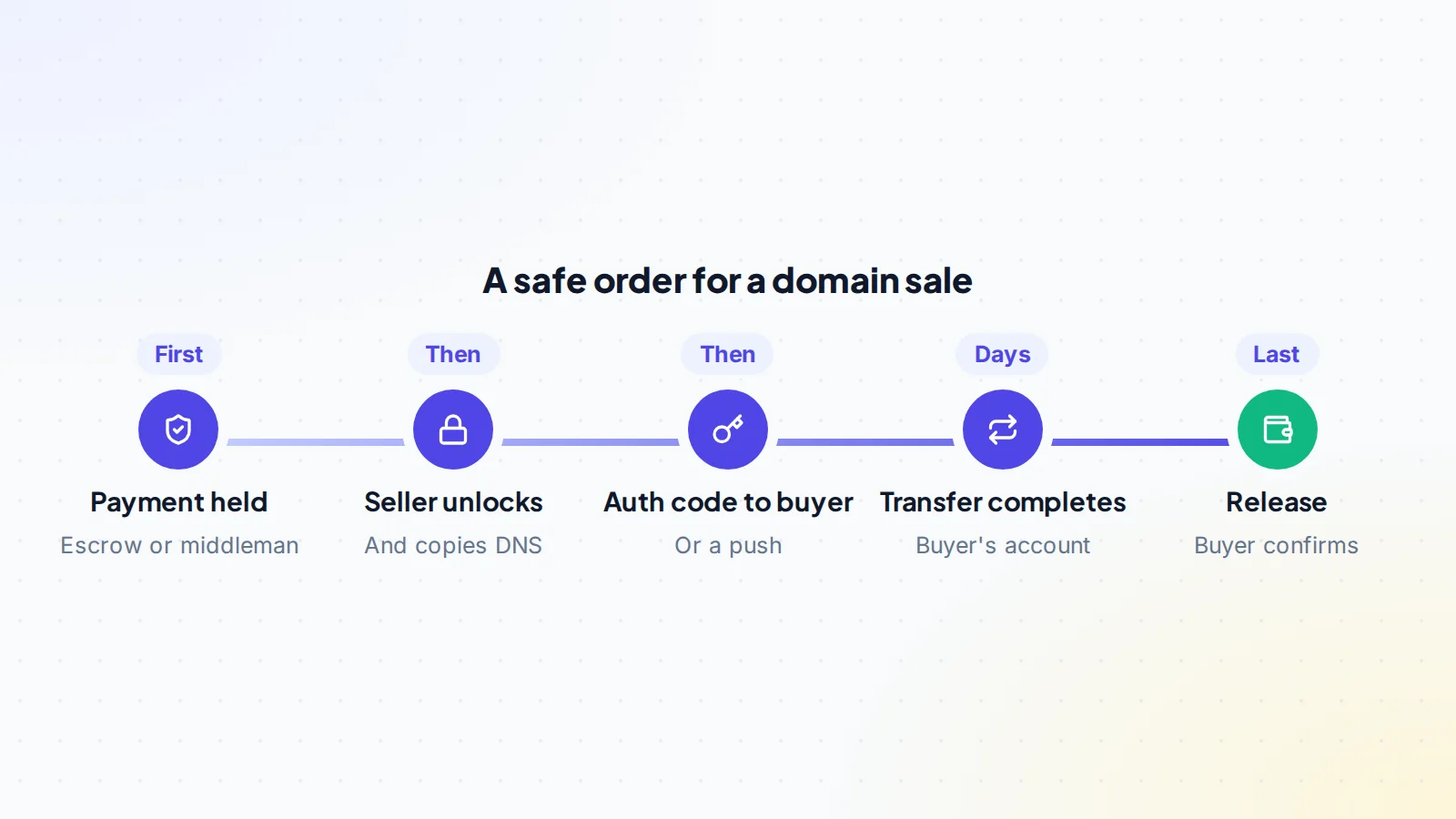
In a sale, the auth code is effectively the key to the domain: whoever has it can start a transfer to their own account. The safe order is:
- Agree the terms in writing: price, method of transfer (registrar transfer or push), and timing.
- Payment held by escrow or a trusted middleman. On digiflippers.com, the ways to pay in a deal are: directly to the seller, through escrow, and the platform never holds the money itself.
- The seller unlocks the domain, copies DNS records for the buyer if a website or email is included, and gets the auth code.
- The seller gives the buyer the auth code, or pushes the domain to the buyer’s account at the same registrar.
- The buyer completes the transfer and confirms the domain is in their account with their contact details.
- The payment is released to the seller.
Our guide to domain escrow covers how escrow services handle the inspection step for domains.
A worked example
The details below are made up to show the process.
Nadia sells a two-word .com with a small website to Omar. The domain is at Registrar A; Omar uses Registrar B. They agree terms and the payment is placed in escrow.
Nadia checks the domain: it was registered years ago, no contact details changed recently, and DNS is hosted at Registrar A. Nadia exports the DNS records into a shared document, unlocks the domain and requests the auth code, which arrives within minutes, then sends it to Omar through the deal’s messages.
Omar starts the transfer at Registrar B and recreates the DNS records there. Nadia approves the transfer from Registrar A’s panel, and it completes the same day. Omar checks that the website loads and email works, updates the contact details, re-enables the lock and confirms in escrow. The payment is released. If Nadia had changed the registrant email the week before, a lock might have delayed the registrar transfer, and they would have used a push or planned around it.
Who does what
In a sale, it helps to agree responsibilities before anything starts:
- The seller renews the domain if it’s near expiry, unlocks it, gets the auth code or performs the push, approves the outgoing transfer, and shares DNS records and any connected services (email, website hosting).
- The buyer opens an account at their chosen registrar, starts the incoming transfer, pays the transfer fee, recreates DNS if needed and updates the contact details once the domain arrives.
- Both keep the deal’s messages in one place and confirm each step in writing, so the escrow or middleman can see when the handover is complete.
Checking the transfer really happened
Before confirming the handover, the buyer should check the domain independently, not only in their own registrar account. ICANN’s registration data lookup tool shows the current registrar and the domain’s status, using the RDAP protocol that replaced WHOIS as the authoritative source for generic domain registration data. A completed transfer shows the new registrar. The buyer should also check the domain’s lock status and expiry date there.
Screenshots from the seller aren’t enough: the registry’s public data is the evidence that counts.
Transferring several domains
When a sale includes several domains (a brand name plus misspellings, or a portfolio), each domain is transferred separately, with its own auth code and approval. Make a simple list of every domain with its expiry date, registrar, lock status and auth code status, and tick each one off as it completes. Agree whether payment is released only when every domain has arrived, or domain by domain. For larger portfolios, ask the registrars whether they offer bulk transfer tools.
Staying safe
- Never send an auth code before payment is held.
- Never share your registrar login. The auth code or a push is all a buyer needs.
- Use the real escrow site, typed in yourself; fake escrow is a common domain scam. See digital asset scams.
- Turn on two-factor authentication at your registrar.
- Re-lock the domain as soon as the transfer completes.
Common problems and fixes
- Transfer rejected: the domain is still locked, the auth code is wrong or expired, or a waiting period applies. Check each in turn.
- Approval email never arrives: the registrant email is out of date. Update it, bearing in mind this can trigger a lock under the long-standing rules.
- Website or email down after transfer: DNS records weren’t copied. Recreate them from your record.
- Domain expired mid-transfer: renew first; ICANN’s rules give a grace period after expiry, but don’t rely on it.
Domain transfer process: the checklist
- Expiry date and contact email checked.
- Recent changes checked for waiting periods.
- DNS records copied.
- Domain unlocked and auth code requested.
- In a sale: payment held before the code is shared.
- Transfer started and approved.
- Website and email tested after completion.
- Contact details updated and lock re-enabled.
Ready to find your next asset?
Browse listings with verified numbers, ask sellers your questions before you offer, and agree every step in a free Deal Room.
Frequently asked questions
How long does a domain transfer take?
For many generic domains, from a few hours to about a week, depending on how quickly the transfer is approved. Country-code domains can follow different rules.
How quickly must a registrar give me the auth code?
ICANN says the registrar must provide it within 5 calendar days of your request.
Can I transfer a domain I just registered?
Registrars may refuse a transfer to another registrar for a period after registration. Check your registrar’s current rules.
Will my website go down during a transfer?
Not if DNS is hosted elsewhere or the records are recreated at the new provider before the move. Copy them first.
Is a push faster than a transfer?
Often, yes. A push moves the domain between accounts at the same registrar, usually without an auth code or a waiting period, but both sides must use that registrar.
Does a transfer include a renewal?
For many generic domains, a registrar transfer adds a year of registration, paid to the new registrar.
Does the domain transfer process change who owns the domain?
Not by itself. A registrar transfer moves the domain to a new registrar. Ownership changes when the registrant details are updated to the buyer, which normally happens as part of a sale, either during or straight after the transfer.
What if the seller stops responding halfway through?
That’s exactly the situation escrow or a middleman protects against: the payment stays held until the buyer confirms the domain has arrived. Keep all messages, and follow the provider’s dispute process if needed.
