Free Website Valuation Tools: How Accurate Are They?
What free website valuation tools actually calculate, why estimates differ, the things no calculator can see, and how to use one well as a starting point.

Type your numbers into a website valuation calculator and, a few seconds later, you have a price. It’s quick, free and genuinely useful, as long as you know what the number means. Free tools give a starting range, not a final answer. This guide explains how they work, why two tools can give different results for the same site, what no calculator can see, and how to turn a quick estimate into a price you can defend to a buyer or a seller.
For the full method behind the numbers, step by step, see our guide to online business valuation.
Key takeaways
- Most calculators multiply profit or revenue by a range of multiples based on your answers.
- The estimate is only as accurate as the numbers you enter and how well they’re verified.
- Calculators can’t see concentration, ownership problems, supplier terms or true owner hours.
- Use the estimate as a starting range, then adjust for risks and compare with similar sales.
- Buyers will check everything, so price on numbers you can prove.
How free valuation tools work
Most online businesses are valued as a multiple of their average monthly net profit, or for some SaaS businesses, of recurring revenue. A calculator automates that: it takes your revenue and profit, asks what kind of business it is and a few questions about it, and applies a range of multiples from its own model.
Typical questions include the business’s age, whether traffic and revenue are growing or falling, how many hours a week it takes, where its traffic comes from and how many income sources it has. Each answer nudges the multiple up or down. The result is a range: the low end reflects a cautious buyer, the high end an enthusiastic one.
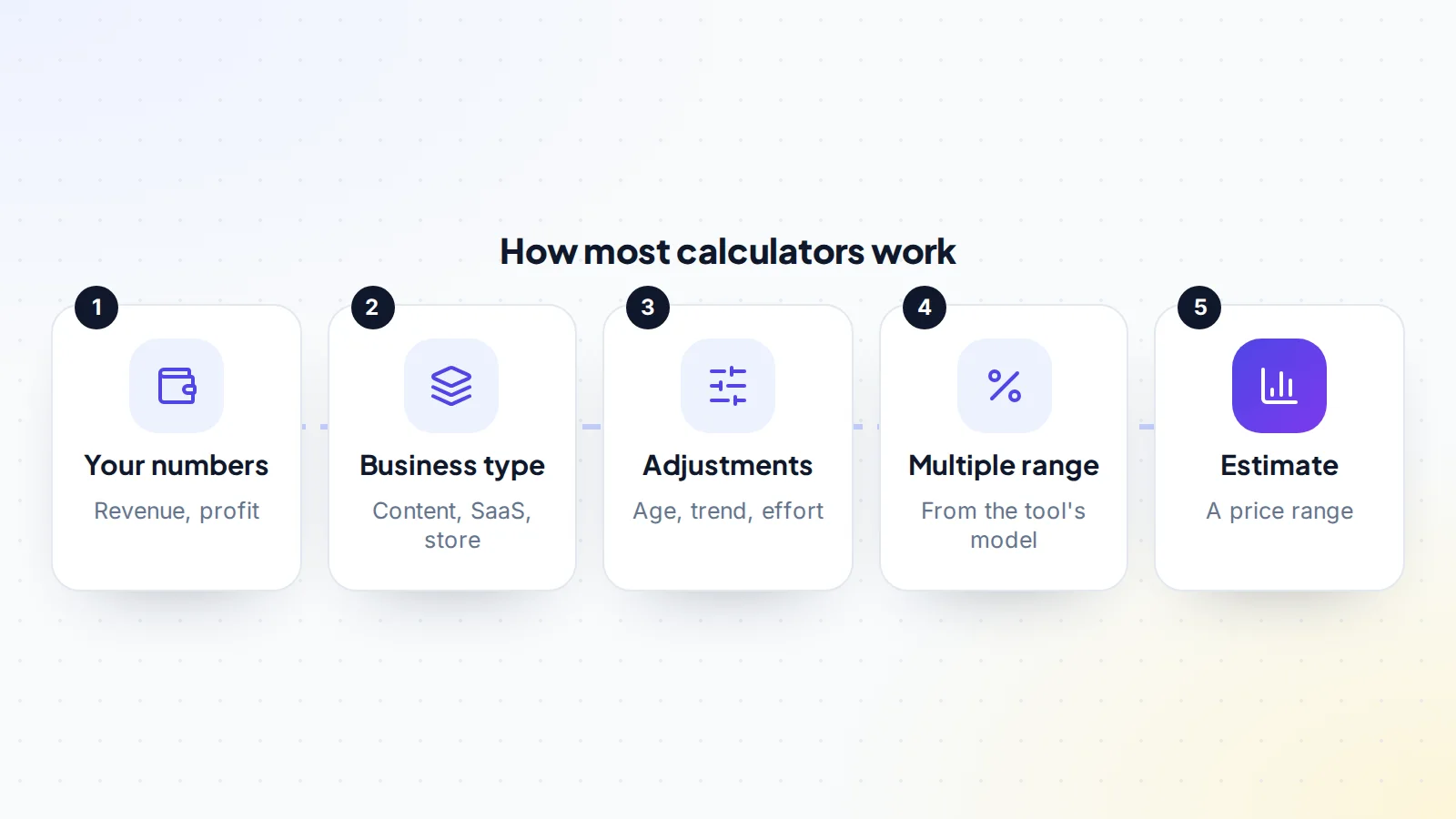
On digiflippers.com, the valuation tool works this way, with an instant mode for a quick range and a more detailed mode that asks about more factors and shows which ones move the price most.
How accurate are they?
As accurate as their inputs, and no more. A calculator can’t tell whether the profit you entered is real, whether it includes your own time, or whether one month was unusually good. Enter last month’s best figure instead of a twelve-month average, and the estimate will be too high. Forget a cost, and it will be too high again.
The model matters too. Different tools use different multiple ranges and weight factors differently, so the same site can get noticeably different results. Neither is “wrong”; they’re simply different starting assumptions. That’s why it’s worth trying more than one tool and reading how each explains its method.
Many tools are also built by brokers and marketplaces as a first step towards a listing, including ours. That isn’t a reason to ignore them, but it is a good reason to check any tool’s output against real sales of similar businesses before you rely on it. A good tool explains the factors behind its estimate; one that gives a single figure with no explanation offers less you can use when a buyer asks how you arrived at your price.
What the range really means
A calculator’s range isn’t a guarantee that someone will pay within it. It’s the tool’s view of where similar businesses tend to land, given the answers you gave. The low end is roughly what a careful buyer might offer if they found nothing better or worse than you described; the high end is what a keen buyer might pay for a business with everything going for it. Where your business actually lands depends on evidence, buyer interest and negotiation. If a tool gives a single number instead of a range, treat it as the middle of an unknown range rather than a precise price.
Profit multiples and revenue multiples
Most calculators for small online businesses use a multiple of monthly net profit, because that’s what a buyer can take home. Some tools for SaaS use a multiple of annual recurring revenue instead, especially for businesses that are growing fast or reinvesting most of their profit. The two give very different numbers, and they aren’t interchangeable: a revenue multiple applied to a low-margin business can overstate its value, and a profit multiple applied to a fast-growing SaaS reinvesting heavily can understate it. Check which one a tool uses before comparing results. Our guide to revenue vs profit valuation explains when each fits.
Getting the inputs right
The single biggest improvement you can make is better input data:
- Use twelve-month averages, not your best month. Our guide to trailing twelve months profit explains why.
- Use net profit, after every cost: hosting, tools, writers, ads, payment fees and paid help.
- Be honest about your hours. Buyers will value the time they’ll need to put in; see our guide to owner hours.
- Check traffic sources in your analytics, such as the Traffic acquisition report in Google Analytics, rather than guessing.
- For subscription businesses, use monthly recurring revenue calculated the standard way, excluding one-off charges.
What no calculator can see
Some of the biggest influences on price never appear in a calculator:
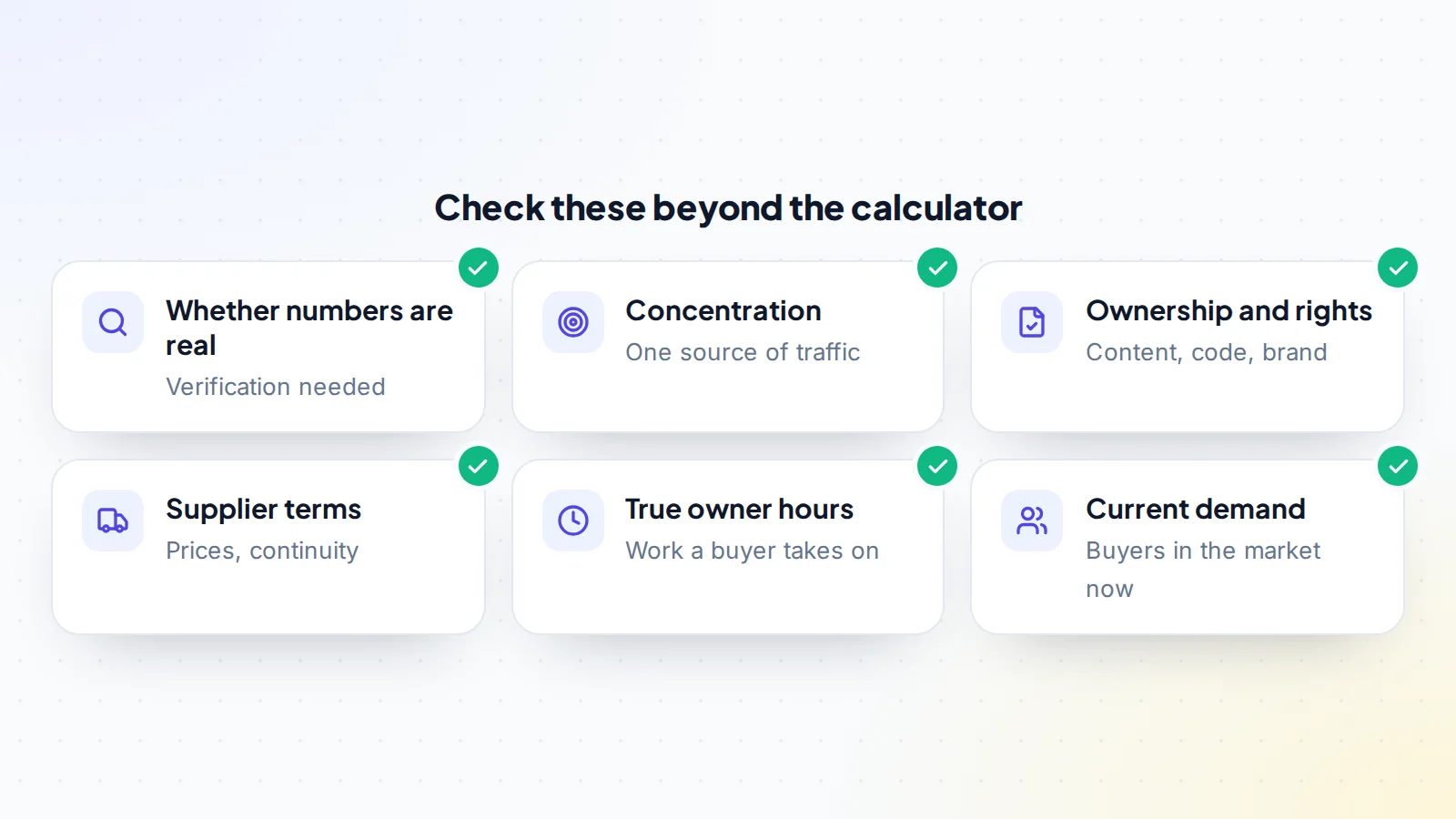
- Verification: whether the numbers are real and provable. Verified numbers support a higher price.
- Concentration: one traffic source, a few pages or one partner carrying the business. Our guide to traffic concentration risk explains how buyers price it.
- Ownership: whether content, code and the brand are fully transferable.
- Suppliers and platforms: terms that may change after a sale.
- Market conditions: how many buyers are active for your type of business right now.
- Quality: the strength of content, code, design and reputation.
Turning an estimate into a price
- Start with the calculator range, using clean, twelve-month figures.
- Adjust for known risks: concentration, a falling trend, heavy owner hours or a single income source each push toward the low end.
- Adjust for strengths: verified numbers, several income streams, steady growth and a business that runs without you push toward the high end.
- Compare with similar sales: businesses of the same type, size and age that have sold recently.
- Settle on a range you can defend with evidence, and an asking price within it.
Why verified numbers change the result
Two sites with identical figures can sell for different prices if one can prove its numbers and the other can’t. Buyers discount what they can’t check, because they have to allow for the chance that it isn’t true. Connecting analytics, sharing payout reports and verifying revenue removes that discount. On digiflippers.com, sellers can verify key numbers, and buyers see which figures are verified on the listing. Our guide to verified metrics explains how it works.
When you run a calculator, use only numbers you could verify if asked. That keeps your estimate close to what a careful buyer will calculate for themselves.
Keep your valuation up to date
A valuation is a snapshot. Traffic, income and costs change month by month, and so do buyers’ expectations. If you’re preparing to sell over several months, re-run your numbers each month with the latest twelve-month figures, and note what moved the result. It helps you spot problems early and shows buyers a clear, consistent history when you list.
For sellers: using a calculator well
A calculator is a good first step before listing. Use it to understand which factors move your price most, then work on them: tidy your accounts, document your processes, add an income source or reduce the hours the business needs. Run the numbers again after each change. When you list, show buyers the evidence behind your price, not just the calculator’s figure. Buyers tend to trust proof more than estimates, and a price backed by verified data is easier to hold during negotiation. Our guide to increasing business value before a sale covers the most effective changes.
For buyers: reading a seller’s valuation
When a listing quotes a calculator’s figure, treat it as the seller’s starting point. Check the inputs: is the profit a twelve-month average, are all costs included, and are the owner’s hours realistic? Then do your own adjustments for risks the calculator couldn’t see. A fair offer is one you can explain with evidence, which also makes it easier for the seller to accept.
Common input mistakes
- Using revenue where profit is asked for, which can inflate the result many times over.
- Leaving out your own time, so the profit looks higher than a buyer will see.
- Using a seasonal peak instead of a twelve-month average.
- Counting one-off income, such as a single large sponsorship, as if it repeats.
- Guessing traffic sources instead of checking them.
Fixing these before you run any website valuation calculator gives you an estimate a buyer is far more likely to recognise.
When to get a professional valuation
For most small sales, a calculator plus your own adjustments and comparable sales is enough. A professional valuation from an accountant or broker is worth considering when the business is large, has several entities or partners, involves complex contracts or staff, or when the valuation will be used for something formal, such as a loan, an investor or a dispute. Professionals look at the same factors, but with more data, more checks and a written report you can rely on.
Different businesses, different measures
- Content sites: usually profit-based, with traffic quality and concentration weighing heavily.
- E-commerce stores: profit after product costs and ads, with suppliers and stock considered separately. See our guide to dropshipping stores.
- SaaS: often recurring revenue or profit, with churn and growth central.
- Apps: revenue, active users and store ratings; see our guide to buying a mobile app.
- Domains and early-stage sites: rarely profit-based; comparable sales and potential matter more.
A good calculator asks different questions for each type. If one asks the same questions for a domain and a SaaS business, take its result with extra caution.
A worked example
The numbers below are made up to show the method.
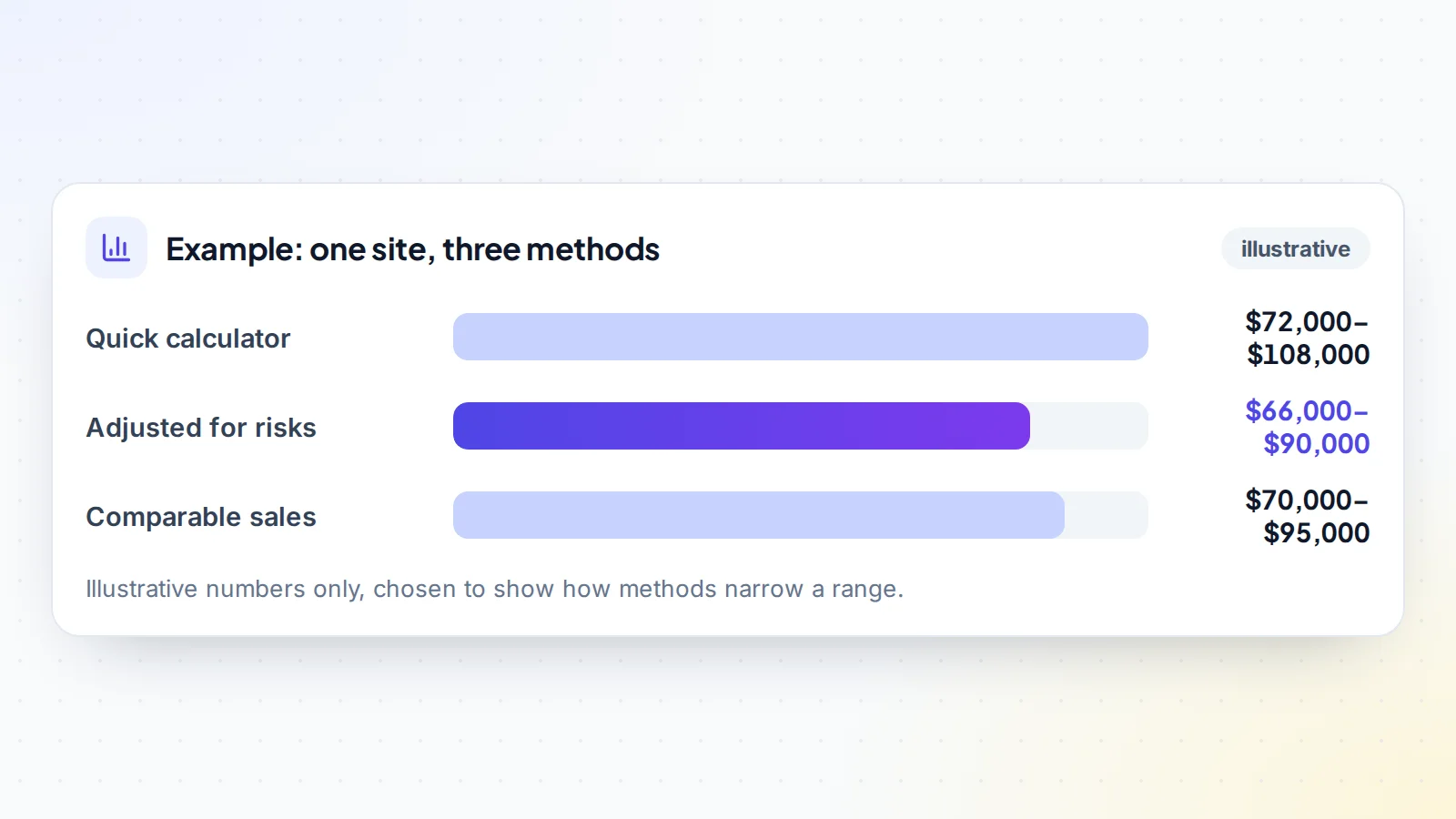
Ella runs a content site with a twelve-month average net profit of $3,000 a month. A quick calculator suggests $72,000 to $108,000. Ella knows two risks the calculator didn’t ask about: 70% of traffic comes from search, and one affiliate programme pays most of the income. Adjusting for those, Ella narrows the range to $66,000 to $90,000. Recent sales of similar sites suggest $70,000 to $95,000.
Ella sets the asking price at $88,000, with verified analytics and twelve months of income records ready to share. A buyer offers $80,000; they agree $84,000, a figure both can explain with the same evidence.
Website valuation calculator: the checklist
- Twelve-month average net profit used, with every cost included.
- Owner hours entered honestly.
- Traffic sources checked in analytics.
- More than one tool tried, and their methods read.
- Range adjusted for concentration, trends and income sources.
- Range compared with recent similar sales.
- Evidence prepared for every number in the listing.
- Final range and asking price written down with reasons.
Ready to find your next asset?
Browse listings with verified numbers, ask sellers your questions before you offer, and agree every step in a free Deal Room.
Frequently asked questions
How accurate is a website valuation calculator?
It’s a useful starting range, as accurate as the numbers you enter. It can’t verify data or see risks such as concentration, ownership problems or supplier terms.
Why do different calculators give different results?
They use different multiple ranges and weight factors differently. Try more than one and read how each explains its method.
What numbers should I enter?
Twelve-month averages of revenue and net profit after every cost, honest owner hours and traffic sources from your analytics.
Can I list my site at the calculator’s price?
You can start there, but adjust for risks and strengths and compare with similar sales. Buyers will check everything, so price on what you can prove.
Are free valuation tools worth using?
Yes, for a quick range and to see which factors move your price. Combine them with due diligence and comparable sales for a final figure.
Does digiflippers.com have a valuation tool?
Yes. It’s free, with an instant mode and a detailed mode that shows which factors affect the estimate most.
Should I use a revenue or a profit multiple?
For most small online businesses, profit. Some SaaS valuations use recurring revenue. Check which one a tool uses, and don’t compare results across the two.