
How to Secure a Game Account After You Buy It
The first hour after you buy a game account matters most. Here's the order to change email, password, two-factor and recovery so the account is fully yours.

Buying a game account is exciting: the skins, ranks and items you wanted are suddenly yours. But an account is only truly yours once every route back into it belongs to you. The first hour matters most, and the order you change things in matters too. This guide shows you how to secure a game account properly, step by step, so you can enjoy it with confidence.
The steps work for most platforms, including Epic Games, Steam, PlayStation and Xbox, with notes on where each platform has its own rules. If you haven’t bought yet, start with our guide on how to buy a game account.
Key takeaways
- Change the account email first. It controls password resets and most recovery options.
- Then set a new, unique password and turn on two-factor authentication on your own device.
- Update or remove the phone number, save new backup codes and check every linked platform.
- Sign out all other sessions and devices, and remove old payment methods.
- Agree the handover steps with the seller in advance, and keep payment held until you’ve finished.
Why the first hour matters
When you buy an account, the previous owner knows its history: the old password, the security questions, the recovery phone, maybe a backup code saved somewhere. Most sellers are honest, but a secure handover doesn’t depend on trust. It depends on making sure that, by the end, nothing the previous owner knows or holds can get them back in.
That’s why the steps below come in a particular order, and why it’s best to do them together with the seller during the agreed handover, while the payment is still held by escrow or a middleman.
Before the handover: plan it with the seller
Agree in writing:
- Which email comes with the account: either the original email is handed over too, or the seller changes the account’s email to yours.
- Who holds two-factor during the handover, and when it moves to your device.
- Linked platforms: which consoles or services are connected and whether they stay linked.
- Timing: some platforms limit how often details can change; Epic Games’ help centre, for example, explains that an account’s email can only be changed once every 90 days, so check the account’s recent changes first.
- Payment: held by escrow or a middleman until you’ve completed the steps. On digiflippers.com, the ways to pay in a deal are: directly to the seller, through escrow, and the platform never holds the money itself.
Setting up the right email and password manager
Because the email is the foundation of everything else, it’s worth setting it up properly before the handover starts:
- Create a dedicated address for the account. Using an email that’s only connected to this account means a problem elsewhere can’t spread to it, and it makes the account easier to hand over cleanly if you ever sell it.
- Protect the email itself with a strong, unique password and two-factor authentication. An account is only as secure as the email that can reset it.
- Use a password manager to generate and store long, unique passwords for both the email and the game account, along with backup codes and notes about linked platforms.
- Keep recovery details current for the email account too, such as a phone number and a backup address that you control.
Ten minutes spent here makes every later step faster and safer.
How to secure a game account, step by step
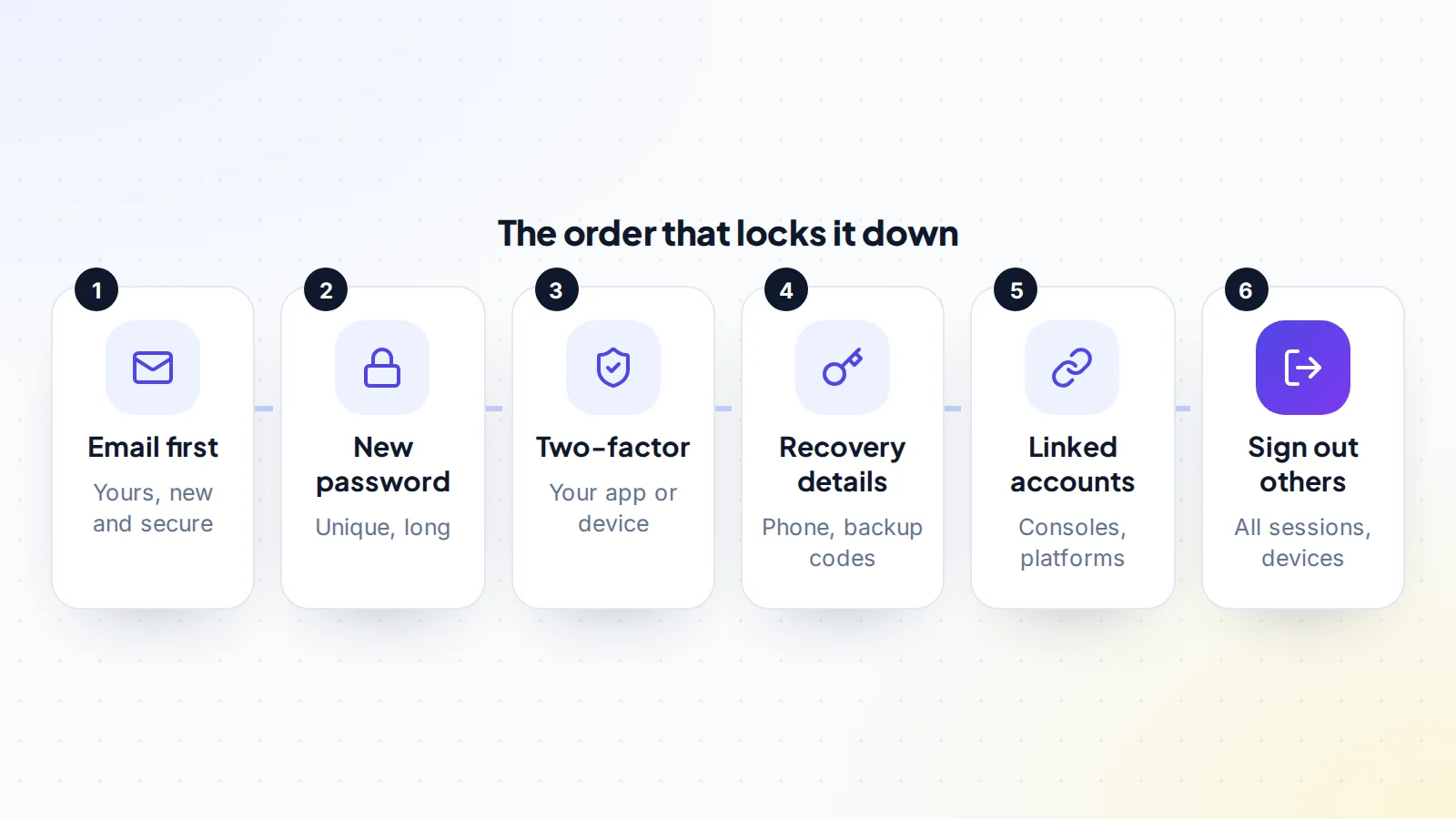
- Change the email to yours. Use an email address that only you control, ideally a new one used just for this account, with its own strong password and two-factor authentication. If the original email is handed over instead, change that email’s password and recovery details first.
- Set a new password. Long, unique and not used anywhere else. A password manager makes this easy.
- Turn on two-factor authentication on your device. Remove the previous owner’s authenticator or phone, and set up your own. Use an authenticator app where the platform supports it.
- Update recovery details. Replace or remove the phone number, change security questions where they exist, and generate new backup codes (which invalidates old ones on many platforms). Store them offline.
- Check linked accounts and platforms. Review console connections and other linked services, and remove any that aren’t part of the deal.
- Sign out everywhere else. Use the platform’s option to sign out of all sessions or devices, and remove any authorised devices you don’t recognise.
- Remove old payment methods and add your own if you plan to buy anything.
Backup codes and recovery, done properly
Backup codes are your way back in if you lose your phone or authenticator. When you secure a game account after buying it, generating fresh backup codes is one of the most important steps, because codes the previous owner saved may still work until new ones are created. On many platforms, generating new codes cancels the old set.
Store the codes somewhere you’ll find them in a year: in your password manager, printed and kept safe at home, or both. Don’t keep them only on the same phone as your authenticator, and never share them with anyone, including people claiming to be support staff.
Platform notes
Epic Games
Epic’s account settings let you change the email (with a code sent to the current address and a verification link to the new one), the password and two-factor authentication. Epic supports several two-factor methods, including authenticator apps and email codes. Check the connected accounts section for console links.
Steam
Steam Guard protects sign-ins and trades. Steam’s support pages explain how the Steam Guard Mobile Authenticator works and how to move it to a new phone. Make sure the authenticator is on your phone, not the seller’s, and review authorised devices.
PlayStation
PlayStation explains how to set up 2-step verification for your account, through a web browser or on the console, and where to find 2-step verification backup codes. Turn it on with your own phone or authenticator, and save the backup codes.
Xbox and Microsoft
Xbox accounts are Microsoft accounts. Microsoft’s support explains how to turn on two-step verification from the security settings, using email, a phone number or an authenticator app, and recommends keeping several pieces of security information on the account. Replace the seller’s security info with yours.
Moving authenticators between people has its own steps; our guide to transferring accounts with two-factor authentication covers them in detail.
What to check on day one
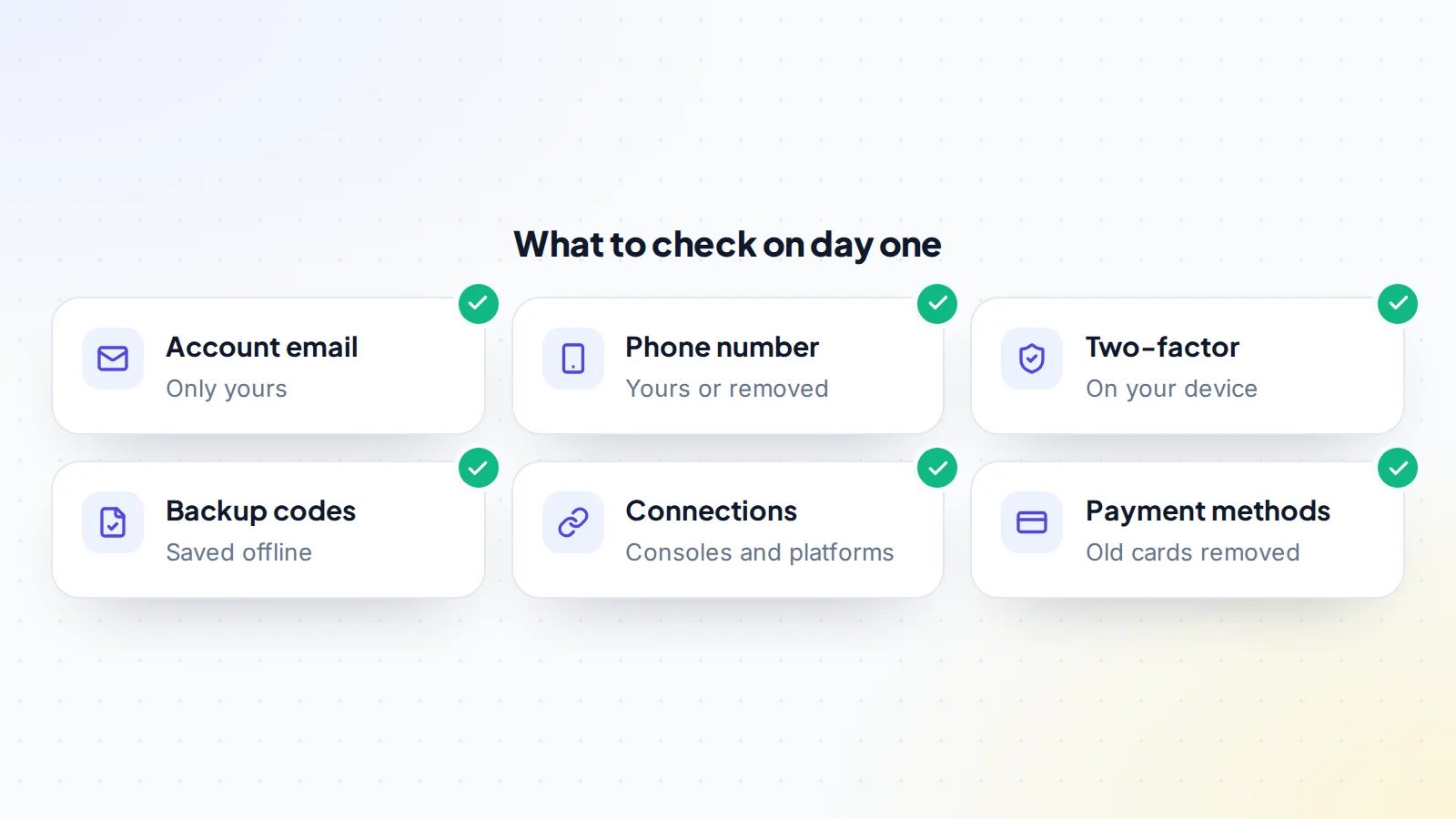
Once the steps are done, go through the account settings and confirm that every item points to you. If anything still shows the seller’s details, fix it before confirming the handover.
A worked example
The details below are made up to show the process.
Riley buys a long-standing account with rare items from early seasons. The deal says the seller will change the account’s email to Riley’s, and payment is held by a middleman.
On handover day, Riley creates a new email address just for the account and turns on two-factor for that email. The seller changes the account email to Riley’s address and confirms the code from the old address. Riley immediately sets a new password, removes the seller’s authenticator and sets up their own authenticator app, saves new backup codes in a password manager, and removes the old phone number.
Next, Riley checks connections: one console link belongs to the seller and isn’t part of the deal, so Riley removes it. Riley signs out of all other sessions, removes a saved card, and plays a match to confirm everything works. Only then does Riley confirm with the middleman, and the payment is released. The whole process takes under an hour.
Checking the account’s history
Once the account is secured, take a few minutes to look around. It confirms you received what you paid for and helps you spot anything unusual early:
- Inventory and items: check that every item, skin, rank and currency balance described in the listing is there.
- Purchase history: where the platform shows it, it’s a useful record of how items were obtained.
- Region and platform settings: confirm they match what you expected, since some items and features depend on them.
- Friends, clubs and messages: tidy these up so the account reflects you, and remove anything that belonged to the previous owner’s social circle.
- Recent sign-ins: where the platform lists them, confirm the latest ones are yours.
If anything doesn’t match the listing, raise it with the seller through the deal messages before you confirm the handover.
For sellers: making the handover easy
Sellers can make this process smooth and build a reputation for clean handovers:
- Check before listing that you can change the email and two-factor settings, and that no recent change will delay them.
- Write down every linked platform and which ones come with the account.
- Be available at an agreed time to receive codes and approve changes.
- Remove your own payment methods and personal details before the handover.
- Never ask the buyer to confirm before they’ve finished securing the account.
Buyers notice and remember sellers who make this easy, and that shows in reviews. For the seller’s full process, see how to sell a game account.
Keeping it secure afterwards
- Keep two-factor on and your backup codes somewhere safe.
- Use a unique password for the account and for its email.
- Be wary of messages asking you to sign in through a link, “verify” your account or share a code. Platforms don’t ask for your codes. See digital asset scams for common tricks.
- Review security settings every few months.
- Keep your purchase records: the agreement, payment confirmation and messages.
Security protects value
An account’s value comes from its items, rank and history, and from the fact that its owner can fully control it. A well-secured account keeps its value if you decide to sell later, because you can offer a clean handover with full access. Our guides to rare skins value, Fortnite account value and Steam inventory value explain what drives that value.
If something goes wrong
- A code goes to the seller’s email or phone: stop, contact the seller through the deal messages, and complete that step together before going further. Don’t confirm the handover.
- A detail can’t be changed yet because of a platform time limit: agree with the seller and the escrow or middleman how long to wait, and keep payment held.
- You notice a sign-in you don’t recognise: change the password, sign out all sessions and check two-factor immediately, then contact the platform’s support.
Secure a game account: the checklist
- Handover steps agreed in writing; payment held.
- Email changed to one only you control, with its own two-factor.
- New, unique password set.
- Two-factor moved to your device or app.
- Phone number and security questions updated.
- New backup codes saved offline.
- Linked platforms and devices reviewed.
- All other sessions signed out.
- Old payment methods removed.
- Handover confirmed only after every step.
Ready to find your next asset?
Browse listings with verified numbers, ask sellers your questions before you offer, and agree every step in a free Deal Room.
Frequently asked questions
What should I change first after buying a game account?
The email. It controls password resets and most recovery options, so once it’s yours, the rest can’t be undone from the outside.
Do I need the original email?
Not always. It’s enough for the seller to change the account’s email to yours, as long as the platform allows it. If the original email is handed over, secure that email first.
How do I move two-factor authentication to my phone?
Remove the seller’s method in the security settings and set up your own, usually with an authenticator app. On some platforms, the seller needs to approve the removal, so do it together.
Should I confirm the handover before securing everything?
No. Complete every step first, while payment is still held, then confirm.
How long does it take?
Usually under an hour if both sides are available, unless a platform time limit applies to a recent change.
What if the platform asks me to wait before changing something?
Some platforms limit how often key details can change. Agree with the seller and the escrow or middleman to keep payment held until the waiting time has passed and the change is made.
Sources
- Epic Games Support: How to change the email on your Epic Games account
- Epic Games Support: Two-factor authentication (2FA) and how to enable it
- Steam Support: Steam Guard Mobile Authenticator
- PlayStation Support: How to set up 2-step verification
- Microsoft Support: How to use two-step verification with your Microsoft account
