
Why You Should Use Escrow When Buying a Domain
Domain escrow holds the buyer's money until the domain arrives. How the process works step by step, what the inspection period is for, and how to use it safely.
A domain sale has a simple problem at its core: the buyer doesn’t want to pay before receiving the domain, and the seller doesn’t want to hand over the domain before being paid. Domain escrow solves it by putting a neutral, licensed third party in the middle. The buyer’s money is held until the domain arrives and is confirmed, then released to the seller. It’s the standard way to buy and sell valuable domains between people who don’t know each other.
This guide explains how domain escrow works step by step, what the inspection period is, what it costs, how it protects both sides, when it’s worth using, and how to avoid fake escrow. For the transfer itself, see the domain transfer process and push vs transfer.
Key takeaways
- Domain escrow holds the buyer’s payment with a neutral third party until the domain transfer is confirmed.
- Escrow.com describes the process as: agree terms, buyer funds, seller transfers, buyer confirms control, funds released.
- The inspection period, agreed in advance, gives the buyer time to confirm control; Escrow.com allows 1 to 30 calendar days.
- Fees are usually a percentage of the price; buyer and seller agree who pays.
- Always choose and reach the escrow provider yourself; fake escrow sites are a common domain scam.
Why use escrow for a domain
Domains move quickly and can be hard to recover. Once a seller sends an auth code or pushes a domain, the buyer controls it within hours. Once a buyer sends a bank transfer, the money is usually hard to get back. The FTC warns that wiring money is like sending cash. Escrow removes that risk for both sides: the money exists and is held before the domain moves, and it’s released only when the domain arrives.
How domain escrow works
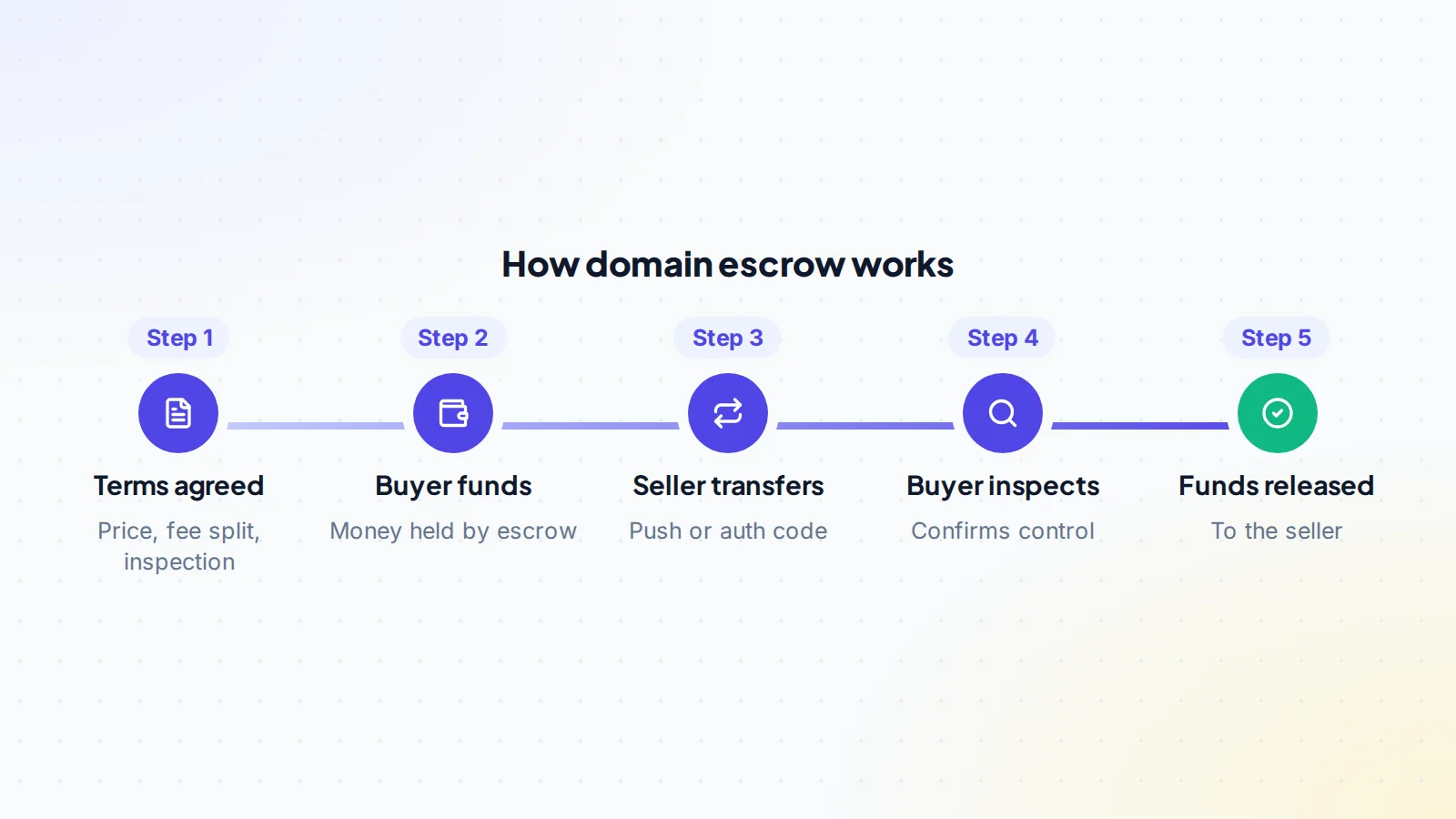
Escrow.com describes the standard domain process in four steps: both sides agree terms, the buyer deposits funds, Escrow.com tells the seller the funds are received and directs them to transfer the domain, and once the buyer confirms control during the inspection period, the funds are released. In practice:
- Agree terms: the domain, price, who pays the fee, the transfer method and the inspection period.
- Buyer funds the escrow by the methods the provider accepts.
- Escrow confirms the funds to both sides through its own platform.
- Seller transfers the domain by a push at the same registrar or a registrar transfer with an auth code.
- Buyer confirms control: the domain is in their account with their details.
- Funds are released to the seller.
The inspection period
The inspection period is the time the buyer has to check the domain after it arrives. Escrow.com explains it’s agreed by all parties, can range from 1 to 30 calendar days, and starts when the buyer marks the item received or Escrow.com confirms delivery. The buyer can accept early, which ends the period and releases the funds; if the buyer does nothing, the period ends automatically when it expires. If the buyer rejects the domain, Escrow.com’s instructions require it to be returned to the seller.
For most domain sales, a short inspection period is enough, because checking control is quick: the domain is in the buyer’s account and public registration data shows the new registrar.
What escrow protects
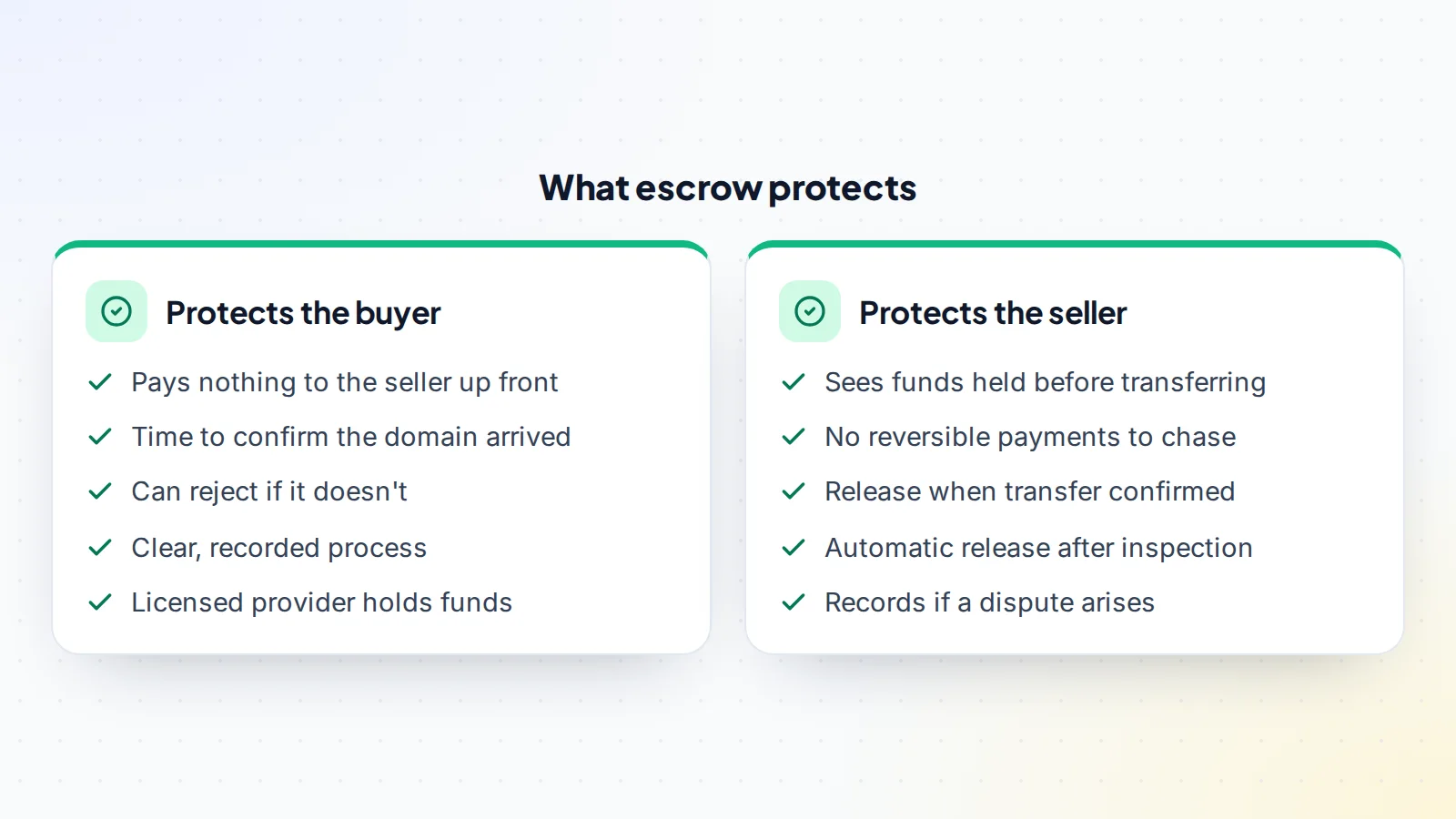
For the buyer, escrow means paying no one until the domain arrives, and having a defined process if it doesn’t. For the seller, it means seeing proof that the money exists before transferring, and avoiding reversible payment methods that could be disputed later. See chargeback risk when selling online.
What it costs
Escrow providers usually charge a percentage of the price, often with a minimum, and the amount can depend on the payment method. Escrow.com publishes a fee calculator so both sides can see the cost before starting. Buyer and seller agree who pays: the buyer, the seller or half each. On digiflippers.com, the escrow fee is normally paid by the seller, and you can agree a different split in the deal. See escrow fees for more.
When escrow is worth it
- Any sale between strangers where the price matters to either side.
- Premium domains, where the amounts are significant; see premium domains.
- Cross-border sales, where recovering money would be especially hard.
- Domains with live websites or email, where a careful, confirmed handover matters.
For very small amounts between people who already trust each other, the fee may outweigh the benefit. Otherwise, escrow is usually money well spent.
Domain escrow vs paying directly
Paying directly is faster and avoids a fee, but one side has to go first. If the buyer pays first, they rely on the seller to transfer the domain. If the seller transfers first, they rely on the buyer to pay and not reverse the payment. With a stranger, either is a real risk. Escrow costs a modest fee and a little time, and in return neither side has to trust the other. For anything beyond small amounts between people who already know each other, domain escrow is usually the better choice. Our guide to escrow vs direct payment compares the options in detail.
If something goes wrong
- The seller doesn’t transfer: the funds stay in escrow, and the transaction can be cancelled under the provider’s rules.
- The transfer is delayed: for example by a registrar waiting period. Agree a new timeline in the escrow platform, or switch to a push if both sides can use the same registrar.
- The buyer rejects the domain: Escrow.com’s instructions say a rejected domain must be returned to the seller within 10 calendar days, unless the provider is holding it under a separate agreement.
- A disagreement arises: the provider’s dispute process applies, using the records in the escrow platform.
Clear terms agreed at the start prevent most of these problems.
Domains with websites
When a domain comes with a live website, the sale involves more than the domain: hosting, files, analytics and sometimes income. Escrow still works the same way, but the inspection period may need to be longer, so the buyer can check everything included. Escrow.com, for example, describes a separate process for a domain name sold with its website content. Copy DNS records before the transfer so the site stays online, and list every included item in the terms. Our asset transfer checklist helps.
Premium domains and larger deals
The higher the price, the more each step deserves a second look. For a premium name, both sides usually want a little more structure around the escrow:
- Confirm the seller controls the domain before funding. The registrant details or a short verification step on the marketplace show the seller can actually move it.
- Check the history. Past use, archived pages and any trademark that matches the name are worth checking before money moves. A quick search in the USPTO trademark database is a sensible start for US marks.
- Agree the timing in writing, including what happens if a registrar rule delays the transfer, because rules can block a further transfer for a period after a recent registration or transfer.
- Allow enough inspection time for the buyer to confirm control at their own registrar, not just in a screenshot.
- Pay the escrow with a traceable method and keep the provider’s receipts.
For a large purchase, some buyers also ask an adviser to review the terms. Our guide to buying a premium domain covers pricing and checks in more depth.
Avoiding fake escrow
Escrow only protects you if it’s real. Fake escrow sites, suggested by the other side, are one of the most common domain scams: they show “funds received” when nothing was paid, and wait for the seller to transfer. California’s DFPI has warned about fake escrow sites that use fictitious or copied licence numbers. Protect yourself:
- Choose the provider yourself, or use the marketplace’s own options.
- Type the provider’s address yourself; never use a link from the other side.
- Check the provider’s licence with the regulator.
- Confirm funds by signing in to your own escrow account, not by email.
Read how fake escrow scams work for the full list of warning signs.
A worked example
The details below are made up to show the process.
Alex sells a short .com to a buyer abroad for an agreed price. They agree to use a licensed escrow company, split the fee, use a push at Alex’s registrar (the buyer opens an account there) and set a three-day inspection period.
The buyer funds the escrow. Alex signs in to the escrow account directly and sees the transaction marked as funded, then pushes the domain to the buyer’s account. The buyer accepts the push, checks the domain is in their account and that public registration data shows the right registrar, and clicks accept in escrow the same day. The funds are released to Alex. Neither side ever had to trust the other with money or the domain.
Questions to settle before opening escrow
- Which escrow provider, reached how?
- Who pays the fee: buyer, seller or split?
- Push or registrar transfer, and at which registrar?
- How long is the inspection period?
- Is anything included besides the domain, such as a website or email?
- What happens if the transfer is delayed by a registrar rule?
Writing the answers down before anyone pays makes domain escrow quick and uneventful.
Tips for a smooth escrow
- Agree everything first: transfer method, inspection period, fee split.
- Check the domain’s status: not expired, not locked by a recent change, contact email current.
- Copy DNS records if a website or email is in use.
- Keep messages on the marketplace and in the escrow platform.
- Buyers: accept promptly once control is confirmed, so sellers aren’t left waiting.
On digiflippers.com, the ways to pay in a deal are: directly to the seller, through escrow, and the platform never holds the money itself.
After the sale: records and handover
When the funds are released, a few small steps finish the job properly. The buyer should update the registrant contact details and email at their registrar, turn on two-step sign-in for the registrar account, and set the domain to renew automatically so it can’t lapse. If the seller ran email or a website on the name, the buyer points DNS to their own services once they are ready.
Both sides should keep the record: the agreed terms, the escrow transaction summary, the transfer confirmation and the messages exchanged. These help with tax records, and they answer any later question about who owned the name and when. Sellers can remove the domain from their registrar account’s renewal settings once the buyer confirms it has arrived.
Domain escrow: the checklist
- Escrow provider chosen and reached directly.
- Licence checked with the regulator.
- Terms agreed: price, fee split, transfer method, inspection period.
- Funds confirmed by signing in to the escrow account.
- Domain transferred by push or auth code.
- Buyer confirms control and accepts.
- Funds released; records kept.
Ready to find your next asset?
Browse listings with verified numbers, ask sellers your questions before you offer, and agree every step in a free Deal Room.
Frequently asked questions
What is domain escrow?
A service where a neutral, licensed third party holds the buyer’s payment until the domain is transferred and confirmed, then releases it to the seller.
How long does domain escrow take?
Often a few days: funding, the transfer and the inspection period. A push and a quick acceptance can complete in a day.
Who pays the escrow fee?
Whoever the buyer and seller agree: the buyer, the seller, or both, half each. Write the choice into the terms before funding.
What if the buyer never accepts?
With Escrow.com, the inspection period ends automatically when it expires, and the funds are released if the buyer hasn’t rejected the domain.
Can escrow be used with a domain push?
Yes. Escrow holds the money whichever way the domain moves.
Is escrow worth it for a cheap domain?
For a low price, the escrow fee can be a large share of the deal, so some buyers and sellers use a registrar push with a marketplace payment option instead. For anything you couldn’t afford to lose, escrow gives both sides the most certainty.
What should the buyer check before accepting?
That the domain shows in their own registrar account, that they can change its settings, and that public registration data names their registrar. A screenshot from the seller is not enough.
