How to Transfer Any Social Account Without Losing Access
How to transfer a social media account safely: the two kinds of handover (roles and logins), preparing, payment protection, moving email, phone and two-step verification, linked accounts and payouts, confirming control and the first weeks after.

A social media account transfer is the moment a purchase becomes real: the account, its audience and its history move from one person to another. Done carefully, it takes a few hours to a few days and leaves the new owner in full control. Done in a rush, it can leave the old owner with a way back in, or the buyer locked out. This guide explains the two kinds of handover, how to prepare, the order of steps that keeps both sides safe, and how to confirm the job is finished.
This guide covers the handover itself. For choosing and checking an account, read how to buy social media accounts; for the seller’s side, see how to sell a social media account.
Key takeaways
- Some platforms let you add a new owner through roles; others move through the login.
- Protect the payment first, so neither side has to trust the other blindly.
- The email address behind an account is the key to it; move it or hand over the inbox.
- Reset password, two-step verification and recovery details as soon as you have access.
- Release payment only after the buyer confirms full, sole control.
The two kinds of handover
Platforms handle ownership in one of two ways, and the method decides your steps.
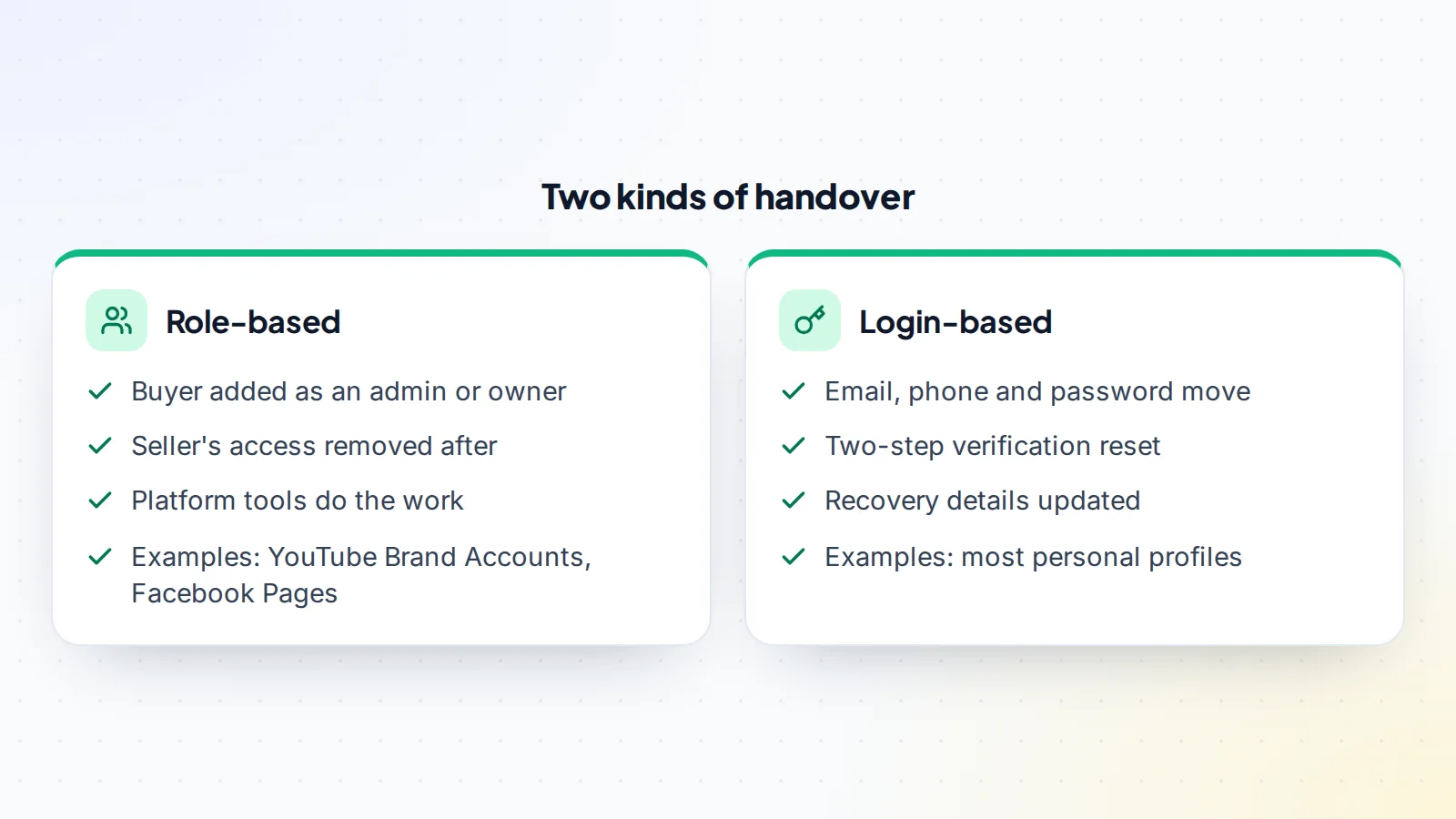
Role-based handovers use the platform’s own tools. On a YouTube channel that uses a Brand Account, the seller invites the buyer as an owner and later makes them primary owner; YouTube explains this in change channel owners and managers with a Brand Account. A Facebook Page uses Page access: a person with full control can give another person full control, and that person can then remove others, as described in Facebook’s guide to giving, editing and removing Page access.
Login-based handovers apply where an account belongs to one sign-in, as with most personal profiles. The buyer takes over the account’s email address, phone number, password and two-step verification, so the sign-in becomes theirs. This needs more care, because the old owner’s details may be linked in places that aren’t obvious.
Before you start: prepare
Agree in writing exactly what’s included: the account, any linked pages or channels, the original email inbox if it comes with the sale, content files, brand assets, and any business contacts. Agree a timeline, who does each step, and how you’ll communicate during the handover. Keep all communication on the marketplace where you agreed the deal, so there’s a record.
The seller should check the account is in good standing, with no warnings or restrictions, and that any monetization is set up so it can move or be reapplied for under the buyer’s name. Read how to secure a social media account for the checks a seller can do in advance.
Protect the payment first
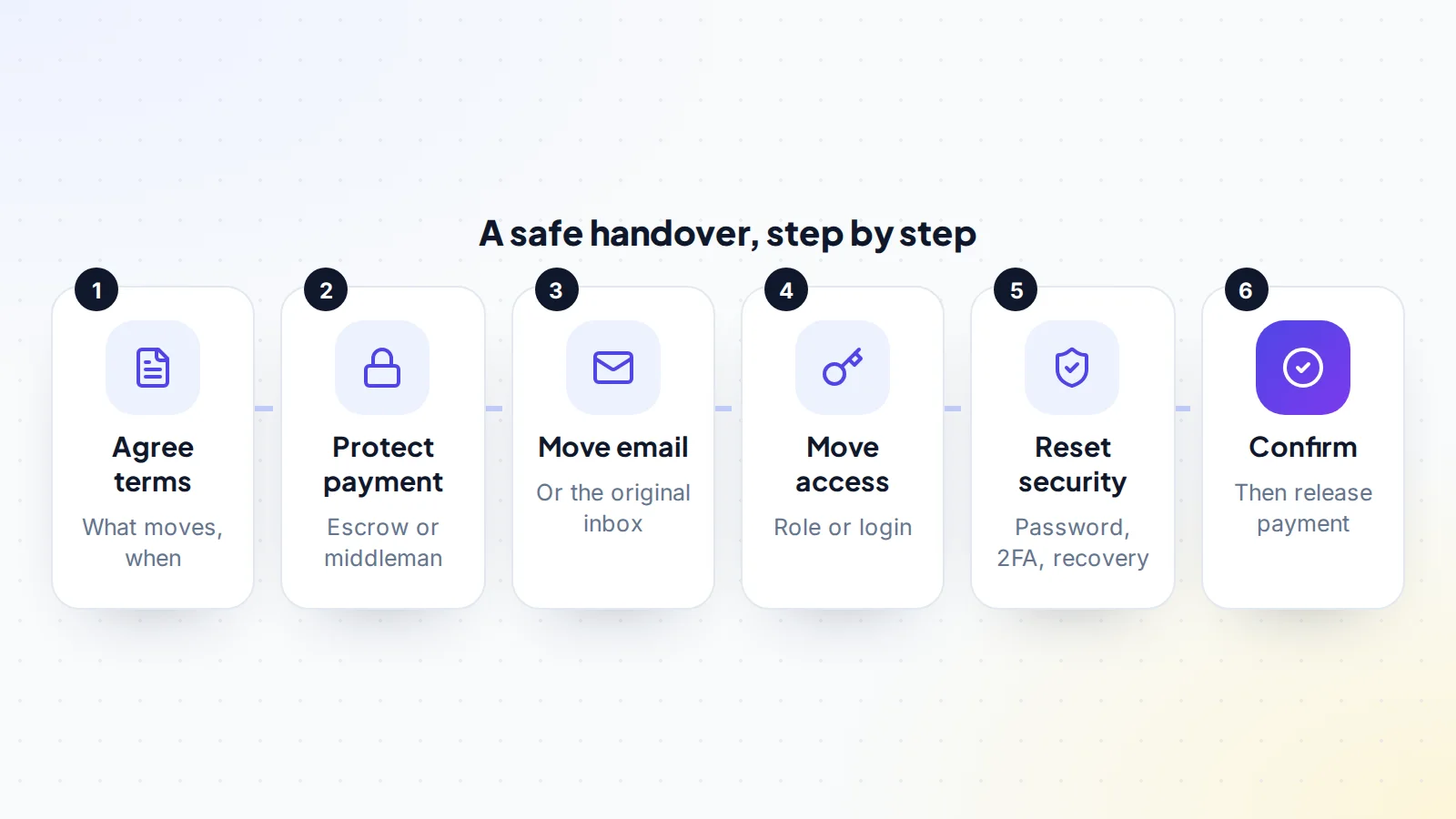
The safest order is: buyer pays into escrow or a trusted middleman; seller hands over; buyer confirms control; payment is released. That way the seller knows the money is there, and the buyer knows it won’t reach the seller until the account is theirs. Read escrow vs direct payment for the options and digiflippers.com’s escrow guide for how it works here.
Be wary of anyone who wants to skip this, pay through an unfamiliar escrow site, or move the conversation to a private chat app. Read fake escrow scams and digital asset scams.
The email address is the key
For most accounts, whoever controls the email address can reset the password. That makes the email the most important part of a login-based handover. There are two common approaches: the seller changes the account’s email to one the buyer controls, or the account was created with a dedicated email that’s handed over along with it. Read why the original email account matters.
If the original inbox is handed over, change its password, recovery phone and recovery email straight away, and turn on two-step verification on the inbox itself.
Role-based handover steps
For a YouTube Brand Account channel: the seller invites the buyer as an owner; the buyer accepts; after the waiting period YouTube applies, the seller makes the buyer primary owner; the buyer then removes the seller and any other managers they don’t need. For a Facebook Page: the seller gives the buyer full control; the buyer accepts; the buyer then removes the seller’s access and reviews everyone else with access.
Platforms add safeguards, such as waiting periods or confirmations, to protect accounts. Build them into your timeline rather than trying to rush past them, and keep payment held until they’re complete.
Login-based handover steps
- The seller changes the account email to the buyer’s, or hands over the original inbox.
- The seller removes their phone number, or the buyer adds theirs and the seller’s is removed.
- The seller turns off their two-step verification method; the buyer sets up their own straight away.
- The buyer changes the password and signs out all other sessions.
- The buyer updates recovery options and checks connected apps and devices.
Do these in one session where possible, with both people available, so there’s no gap where the account is half-moved.
Reset security straight away
As soon as the buyer has access, they should change the password to a new, unique one, set up two-step verification with their own app or device, update recovery email and phone, review logged-in devices and sign out every session but their own, and remove connected apps they don’t recognise. Read transferring accounts with two-step verification for the details.
Linked accounts and tools
Accounts are often connected to other things: a business portfolio, an ad account, a scheduling tool, a link-in-bio page, an online shop, a newsletter. Make a list of everything linked and decide for each whether it moves with the account or is disconnected. Business tools usually need their own handover, and an ad account with a payment card should be detached from the seller’s card before closing.
Monetization and payouts
Payout details belong to a person, so the buyer’s own details need to be set up. On some platforms that’s a simple change; on others, monetization is reviewed again under the new owner. Agree in advance how earnings during the handover will be split, and when payouts switch over. For YouTube, read YouTube monetization after a purchase.
Platform notes
- YouTube: Brand Account channels move through owner roles; check whether the channel uses channel permissions too. See transferring YouTube channel ownership.
- Facebook Pages and groups: moved with Page access and admin roles. See Facebook Page transfers and Facebook group admin transfers.
- Instagram, TikTok, X and Pinterest: usually moved through the login and email. See the platform guides for Instagram, TikTok, X and Pinterest.
- Telegram and Discord: ownership moves through the platform’s own owner tools. See Telegram channels and Discord servers.
Each platform’s terms and tools change over time, so check the current help pages before you begin.
Write a handover plan
A one-page plan makes any social media account transfer smoother. List every item that moves, who does each step, the order, and how each step is confirmed. Include the platform’s waiting periods, the time both of you are available, and what happens if a step fails. Share it in the marketplace conversation so both sides agree before anything starts. It takes ten minutes and prevents most of the confusion that slows handovers down.
Timing and time zones
Login-based steps work best when both people are online together, because a security code or confirmation might go to the seller’s phone halfway through. Pick a time that suits both time zones and allow an hour or two. Avoid starting late on a Friday or before a holiday, when either side may be hard to reach if something needs fixing. Platforms sometimes flag sign-ins from a new country or device; if that happens, follow the platform’s prompts calmly rather than repeating attempts, which can lock the account for a while.
What the seller should keep
Sellers should keep a record of the handover: the agreed terms, the time each step was done, and the buyer’s confirmation. Keep it until the escrow or middleman period has ended and the payment has arrived. After that, delete any copies of the buyer’s details and sign out of the account on every device you used. A clean exit protects both sides and makes a good review more likely, which helps the seller’s next social media account transfer go faster.
Confirming the transfer is complete
Before payment is released, the buyer should check every item themselves, not take the seller’s word for it.
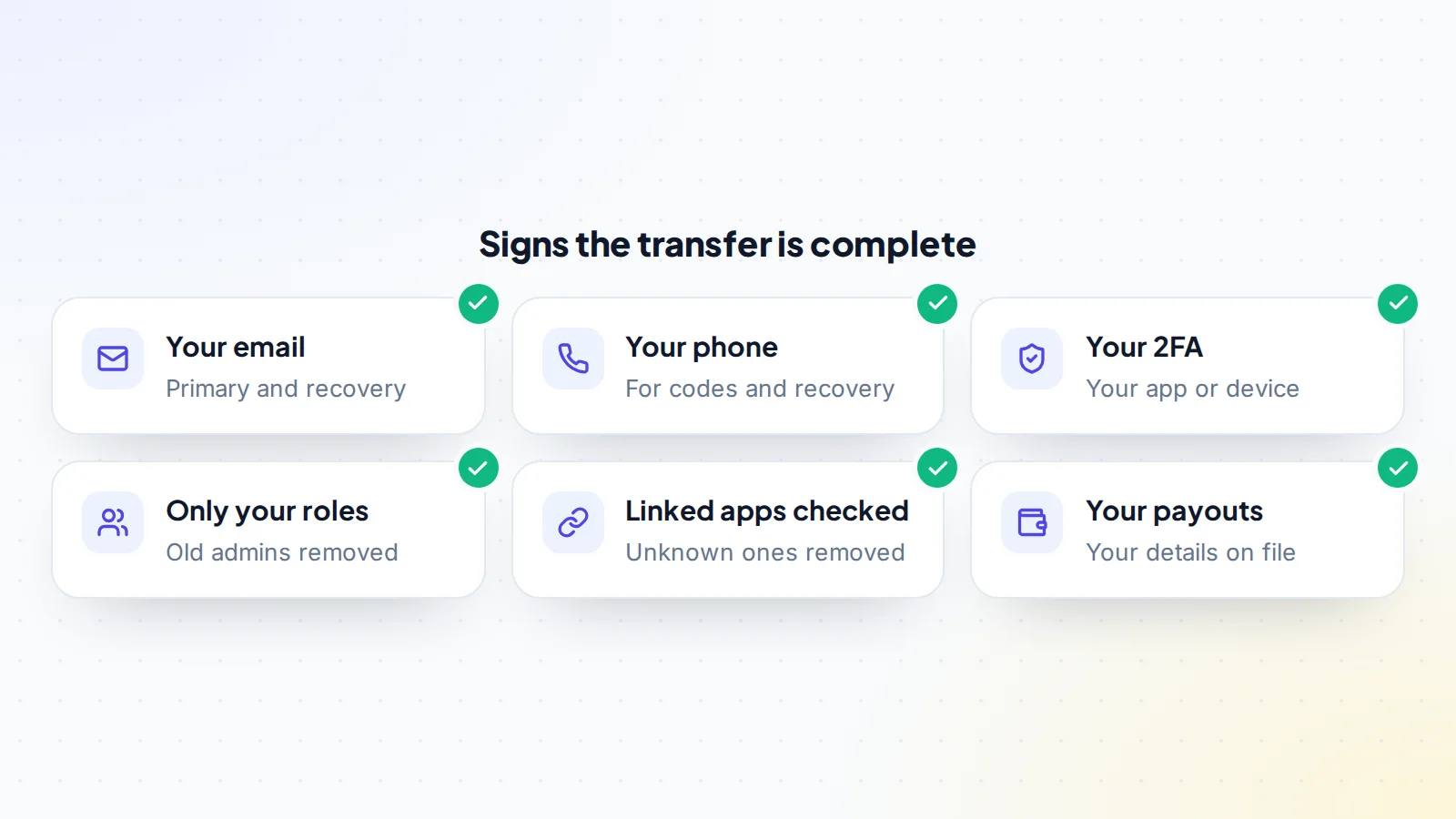
A good test: sign out everywhere, then sign in again from a new device using only the buyer’s details and two-step method. If that works and no one else appears in roles, sessions or recovery options, the account is the buyer’s.
The first weeks after
Keep posting in the style the audience knows, so the change doesn’t stand out. Check security settings again after a week, since some changes take time to show. Watch for unexpected login alerts or emails about changes. If the seller agreed to help with introductions or content, use that time well. For growth ideas, read how to grow a YouTube channel you bought; much of it applies to other platforms too.
If something goes wrong
If the buyer loses access or the seller tries to take the account back during the escrow period, stop and report it through the marketplace’s dispute process straight away; keep screenshots and messages. Use the platform’s official account recovery, not third-party “recovery services”, which are often scams. Read how sale disputes work.
Common mistakes
- Paying in full before any access moves.
- Moving the password but not the email or two-step verification.
- Forgetting linked ad accounts, shops or tools.
- Leaving the seller as an admin or manager “for now”.
- Releasing payment before testing a fresh sign-in.
- Rushing past platform waiting periods.
A worked example
The details below are made up to show the method.
Casey sells a cooking account with a linked shop and a scheduling tool to Drew. They agree the terms on the marketplace, and Drew pays into escrow. On a call together, Casey changes the account’s email to Drew’s, removes their phone number and turns off their two-step method. Drew immediately sets a new password, adds their own authenticator app and phone, and signs out every other session.
Casey disconnects the scheduling tool and hands the shop over through its own ownership transfer. Drew reviews connected apps and removes two old ones. The next day, Drew signs in from a new laptop using only their details, checks that no one else has access, and confirms in the marketplace. Escrow releases the payment to Casey.
Social media account transfer: the checklist
- Written terms covering what moves and when.
- Payment held in escrow or with a trusted middleman.
- Email moved, or original inbox handed over and secured.
- Role or login moved using the platform’s own tools.
- Password, two-step verification and recovery reset by the buyer.
- Linked accounts, tools and payouts handled.
- Old admins, sessions and apps removed.
- Fresh sign-in tested before payment is released.
Browse social media accounts for sale, or list your account with 0% success fee up to $10,000, then 5% (max $5,000). Read how digiflippers.com handles trust and safety.
Ready to find your next asset?
Browse listings with verified numbers, ask sellers your questions before you offer, and agree every step in a free Deal Room.
Frequently asked questions
How long does a social account transfer take?
From a few hours to a few days, depending on the platform’s tools and any waiting periods.
What’s the most important part?
The email address and two-step verification, because they control password resets and sign-ins.
Should the seller give me their password?
For login-based handovers, the buyer replaces it straight away. Where roles exist, use them instead.
When should payment be released?
Only after the buyer confirms full, sole control, ideally after testing a fresh sign-in.
What about linked shops and ad accounts?
List them in the terms. Each usually needs its own handover or disconnection.
Do earnings move with the account?
Payout details must be changed to the buyer’s. Some platforms review monetization again under a new owner.
What if the seller tries to take the account back?
Report it through the marketplace’s dispute process and use the platform’s official recovery tools.
Do I need to tell followers?
Not always. Many owners keep the style steady; a short introduction works well where a personality was central.